Best AI Model for Invoice Parsing in 2026: What the Benchmarks Show for AP and Q2C Teams
Gemini 3 Pro, Claude Sonnet 4.5, GPT-5, Azure Document Intelligence, AWS Textract and Google Document AI compared on invoice extraction, using 2025-2026 published benchmarks: field accuracy, line items, scanned documents and AP integration.
RevExOS
Q2C Consulting
If you have spent time evaluating AI tools for invoice processing, you have already noticed the problem: every vendor claims high accuracy, but the numbers collapse the moment you feed in a scanned PDF from a vendor who designed their invoice template in 2004.
The question "which AI model is best for invoice parsing" does not have a single answer. It has three answers depending on what you are actually trying to extract, what your documents look like, and what system needs to receive the output. This post gives you a framework for making that call, backed by published benchmarks and practical findings from production AP workflows.
Updated October 2026 with the March 2026 Businessware Technologies benchmark (Gemini 3 Pro, Claude Sonnet 4.5, GPT-5.2, GPT-5 Mini) and the GPT-5 results from the 2025 arXiv study. Every figure below names its source and test set, because the test sets are small and differ from each other.
What Makes Invoice Parsing Hard
Before comparing models, it helps to be precise about what "invoice parsing" actually requires. There are four categories of fields, and they have very different difficulty profiles:
Header fields are straightforward: invoice number, invoice date, vendor name, buyer name, billing address, payment terms, due date. These appear once per document in predictable locations. Most tools handle them well on clean PDFs.
Financial summary fields are harder: subtotal, tax amount, tax rate, total due, currency. The challenge is that tax can appear as a line, a percentage, or a calculated value - sometimes all three, inconsistently labeled. A model needs to understand the relationship between fields, not just extract text at a location.
Line items are the hardest. Each invoice has a variable number of rows. Each row has a description, quantity, unit price, and extended amount - but the column headers vary by vendor. The model must parse a table with no fixed schema, validate that quantity times unit price equals extended amount, and handle merged cells, multi-line descriptions, and subtotals that appear mid-table.
Inferred and cross-referenced fields require reasoning: purchase order number (sometimes in a header, sometimes in a line item), project codes, GL codes, cost centers. These are rarely explicitly labeled and require contextual understanding. The PO number matters most when the invoice is checked against the order: the free 3-Way Match Checker extracts both documents and compares them line by line.
The accuracy spread between vendors is largest on line items and inferred fields. That is where your evaluation should focus.
The Three Approaches to Invoice Parsing
Before comparing specific models, it matters which architectural approach you are using. Research published in 2025 and 2026 shows that the extraction method often matters more than the model.
Approach 1: Specialized IDP Tools
Purpose-built Intelligent Document Processing tools - AWS Textract, Azure Document Intelligence, Google Document AI, Rossum, Nanonets - are trained specifically on financial documents. They use a combination of OCR, layout analysis, and fine-tuned models to identify fields by their visual position on the page, not just their text content.
Strengths: Fast, cheap per page, consistent output schema, built-in table detection for line items, no prompt engineering required.
Weaknesses: They rely on layout heuristics that break on non-standard formats. They cannot infer a value that is not present on the page. They struggle when a vendor changes their template.
Approach 2: General-Purpose LLMs with Native Image Input
Sending the invoice image (or PDF rendered as images) directly to a multimodal LLM - Claude, GPT-5, Gemini - and asking it to extract fields as structured JSON.
Strengths: Handles non-standard layouts, can reason about implied values, understands context ("this is a consulting invoice, so the line item descriptions are service codes"), produces flexible output.
Weaknesses: Higher cost per document, slower inference, token limits can cause problems with long multi-page invoices, requires careful prompting to get consistent output schema.
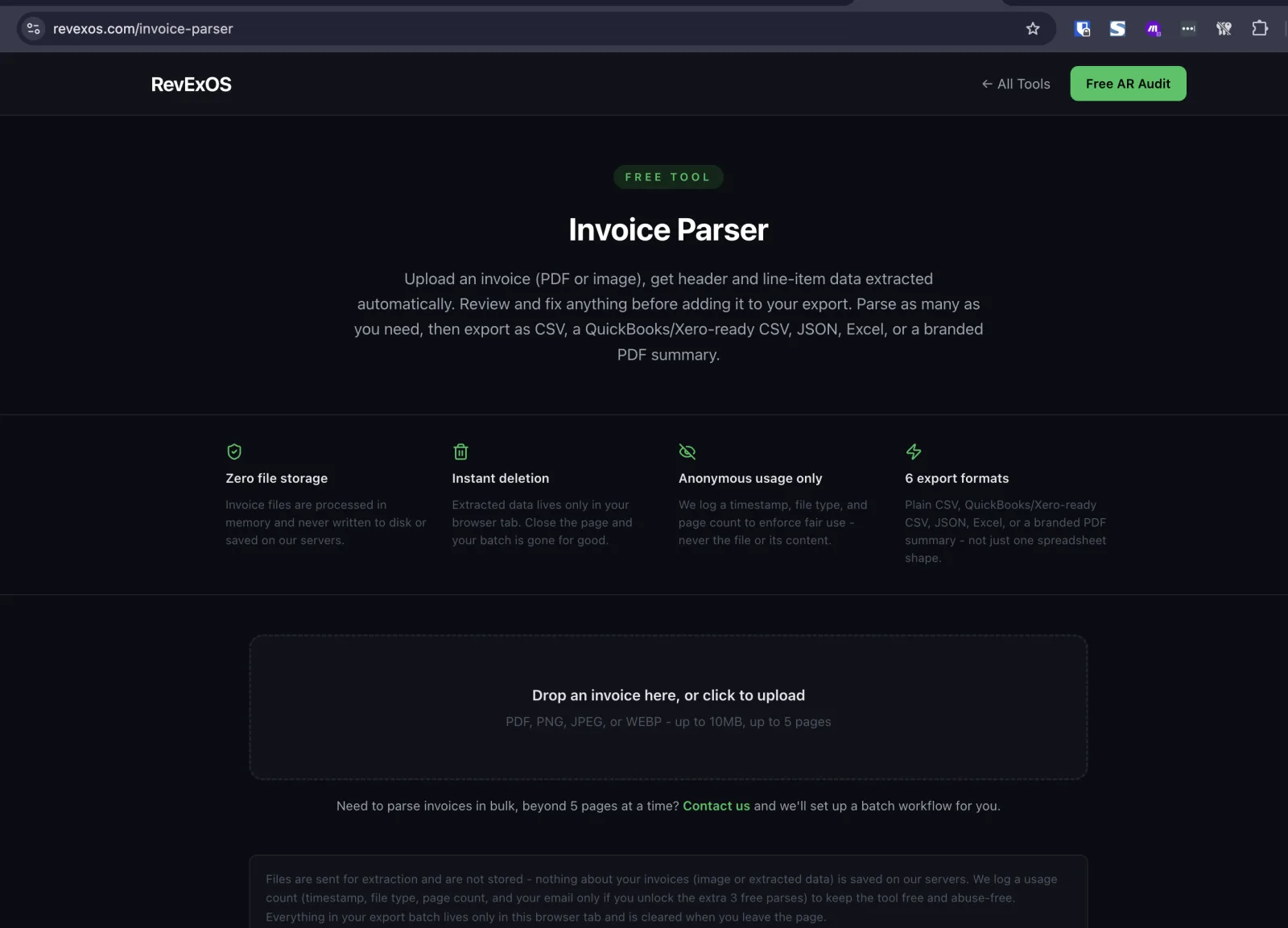
This is the approach we used to build our own free invoice parser: an OpenAI model (GPT-4o today) with native image input, a fixed extraction schema for header, line-item, and summary fields, and a review step before export. It is a useful reference point if you want to see this method's accuracy on your own documents before committing to a build.
Approach 3: Hybrid - OCR Pipeline + LLM Validation
Run OCR first (Textract, Azure, or an open-source tool like Docling), convert the document to structured text or markdown, then pass that text to an LLM for extraction and validation.
Strengths: Cheaper than pure LLM approaches, scales well.
Weaknesses: This approach has a critical flaw that benchmarks have exposed: the OCR step loses spatial information. A field that was visually obvious as "the number in the bottom right after the word Total" becomes ambiguous in markdown. The LLM is now working blind.
An August 2025 arXiv study (2509.04469) tested eight models from the GPT-5, Gemini 2.5 and Gemma 3 families both ways and found a 40-point gap on scanned receipts: 87.46% accuracy with native image processing (Gemini 2.5 Pro) versus at best 47.00% after Docling text conversion. On scanned invoices the best results were 92.71% native versus 64.03% via Docling. That gap is decisive. If your documents include scanned invoices, the hybrid text-conversion approach is not viable.
Model-by-Model Findings
Claude (Anthropic)
Claude Sonnet 3.5 and Claude Sonnet 4.5 have both been benchmarked on invoice extraction tasks. In an earlier head-to-head comparison against Amazon Textract, Docsumo, Google Document AI, Azure Document Intelligence, and Rossum across varying document quality levels, Claude Sonnet 3.5 demonstrated the highest overall resilience - meaning its accuracy degraded least when document quality dropped from clean PDFs to scanned or photographed invoices.
Claude's strength in invoice parsing comes from its instruction-following precision. When given a detailed extraction schema with field definitions and validation rules, it produces JSON that matches the schema reliably. It handles multi-page invoices well and can apply business logic during extraction (for example: "if the tax field is blank but a 10% GST rate is implied by the country code in the vendor address, calculate and include it").
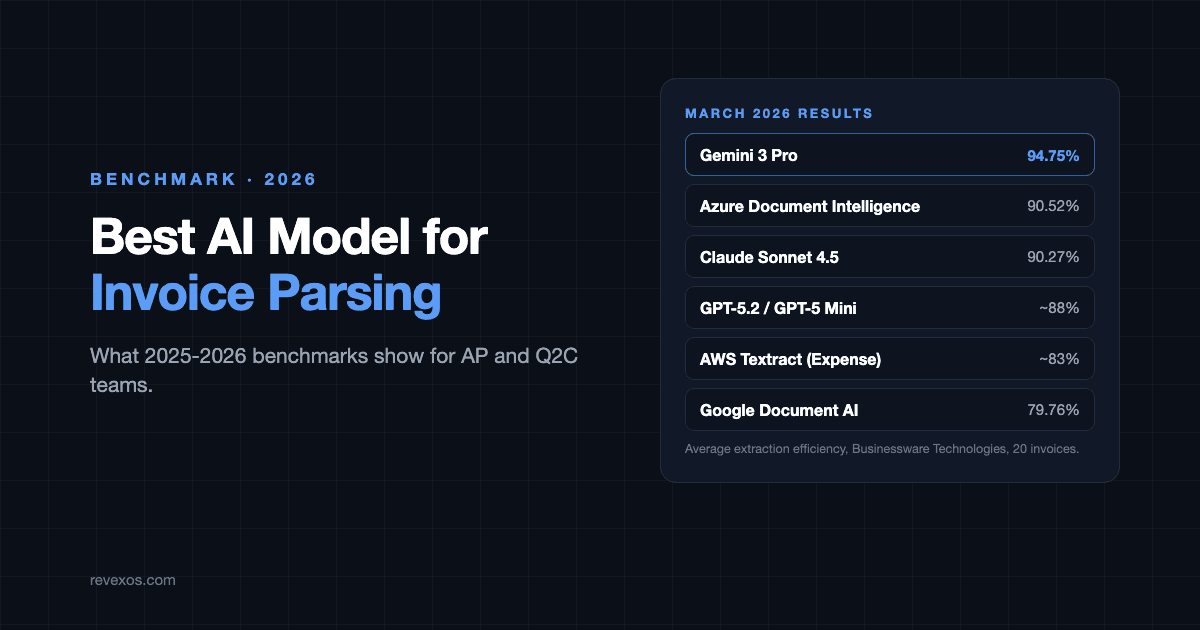
In the March 2026 Businessware Technologies benchmark, Claude Sonnet 4.5 scored 90.27% average extraction efficiency, third behind Gemini 3 Pro (94.75%) and Azure AI Document Intelligence (90.52%). That test set is 20 invoices dated 2006-2020 with 1-12 line items each, so a two-point difference is a few fields, not a verdict. Newer Claude releases (the Claude 5 family) were not part of it.
Best suited for: Complex invoices with non-standard layouts, cases where reasoning about implied values matters, AP workflows where you need to enforce business rules during extraction rather than after.
GPT (OpenAI): GPT-4o to GPT-5
OpenAI's current models are strong on clean, well-formatted invoices and weaker on noisy scans. In the 2025 arXiv study, GPT-5 Chat and GPT-5 Mini both scored above 96% on clean invoices (96.03% and 96.31%, against 96.50% for Gemini 2.5 Pro), but on scanned receipts GPT-5 Chat fell to 69.21% and GPT-5 Mini to 53.92%, where Gemini 2.5 Pro held 87.46%. In the March 2026 Businessware benchmark, GPT-5.2 and GPT-5 Mini both landed around 88%, below Gemini 3 Pro, Azure and Claude Sonnet 4.5.
If your AP team receives invoices mainly as clean PDFs from large vendors, a GPT-5-class model is a good choice. If you receive scanned paper invoices from smaller vendors, the drop is large enough to affect automation rates.
The older GPT-4o results still explain where the risk sits. In Businessware's earlier study, GPT-4o with third-party OCR preprocessing reached 98% field-level accuracy on clean header fields but only 57% on line item extraction, well below Azure Document Intelligence (87%) and AWS Textract (82%). This is the opposite of what most people expect - the general LLM underperforms specialized tools on the specific task of structured table extraction from invoices.
Best suited for: High-volume AP automation with clean digital invoices, scenarios where you already have an OCR pipeline you want to keep, clean PDF-first vendor bases.
Gemini (Google)
Gemini 2.5 Pro and Gemini 3 Pro have been the strongest performers in 2025-2026 benchmarks. In the March 2026 Businessware benchmark, Gemini 3 Pro achieved the highest average extraction efficiency at 94.75%, outperforming both Claude and the specialized document AI tools on that particular corpus.
The 2025 arXiv study (2509.04469) showed Gemini 2.5 Pro achieving the highest accuracy across all three benchmark datasets tested: 87.46% on scanned receipts, 96.50% on clean invoices, and 92.71% on scanned invoices. These numbers should be treated with appropriate caution - model-specific benchmark results vary by corpus - but the pattern is consistent: Gemini performs well across document quality levels.
Gemini's longer context window is also relevant for multi-page invoices, which can run to 10-20 pages for complex project-based billing.
Best suited for: High-accuracy scenarios where document quality varies, multi-page invoices, cases where you want a single model to handle the full quality spectrum without a fallback path.
AWS Textract (Amazon)
Textract's Analyze Expense API is purpose-built for financial documents. In March 2025 benchmarks, it achieved 91.1% accuracy on invoices with line items at approximately $10 per 1,000 pages. That is a strong line-item number - higher than any general-purpose LLM in the same study.
However, its results have slipped. Businessware's tracking shows the Analyze Expense API falling from 91.1% in 2025 to about 83% in 2026, while most other tools improved. This aligns with practitioner reports that Textract struggles with format diversity as invoice templates proliferate. It was trained on a certain distribution of financial documents and performs best when your vendor invoices resemble that training distribution.
Textract's cost and speed make it attractive for high-volume processing. The combination approach of Textract for initial extraction with an LLM for validation and exception handling is a reasonable architecture for teams already on AWS.
Best suited for: High-volume standardized invoices from a known vendor base, AWS-native stacks, cost-sensitive AP workflows.
Azure Document Intelligence (Microsoft)
Azure Document Intelligence's pre-built invoice model is the specialized tool that holds up best against general LLMs in structured extraction tasks. In Businessware's earlier study, it scored 93% field-level accuracy overall and 87% on line item extraction specifically - the best line-item score among the tools tested.
The March 2026 benchmark puts it at 90.52% (up from 85.7% in 2025), essentially level with Claude Sonnet 4.5 and well above Textract.
For teams on Microsoft's stack (Azure, Microsoft 365, Dynamics), the native integrations make Azure Document Intelligence the natural starting point. It also supports 60+ invoice languages natively, making it a strong choice for international AP workflows.
Best suited for: Microsoft-stack environments, international invoices across multiple languages, workflows where line item accuracy is the critical metric.
Google Document AI
Google Document AI improved from 68.1% in 2025 to 79.76% in 2026 in Businessware's tracking, though it still trails the leaders. In Businessware's earlier comparison, Google Document AI scored 82% on field-level accuracy overall. Its line item extraction (40% in one study) is the weakest among the major specialized tools.
If you are in a Google Cloud environment, Document AI has integration advantages, but purely on accuracy metrics it is not the strongest choice for invoice extraction today.
The Line Item Problem
Line item extraction deserves a separate discussion because it is where every tool degrades most sharply, and because it is the highest-value extraction task for Q2C workflows.
In a second arXiv study (2510.15727) comparing LLM-based extraction against OCR-based approaches on line items specifically:
- LlamaExtractor (LLM-based): 91% accuracy
- Docling (OCR-based): 58% accuracy
That 33-point gap confirms the pattern seen across studies: for line item extraction, LLM-based native image processing outperforms OCR-then-parse approaches by a substantial margin.
The academic research also confirms that traditional non-LLM NLP models have a structural limitation for complex invoice fields: they cannot infer values that are not explicitly present on the page. A model that relies only on layout and text position cannot calculate a missing subtotal or map a cryptic product code to a GL account. LLMs can. That reasoning capability is exactly what AP automation workflows need for exception handling.
What this means practically: if you are automating AP and line item extraction is your primary challenge, a general-purpose LLM with native image input will outperform a specialized OCR tool. If your line items are simple (one or two per invoice, consistent column headers), specialized tools are faster and cheaper.
Practical Recommendations by Use Case
Your invoices are clean digital PDFs from a known vendor base, high volume: Use Azure Document Intelligence or AWS Textract for the bulk of extraction. Route outliers (low-confidence scores, field mismatches) to Gemini, Claude or a GPT-5-class model for exception handling. You will get near-98% accuracy on headers at the lowest per-document cost.
Your invoices include a mix of scanned paper and digital PDFs: Do not use a text-conversion (OCR-to-markdown) pipeline. Send images natively to Gemini or Claude. The 40-point accuracy gap on scanned documents is not recoverable with prompt engineering - it is a fundamental information loss in the OCR conversion step.
Your invoices have complex line items (project billing, multi-tier services, consumption-based): Use a multimodal LLM (Claude or Gemini) with a detailed extraction schema that includes validation rules. Tell the model to check that line item amounts sum to the subtotal and flag discrepancies rather than silently producing wrong numbers.
You need to extract and validate against PO data or a vendor master: This is a two-step workflow. Extract with any high-accuracy tool, then use an LLM to compare the extracted data against your ERP's PO records and flag exceptions. The LLM step here is not extraction - it is reasoning about whether what was extracted matches what was expected.
You process invoices in multiple languages and currencies: Azure Document Intelligence has the broadest native multi-language support. For currencies, any LLM handles currency identification well, but you need to verify that your extraction schema explicitly requests currency codes (ISO 4217) rather than symbols, since the same symbol ($) appears in multiple currencies.
What the Benchmarks Do Not Tell You
Published accuracy numbers are measured on benchmark corpora that do not match your vendor invoice distribution. A model that scores 94% on a research dataset may score 78% on your specific mix of construction subcontractor invoices. The only benchmark that matters is the one you run on your own documents.
Before committing to a tool or model, run 200-500 of your actual invoices through each candidate and measure:
- Header field accuracy (invoice number, date, vendor name, total)
- Line item extraction rate (percentage of invoices where all line items were extracted correctly)
- Tax handling accuracy (especially if you deal with multiple tax jurisdictions)
- Error type distribution (hallucinated fields vs. missed fields vs. wrong values)
- Latency and cost per document at your expected volume
The error type distribution matters as much as the accuracy number. A model that hallucinates a line item that was not there is harder to catch than a model that marks a field as null when it cannot extract confidently. For AP workflows, models that express uncertainty rather than guessing are safer to automate against.
Integrating into a Q2C Stack
Invoice parsing is not a standalone problem in a quote-to-cash workflow. The extracted data feeds:
- AP systems (Stampli, Bill.com, Tipalti) for approval routing
- ERPs (NetSuite, SAP, Dynamics) for GL coding and payment
- Revenue recognition systems for matching invoices to contracts
- Cash flow forecasting for DSO calculations
If your downstream system is QuickBooks Online, exporting parsed invoices straight into QuickBooks walks through the column mapping, and our comparison of free invoice OCR tools covers the no-cost options.
The practical integration question is not "which model is most accurate" but "which model produces output that my downstream system can consume without a transformation layer."
Azure Document Intelligence produces output in its own schema. AWS Textract produces its own schema. LLMs produce whatever JSON schema you specify in your prompt. For teams building custom integrations, the LLM's flexibility is a real advantage: you define the output schema to match your ERP's API contract, and the model extracts directly into it.
For teams using purpose-built AP automation platforms (Stampli, Rossum, Kofax, Nanonets), those platforms handle the model selection internally and expose a single API. In that case, the right answer is to evaluate the platform on your document corpus, not the underlying model.
If parsing is only half your problem and you also need the extracted data to generate and reconcile invoices automatically, see RevExOS's invoice automation for how that connects to QuickBooks, Xero, and Zoho.
The Bottom Line
There is no single best AI model for invoice parsing. There is a best model for your document type, your extraction goals, and your technical stack.
The clearest finding from 2025 benchmarks: native image processing beats OCR-to-text pipelines by 40+ percentage points on scanned documents. If your workflow includes scanned invoices and you are currently using a text-conversion approach, fixing that architecture gap will deliver more accuracy improvement than any model switch.
Among the models: Gemini leads the 2025-2026 benchmarks on overall accuracy across document quality levels. Claude Sonnet 4.5 and Azure Document Intelligence sit just behind it, with Azure strongest on line items from structured invoices. GPT-5-class models match the leaders on clean digital invoices but lose more on scans. All of these tests are small, and models change every few months, which is the strongest argument for running your own 200-invoice test before you choose.
For most Q2C and AP teams, the right architecture is: specialized document AI for high-confidence standard invoices, a multimodal LLM (Claude or Gemini) for exception handling and complex documents, and explicit validation logic that checks extracted values for internal consistency before they touch your ERP.
That combination gets you to 95%+ straight-through processing on most invoice volumes, with a human review queue that contains only the genuinely ambiguous cases.
Want to see this in practice on your own invoices before building anything? Try our free invoice parser - upload a PDF or scanned image, review the extracted fields, and export to CSV. No signup required.
Once extraction works reliably, the natural next step is automating what happens after: sending the invoice, chasing payment, matching cash. The free AR Prompt Playbook covers that workflow with copy-paste prompts.
Frequently Asked Questions
- Which AI model is best for invoice parsing?
- There's no single best model - it depends on your document type and extraction goal. In the March 2026 Businessware benchmark, Gemini 3 Pro led at 94.75%, followed by Azure Document Intelligence (90.52%) and Claude Sonnet 4.5 (90.27%), with GPT-5.2 and GPT-5 Mini around 88%. GPT-5-class models match the leaders on clean digital invoices but lose more on scans. The test set was 20 invoices, so run your own before choosing.
- Why does OCR-to-text conversion perform worse than native image processing?
- Converting a document to text loses spatial information - a field that was visually obvious as 'the number in the bottom right after Total' becomes ambiguous once flattened to markdown. An August 2025 arXiv study (2509.04469) found 87.46% accuracy on scanned receipts with native image processing versus at best 47.00% after Docling text conversion, a gap prompt engineering cannot close.
- Which model is best for line item extraction on invoices?
- Azure Document Intelligence leads specialized tools at 87% line-item accuracy, with AWS Textract close behind at 82-91% depending on the benchmark year. Among general-purpose LLMs, native image processing (LlamaExtractor-style, 91% in one benchmark) substantially outperforms OCR-then-parse approaches (58%) - the opposite of what most teams expect.
- Can Claude parse scanned invoices accurately?
- Yes. In an earlier head-to-head benchmark against Textract, Docsumo, Google Document AI, Azure Document Intelligence and Rossum, Claude Sonnet 3.5 degraded least when documents moved from clean PDFs to scanned or photographed invoices, and Claude Sonnet 4.5 scored 90.27% in the March 2026 Businessware benchmark. Send pages as images rather than OCR text for the best results on scans.
 Claude