How Claude AI Can Automate the Full Quote-to-Cash Cycle
A detailed breakdown of how Claude - Anthropic's AI - can automate every phase of the quote-to-cash cycle: from CPQ and contract review through billing, revenue recognition, and collections. With real workflow examples and integration patterns.
RevExOS
Q2C Consulting
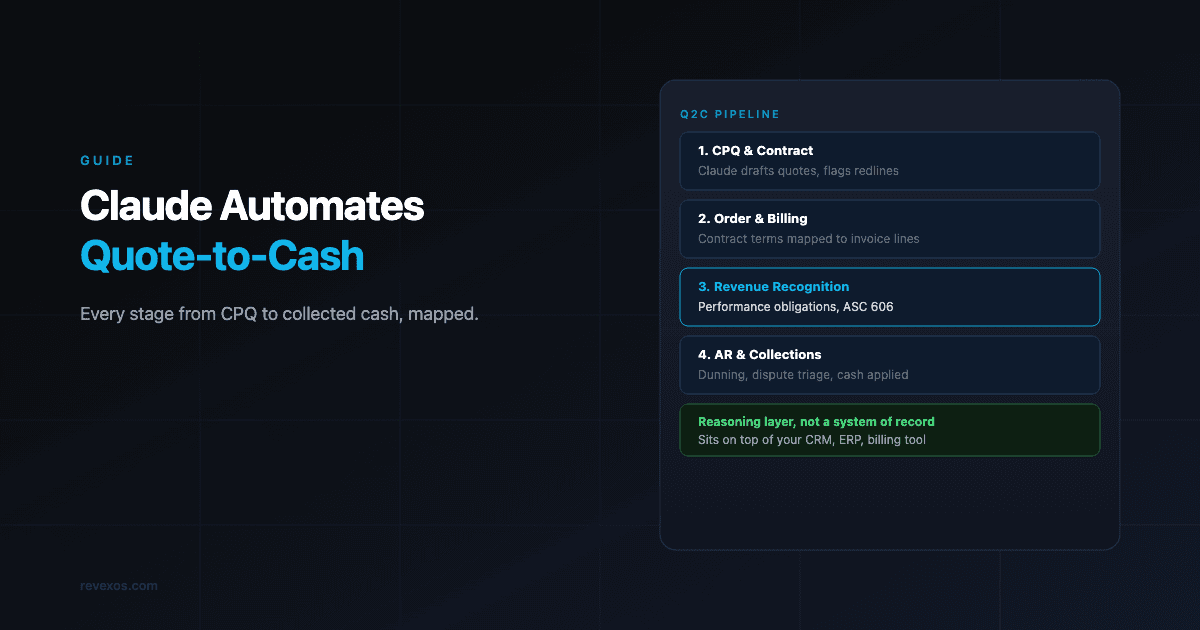
The quote-to-cash cycle is, operationally, one of the most complex sequences in any B2B company. It runs from the first pricing conversation with a prospect all the way through invoice delivery, payment collection, and revenue posting to the general ledger. Every team touches it: sales, legal, finance, operations. Every system feeds it: CRM, CPQ, contract management, billing, ERP, AR.
And yet in most companies, it is still driven by humans copying data between systems, emailing spreadsheets, and chasing approvals.
Claude - Anthropic's large language model - is not a workflow tool. It does not replace your billing system or your ERP. What it does is sit on top of those systems and handle the reasoning, writing, reviewing, and decision-making tasks that currently require human attention at every step. When those tasks are automated, the Q2C cycle shrinks from days to hours. Manual error rates drop. Finance teams spend time on exceptions, not process execution.
This post breaks down the full Q2C cycle, phase by phase, and shows exactly where Claude creates leverage - with specific workflow examples, integration patterns, and the kinds of prompts and outputs that make each step work in practice.
The Q2C Cycle: A Systems View
Before getting to Claude, it helps to be precise about what the quote-to-cash cycle actually includes. The term is used loosely in the market. Here is the full scope: (Our lead-to-cash stage guides cover the same cycle one stage at a time, starting with the handoff from sales to finance.)
Lead / Opportunity
       |
       v
  [1] CONFIGURE, PRICE, QUOTE (CPQ)
       - Product configuration
       - Pricing and discount logic
       - Quote document creation
       |
       v
  [2] CONTRACT CREATION AND NEGOTIATION
       - MSA / Order Form generation
       - Redline review and negotiation
       - Approval and signature
       |
       v
  [3] ORDER MANAGEMENT
       - Order capture and validation
       - Provisioning triggers
       - Entitlement setup
       |
       v
  [4] BILLING AND INVOICING
       - Subscription and usage rating
       - Invoice generation and delivery
       - Billing dispute handling
       |
       v
  [5] REVENUE RECOGNITION
       - ASC 606 / IFRS 15 allocation
       - Performance obligation tracking
       - Deferred revenue schedules
       |
       v
  [6] ACCOUNTS RECEIVABLE AND COLLECTIONS
       - Cash application
       - Dunning and follow-up
       - Dispute resolution
       |
       v
     CASH COLLECTED
Each phase has a set of human-intensive tasks: writing, reviewing, deciding, communicating. Claude addresses all of them. The mechanical tasks - reading from a database, posting to an API, generating a PDF - are still handled by your existing systems and automation tools (n8n, Make, Zapier, custom code). Claude handles the intelligence layer on top.
Phase 1: Configure, Price, Quote (CPQ)
What makes CPQ hard
Modern B2B pricing is rarely simple. Enterprise customers get custom discounts. Deals combine subscriptions with professional services and one-time setup fees. Usage tiers kick in at different thresholds. A rep building a quote has to assemble all of this accurately, apply the right approval rules, and produce a document that looks professional and matches what the customer actually wants. If you price services from a rate card, the free Rate Card to Quote Calculator checks the margin before a number reaches the quote, and our roundup of free proposal generators covers the document itself.
CPQ tools like Salesforce CPQ, DealHub, or custom-built configurations exist to help with this - but they require ongoing configuration maintenance, and they still produce quotes that someone has to review, adjust, and contextualise for each customer.
Where Claude fits in CPQ
1. Quote narrative and personalisation
Most CPQ tools produce quotes that look like pricing tables. They are accurate but cold. Claude takes the output of a CPQ tool and turns it into a personalised quote document - one that addresses the customer's specific use case, references their stated pain points from the CRM opportunity record, and frames the pricing in terms of value delivered rather than line items.
A workflow that does this looks like:
CRM opportunity record (deal context, customer industry, pain points)
         +
CPQ output (line items, pricing, discounts)
         +
Claude prompt: "Write a quote narrative for this opportunity.
                Lead with the customer's core problem.
                Frame each line item in terms of business outcome.
                Match the tone to [enterprise / mid-market / startup]."
         =
Personalised 2-page quote document ready for review
The rep reviews and edits, but they are not writing from scratch. Time from CPQ output to quote-ready drops from 45 minutes to 5.
2. Discount justification and approval memos
When a deal requires non-standard discounts, most approval workflows require the rep to write a justification. This is friction. Claude generates the justification automatically:
Input: Deal size, discount requested, customer segment,
       competitive situation (from CRM notes), rep's deal notes

Output: "Discount approval request - Acme Corp ($180K ARR, 22% discount)
         Justification: Competitive displacement from [Competitor].
         Customer is migrating from a legacy system with a 3-year lock-in
         at 40% below market. The 22% discount achieves close in Q2 and
         secures a 3-year term. Comparable deals in this segment: [references].
         Recommendation: Approve."
Approvers get a clear brief instead of a half-filled form. Approval cycles shrink from days to hours.
3. RFP response automation
For enterprise deals that start with an RFP, Claude can draft responses to individual questions using context from your product documentation, past RFP responses, and customer discovery notes. This is one of the highest-leverage applications in the pre-quote phase: RFP responses that used to take 3-5 days of cross-functional time can be drafted in hours, with humans reviewing and refining rather than writing from blank pages.
Phase 2: Contract Creation and Negotiation
What makes contracts expensive
Contract creation and negotiation is where Q2C typically stalls. A deal closes in the CRM, then sits for two to six weeks in legal review. The bottleneck is always the same: generating the first draft, reviewing the customer's redlines, and cycling through approval on non-standard terms.
Where Claude fits in contract work
1. First-draft contract generation
Given a signed quote and a set of standard template parameters, Claude can generate a first-draft MSA or Order Form that is complete and ready for legal review - not just a fill-in-the-blanks template, but a contextually appropriate document:
Input:
- Quote / Order Form data (products, term, pricing, SLAs)
- Customer details (entity name, jurisdiction, industry)
- Deal classification (enterprise / commercial / SMB)
- Special terms agreed in negotiation (from CRM notes)

Output:
- Full MSA first draft with correct clauses populated
- Order Form with correct product schedule
- Cover note to legal flagging any non-standard elements
The output is not final. Legal still reviews. But they are reviewing a complete, well-structured draft rather than building from scratch. First-draft generation time drops from 2 hours to under 5 minutes.
2. Redline review and risk flagging
When a customer returns a redlined contract, someone has to read every change and assess whether it is acceptable, negotiable, or a red line. For junior legal staff or sales ops teams that handle commercial review before escalating to legal, this is slow and error-prone.
Claude can read a redlined document and produce a structured review:
Input: Customer's redlined contract (PDF or DOCX)

Output:
- Summary of all changes (by clause, with customer's proposed language)
- Risk classification: Acceptable / Negotiable / Escalate to Legal
- Recommended counter-language for negotiable items
- Specific flags: "Customer has removed limitation of liability cap -
                   this is non-standard and requires Legal approval"
Illustration: Redline review output format
| Clause | Customer Change | Risk Level | Recommended Action |
|---|---|---|---|
| 4.2 Payment Terms | Net 30 changed to Net 60 | Negotiable | Counter with Net 45, flag AR team |
| 8.1 Liability Cap | 12-month cap removed entirely | Escalate | Requires Legal sign-off, non-standard |
| 12.3 Data Residency | Added EU-only data storage requirement | Negotiable | Confirm with Engineering, standard for EU customers |
| 6.1 Auto-Renewal | Removed auto-renewal clause | Acceptable | Sales ops to track manual renewal date |
| 15.2 Audit Rights | Extended audit window from 30 to 90 days | Negotiable | Counter with 60 days |
A 40-page redlined document reviewed and summarised in 3 minutes instead of 3 hours.
3. Non-standard terms approval packages
When a deal requires legal to approve non-standard terms, Claude can prepare the approval package: what the customer is asking for, the business context, comparable precedents from past deals, and a recommendation. This removes the back-and-forth between sales and legal that typically adds days to the cycle.
Phase 3: Order Management
What makes order management error-prone
After a contract is signed, someone has to capture the order correctly: product SKUs, quantities, billing frequency, start dates, discounts, and any special entitlements. Errors here cascade downstream into billing errors, provisioning failures, and customer disputes that take weeks to resolve.
Where Claude fits in order management
1. Contract-to-order extraction
A signed contract contains all the information needed to create an order record. Claude can extract that information accurately and structure it for entry into your order management system:
Input: Signed Order Form (PDF)

Output (structured JSON for OMS):
{
  "customer": "Acme Corp",
  "contract_id": "ACM-2026-0412",
  "start_date": "2026-06-01",
  "term_months": 36,
  "billing_frequency": "annual",
  "line_items": [
    {
      "product": "RevExOS Platform - Enterprise",
      "quantity": 250,
      "unit": "seats",
      "list_price": 120,
      "discount_pct": 22,
      "net_price": 93.60,
      "total_arr": 280800
    },
    {
      "product": "Professional Services - Implementation",
      "quantity": 1,
      "unit": "engagement",
      "list_price": 45000,
      "discount_pct": 0,
      "net_price": 45000,
      "billing": "one-time, on contract signature"
    }
  ],
  "special_terms": [
    "Net 45 payment terms",
    "Auto-renewal with 90-day notice window"
  ]
}
Manual data entry error rate on order creation typically runs at 3-8%. Structured extraction from the signed document reduces this to near zero.
2. Order validation and anomaly detection
Before an order is provisioned, Claude can cross-check it against the opportunity record, the quote, and the signed contract to flag discrepancies:
Flag: "Order line item shows 250 seats at $93.60.
       Quote shows 250 seats at $93.60, matching.
       Contract shows discount approved for 22% from list price of $120.
       Calculation confirms: $120 x 0.78 = $93.60. Order is correct.

Flag: Professional Services billing on contract is listed as
      'on contract signature'. Order is set to bill on 2026-06-01 (start date).
      These do not match. Recommend checking with sales ops before provisioning."
3. Customer onboarding communications
Once an order is confirmed, Claude drafts the welcome communication, provisioning instructions, and kickoff scheduling email - personalised to the product purchased and customer context, sent automatically on order confirmation.
Phase 4: Billing and Invoicing
What makes billing complex
Subscription billing is not complex. What is complex is subscription plus usage plus one-time fees plus mid-period changes (upgrades, downgrades, seat additions) plus multi-currency plus customer-specific billing schedules. This is the reality for most growing B2B companies. Billing systems handle the mechanics; Claude handles the exceptions and communications.
Where Claude fits in billing
1. Invoice explanation and dispute triage
The most common billing support request is: "I don't understand this invoice." A customer receives an invoice with a pro-rated charge, a usage overage, and a credit from a prior period, and they have no idea how to reconcile it. Claude can generate a plain-language explanation of any invoice automatically:
Input: Invoice data + customer's contract terms + usage data for the period

Output (customer-facing explanation):
"Your July invoice of $14,320 breaks down as follows:

Base platform fee (250 seats x $93.60/month): $23,400
Less: Annual billing credit applied (paid annually, June invoice): -$11,700
Pro-rated seat addition (25 seats added June 15, half-month): $1,170
API overage (1.2M calls above 1M included threshold at $0.0012/call): $240
Prior-period credit from June billing adjustment: -$790

Total due: $14,320

Payment is due July 30. If you have questions about any of these items,
reply to this email and we'll walk through the detail."
Billing disputes that start with confusion are resolved before they become disputes. Support ticket volume for billing questions drops significantly.
2. Usage anomaly detection
For usage-based billing, Claude can review consumption data before invoicing and flag anomalies that might indicate customer problems (unexpected usage spike = possible integration issue) or internal errors (usage drop = possible metering failure):
Anomaly flag: "Customer Acme Corp - API usage this period: 1,200,000 calls.
               Prior 3-month average: 850,000 calls (+41%).
               This will generate a $240 overage charge.

               Action: Before invoicing, notify customer success to confirm
               this usage spike is expected and not a metering error.
               If unexpected, the customer may dispute the charge post-invoice."
3. Billing error root-cause analysis
When a billing error is discovered, tracing its root cause across CPQ, order management, and billing configuration is slow manual work. Claude can read the trail of records and surface the root cause:
Input: Invoice, order record, contract, CPQ quote, billing config

Output: "The invoice for Acme Corp shows $23,400 (250 seats x $93.60).
         The correct net price per the contract is $93.60.
         However, the billing system is applying the list price of $120
         rather than the discounted rate.

         Root cause: The discount field in the order record is set to 0%.
         The 22% discount was applied at the quote level but not carried
         forward to the order. The order was likely created manually rather
         than from the CPQ export.

         Recommended fix: Update the billing line item discount to 22%
         and issue a credit note for the overbilled amount."
A pre-send invoice QA gate
The problem. Invoice errors are expensive. A wrong PO number on an enterprise invoice triggers a rejection that adds 15 to 30 days to your DSO. A wrong billing entity name causes the invoice to route to the wrong AP team. A missing line item description triggers a dispute. The fix is a pre-send QA step. The problem is that manual QA is inconsistent and often skipped under deadline pressure.
The Claude approach. Before every invoice sends, pass the invoice data and the original contract summary through Claude for a validation check.
Prompt:
You are a pre-send invoice QA reviewer. Compare this invoice against the contract terms and flag any discrepancies.

CONTRACT SUMMARY:
- Customer legal name: [Name]
- Our billing entity: [Your legal entity]
- PO number required: [Yes/No] | PO number: [PO if applicable]
- Payment terms: Net [X]
- Contracted services: [List each line item from the contract]
- This invoice covers: [Billing milestone or period description]
- Expected invoice amount: [$X]

INVOICE DATA:
- Bill To name: [Name on invoice]
- Bill From entity: [Your entity on invoice]
- PO number on invoice: [PO shown]
- Payment terms on invoice: [Terms stated]
- Line items: [Description and amount for each line]
- Invoice total: [$X]

For each of the following checks, respond PASS, FAIL, or REVIEW. If FAIL or REVIEW, state what is wrong and what the correct value should be:

1. Billing entity: does Bill From on the invoice match the contracted entity?
2. Bill To: does Bill To on the invoice match the customer legal name?
3. PO number: does the PO on the invoice match the contract?
4. Payment terms: do the invoice terms match the contract?
5. Line items: are the descriptions consistent with contracted services?
6. Amount: is the invoice total consistent with the billing schedule?
What you get. A 6-point validation check in 3 seconds. This runs as a pre-send gate: invoices that pass send automatically; invoices that fail route to a human for a 5-minute fix before they cause a 30-day delay.
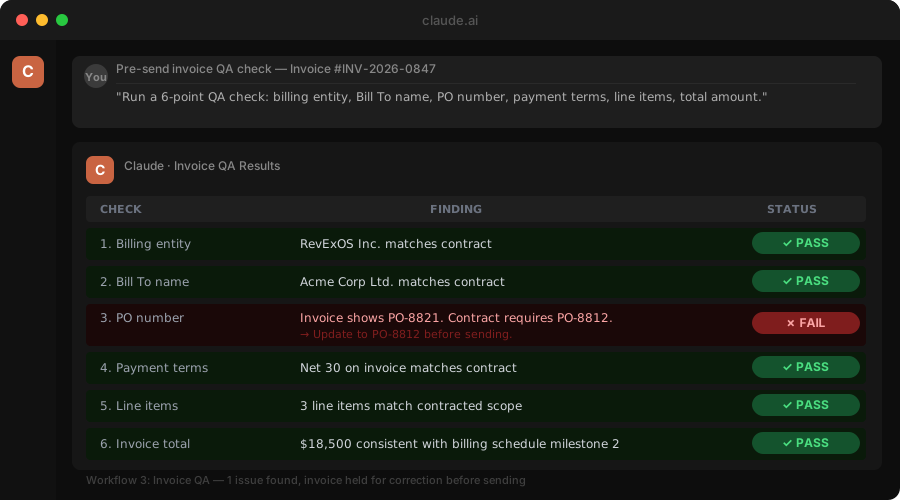
The ROI math. If your team sends 200 invoices per month and 8% have errors, that is 16 invoices triggering disputes or rejections. Each one adds an average of 20 days to collection. That is 320 invoice-days of lost cash flow per month. An automated QA gate that catches 80% of those errors saves 256 invoice-days per month. This pre-send validation is core to how RevExOS builds invoice automation.
Phase 5: Revenue Recognition
Why revrec is uniquely suited to AI assistance
Revenue recognition under ASC 606 requires judgment: identifying performance obligations, allocating transaction prices, determining when obligations are satisfied. For complex contracts with multiple elements - platform access, implementation services, training - this analysis has to be done at contract inception and updated as the contract evolves.
Most companies handle this through a combination of ERP configuration and manual spreadsheets. The ERP handles simple, repetitive cases well. The hard cases - multi-element arrangements, variable consideration, contract modifications - end up in spreadsheets that are expensive to maintain and audit.
Claude is exceptionally well-suited to the reasoning layer of revenue recognition: reading a contract, identifying the relevant performance obligations, and proposing the allocation treatment.
Where Claude fits in revrec
1. Performance obligation identification
Input: Signed contract (Order Form + MSA terms)

Output:
"Performance obligations identified in this contract:

1. SaaS Platform Access (ongoing, 36-month term)
   - Satisfied over time (daily as customer accesses the platform)
   - Stand-alone selling price: $93.60/seat/month x 250 seats

2. Implementation Services (one-time)
   - Satisfied at point in time (upon go-live acceptance)
   - Stand-alone selling price: $45,000

3. Training (included in platform fee, not separately priced)
   - Assessment: Not a distinct performance obligation.
     Training is not separately sold, and the customer cannot
     benefit from it without the platform. Combine with PO #1.

Transaction price allocation:
- Total contract value: $280,800 (platform, 36 months) + $45,000 (services)
- Relative SSP allocation:
  - Platform: 86.2% = $280,800 recognisable ratably over 36 months
  - Implementation: 13.8% = $45,000 recognisable upon go-live

Deferred revenue at signing: $280,800 + $45,000 = $325,800"
2. Contract modification analysis
Mid-contract changes are one of the most complex areas of ASC 606. A customer adds 50 seats in month 14 of a 36-month contract. Is this a modification of the existing contract, a new contract, or a combination? Claude can analyse the modification and propose the accounting treatment:
Illustration: Contract modification analysis
Scenario: Customer adds 50 seats at Month 14 of a 36-month contract.
          Original: 250 seats at $93.60 net.
          New seats: 50 seats at $95.00 net (updated pricing).

ASC 606 Question: New contract or modification of existing?

Analysis:
- Additional seats are distinct (customer benefits from them independently).
- Pricing for new seats ($95.00) is consistent with current SSP for
  comparable customers at this contract size.
- Conclusion: Treat as a SEPARATE contract for the additional 50 seats.
  Do not restate original contract.

Revenue schedule for incremental seats:
- Start date: Month 14 (July 1, 2027)
- Remaining term: 22 months
- Monthly recognition: 50 x $95.00 = $4,750/month
- Total from modification: $104,500 over 22 months
3. Deferred revenue reconciliation
At month-end, Claude can reconcile the deferred revenue schedule against actual cash received and revenue recognised, flag discrepancies, and prepare the commentary for the finance close pack - reducing the time finance teams spend on the revrec close from days to hours.
Phase 6: Accounts Receivable and Collections
The collections problem
Collections is the final step in Q2C and the one where the most cash gets trapped. Invoices go unpaid not always because customers refuse to pay, but because:
- The invoice arrived but the AP contact changed
- There is a dispute about a line item that nobody told you about
- The invoice is stuck in a PO approval queue
- The customer simply needs a nudge
Most AR teams run a dunning sequence on a timer. The same email goes out on day 7, day 14, day 30. It does not adapt to the customer's situation, relationship history, or the nature of the hold. Claude makes the dunning sequence intelligent.
Where Claude fits in collections
1. Personalised, context-aware dunning
The standard dunning email is a template. Claude-driven dunning reads the customer record before sending:
Context available:
- Invoice amount and age
- Customer's payment history (always pays on time vs. chronic late payer)
- Any open support tickets or disputes on the account
- Recent CRM notes (customer expressed budget constraints last month?)
- Customer tier (strategic account vs. standard commercial)

Output: "Hi Sarah,

Just a quick note - Invoice #INV-2026-0847 for $23,400 was due on May 15
and is now 7 days past due.

I noticed you've had some questions into our support team this month about
the API overage charges - I've looped in your account manager to make sure
those are resolved before the next billing cycle. If that's holding up
this payment, let me know and we can discuss.

If payment is already on the way, please disregard this note.

Best,
[AR Team]"
Compare this to the standard "Your invoice is overdue. Please remit payment." template. The Claude-generated version acknowledges the open issue, avoids demanding payment in the context of an unresolved dispute, and gives the customer a path to resolution. Conversion to payment on the first outreach is materially higher.
Not automating this yet? The free AR Collections Email Generator gives you a stage- and relationship-aware starting draft for a single invoice, no dispute-record integration required. For copy-paste prompts covering dashboards, outreach, disputes and cash forecasts, get the free AR Prompt Playbook.
2. Dispute classification and routing
When a customer disputes an invoice, the dispute lands in an inbox. Someone reads it, figures out what the customer is actually disputing, routes it to the right team, and drafts a response. This loop can take 3-5 days. Claude handles it in minutes:
Input: Customer dispute email

Output:
"Dispute classification: Pricing discrepancy
Customer claim: Invoice shows 300 seats billed; customer believes
                count should be 250.
Likely root cause: Seat count in billing system may not reflect
                   contract amendment from March.

Routing: Billing Operations team to verify seat count in system
         against March amendment (Contract ID: ACM-2026-0412,
         Amendment 1 dated March 3, 2026).

Draft response to customer:
'Thank you for flagging this. We are reviewing the seat count on
your account against your current contract terms and will respond
within 24 hours with our findings. We will not send a collection
notice while this review is open.'"
3. Cash application
When payments arrive as wire transfers or ACH with minimal remittance detail, matching them to open invoices is manual work. Claude can read a bank statement or remittance advice, cross-reference open invoices, and propose the matching:
Input: Payment of $46,800 from Acme Corp, no invoice reference

Analysis:
Open invoices for Acme Corp:
- INV-2026-0847: $23,400 (overdue 12 days)
- INV-2026-0891: $23,400 (due in 18 days)

$46,800 matches INV-0847 + INV-0891 exactly.
High confidence: This payment covers both open invoices.
Apply $23,400 to INV-0847, $23,400 to INV-0891.

Confidence: 97%. Human review recommended before posting.
Integration Architecture: How Claude Fits Into Your Stack
Claude is not a standalone system. It works as an intelligence layer over your existing tools. Here is what a production-grade Q2C automation architecture looks like with Claude embedded:
                    YOUR EXISTING SYSTEMS
    ___________________________________________________
    |  CRM          |  CPQ         |  Contract Mgmt   |
    |  (Salesforce, |  (DealHub,   |  (Ironclad,      |
    |   HubSpot)    |   SFCPQ)     |   DocuSign CLM)  |
    |_______________|______________|__________________|
                          |
                     [ORCHESTRATION LAYER]
                     (n8n / Make / custom)
                          |
               ___________|___________
              |                       |
        [CLAUDE API]           [DATA SOURCES]
        - Text generation      - Invoice history
        - Document review      - Payment records
        - Classification       - Contract repository
        - Extraction           - Customer CRM notes
              |
              |_________________________
              |           |            |
    [BILLING SYSTEM]  [ERP / GL]  [AR PLATFORM]
    (Stripe, Zuora,   (NetSuite,  (RevExOS, custom)
     Chargebee)        SAP)
The orchestration layer (n8n, Make, or custom code) handles the trigger logic: "When a contract is signed, pull the data and send it to Claude. Take Claude's structured output and post it to the billing system." Claude handles the reasoning, writing, and analysis in between.
API integration pattern
For teams building this natively, the interaction pattern with Claude looks like:
import anthropic

client = anthropic.Anthropic()

def extract_order_from_contract(contract_text: str, quote_data: dict) -> dict:
    prompt = f"""
    You are a revenue operations specialist. Extract the order details
    from this signed contract and validate against the quote data.

    CONTRACT:
    {contract_text}

    QUOTE DATA:
    {quote_data}

    Return a JSON object with:
    - line_items (product, quantity, unit, list_price, discount_pct, net_price)
    - billing_terms (frequency, start_date, payment_terms)
    - special_terms (list of non-standard terms)
    - discrepancies (any mismatches between contract and quote)
    """

    message = client.messages.create(
        model="claude-opus-4-7",
        max_tokens=2048,
        messages=[{"role": "user", "content": prompt}]
    )

    return parse_json_response(message.content[0].text)
For production use, add prompt caching on the system prompt and any large reference documents (contract templates, pricing tables) that remain constant across calls. Cache hits on a 10,000-token system prompt reduce per-call cost by roughly 90%.
The Compounding Effect: Where the ROI Accumulates
The case for Claude in Q2C is not built on any single automation. It is built on the compounding effect across the full cycle. Here is what the aggregate impact looks like for a mid-market B2B company running $20M ARR:
| Phase | Manual Time Per Deal | With Claude | Time Saved |
|---|---|---|---|
| Quote personalisation | 45 min | 5 min | 40 min |
| Contract first draft | 2 hours | 10 min | 110 min |
| Redline review | 3 hours | 20 min | 160 min |
| Order validation | 30 min | 5 min | 25 min |
| Billing dispute triage | 45 min / dispute | 10 min | 35 min |
| Revrec analysis (complex contracts) | 2 hours | 20 min | 100 min |
| Dunning and collections | 3 hours/month/rep | 30 min | 150 min |
For a company closing 15 enterprise deals per quarter, with an average of 2 billing disputes per deal and 3 contract modifications per year, this represents roughly 400-600 hours of finance and legal time per year - recaptured and redirected to work that actually requires human judgment.
The DSO impact is more important. Companies that implement intelligent dunning with personalised, context-aware outreach consistently report DSO reductions of 8-15 days. On $20M ARR with a 45-day DSO, moving to 35 days frees approximately $550,000 in working capital. That is not a technology cost. That is a balance sheet outcome.
The Metrics to Track From Day One
The ROI shows up in specific metrics. Track these from day one:
Invoice error rate. Should drop 60 to 80% within 60 days of deploying the invoice QA workflow. Calculate errors as invoices that required correction before sending or were rejected post-send.
Days from deal close to invoice send. If the quote generation workflow is connected to your CRM, this compresses by 3 to 7 days. Track it monthly by deal type.
Collection email response rate. Track promise-to-pay rates for AI-drafted vs. manually-drafted emails. Expect 15 to 25% improvement in response rates within 60 days once prompts are tuned.
Time to contract review completion. Track from contract received to review-complete in your CLM. Should drop by 40 to 60% once the clause extraction workflow is live.
Controller time on RevRec analysis. Hard to measure precisely. Survey your controller monthly: "How long did first-pass RevRec analysis take for new contracts this month?" Should drop 50% within 60 days.
Where to Start: A Phased Rollout
Before any integration work, run a manual pilot: pick one workflow, keep the prompt in a shared document, have the team paste data into Claude by hand for 30 days, and measure the catch rate or time saved. Only then build the webhook for the highest-volume case, and document the result before moving to the next workflow. The teams getting the most value started with one specific, measurable use case, not the most sophisticated integration.
If you are building a Claude-augmented Q2C process from scratch, the sequence that delivers the fastest payback looks like this:
Phase 1 (Weeks 1-4): Collections intelligence
Start with dunning. It has the clearest ROI, the lowest integration complexity, and the fastest feedback loop. Connect your billing system's overdue invoice export to Claude. Generate personalised follow-up emails. Review them for the first two weeks, then start sending automatically.
Metric to watch: First-contact payment rate and average days to payment resolution.
Phase 2 (Weeks 5-10): Contract review automation
Build the redline review workflow. Connect your contract management system to Claude. When a customer redline arrives, route it through Claude's review before it goes to legal. The output is a structured brief for your legal team.
Metric to watch: Days from customer redline received to legal review started.
Phase 3 (Weeks 11-20): Quote-to-order extraction
Automate the extraction of structured order data from signed contracts. Build the validation layer that cross-checks orders against quotes before they enter the billing system.
Metric to watch: Order entry error rate and billing dispute frequency.
Phase 4 (Ongoing): Revrec and close pack automation
Revenue recognition analysis and month-end commentary require the most domain-specific prompt engineering. Build this last, when you understand how Claude's output needs to integrate with your specific ERP and how your finance team will use it.
What Claude Cannot Do (And What You Still Need)
Claude is language-based. It reads, reasons, writes, and classifies. It does not natively connect to your billing system, execute database queries, or generate PDFs. For Q2C automation to work end to end, you need:
- An orchestration layer (n8n, Make, custom APIs) to move data between systems and trigger Claude
- Your existing billing, ERP, and CRM systems to remain the systems of record
- Human review checkpoints, especially for anything that touches revenue recognition, legal terms, or customer-facing commitments above a defined threshold
The right mental model: Claude is a very capable, very fast analyst and writer who works 24 hours a day and never makes transcription errors. It does not replace your systems. It replaces the human time spent sitting between them.
The Broader Shift: AI-Native Q2C
The companies that are furthest along in Q2C automation are not just using AI to speed up individual tasks. They are redesigning the process around what AI is good at. In a well-designed AI-native Q2C workflow:
- Contracts are drafted from structured data, not from templates and manual edits
- Orders are created from contract extraction, not from manual data entry
- Billing disputes are triaged and routed in minutes, not days
- Collections outreach is personalised to each customer's actual situation
- Revenue recognition is proposed by AI and reviewed by finance, not produced by finance from scratch
This is not a distant future state. Teams at mid-market B2B companies are building this now, with tools that exist today. The inputs are your existing contracts, invoices, CRM records, and payment data. The output is a Q2C process that runs faster, with fewer errors, and with your finance and legal teams focused on the decisions that actually require their expertise.
The Claude API makes the reasoning layer accessible. The systems you already have supply the data. The only remaining question is where to start. For the workflow-level breakdown of what to automate at each stage, see the full order-to-cash automation guide.
RevExOS builds Q2C infrastructure for B2B companies. If you are evaluating AI automation for your quote-to-cash cycle, contact us to discuss what a phased implementation looks like for your stack.
Frequently Asked Questions
- What is the quote-to-cash (Q2C) cycle?
- The full sequence from the first pricing conversation with a prospect through invoice delivery, payment collection, and revenue posting to the general ledger: CPQ, contract creation, order management, billing and invoicing, revenue recognition, and accounts receivable and collections.
- Does Claude replace billing systems, CRMs, or ERPs?
- No. Claude is not a workflow tool and doesn't replace your billing system or ERP. It sits on top of those systems as an intelligence layer, handling the reasoning, writing, reviewing, and decision-making tasks that currently require human attention, while an orchestration layer (n8n, Make, or custom code) moves data and your existing systems stay the system of record.
- Where does Claude create the most value in the Q2C cycle?
- Collections and dunning has the clearest ROI and lowest integration complexity, which is why it's the recommended starting point. Other high-leverage areas include redline review and risk flagging in contracts, contract-to-order extraction, invoice explanation and dispute triage, and performance obligation identification for revenue recognition.
- Can Claude handle revenue recognition under ASC 606?
- Claude can identify performance obligations, propose transaction price allocation, and analyze contract modifications to recommend accounting treatment, but the output should be reviewed by finance, not applied automatically. It's the reasoning layer for revrec analysis, not a replacement for accountant judgment.
- What's the fastest way to start automating Q2C with Claude?
- Start with collections: connect your billing system's overdue invoice export to Claude, generate personalized follow-up emails, review them for the first two weeks, then automate sending. This phase typically takes 1-4 weeks and has the fastest feedback loop of any Q2C automation.
 Claude
 n8n
n8n