How to Build a Quote-to-Cash Automation Stack Under $500/Month (Bootstrapped SaaS)
Enterprise Q2C platforms cost $50K to $200K per year. Here is the full stack for bootstrapped and early-stage SaaS companies - CRM, quoting, billing, AR automation, and revenue reporting - at under $500/month, with the integration logic to connect it.
RevExOS
Q2C Consulting
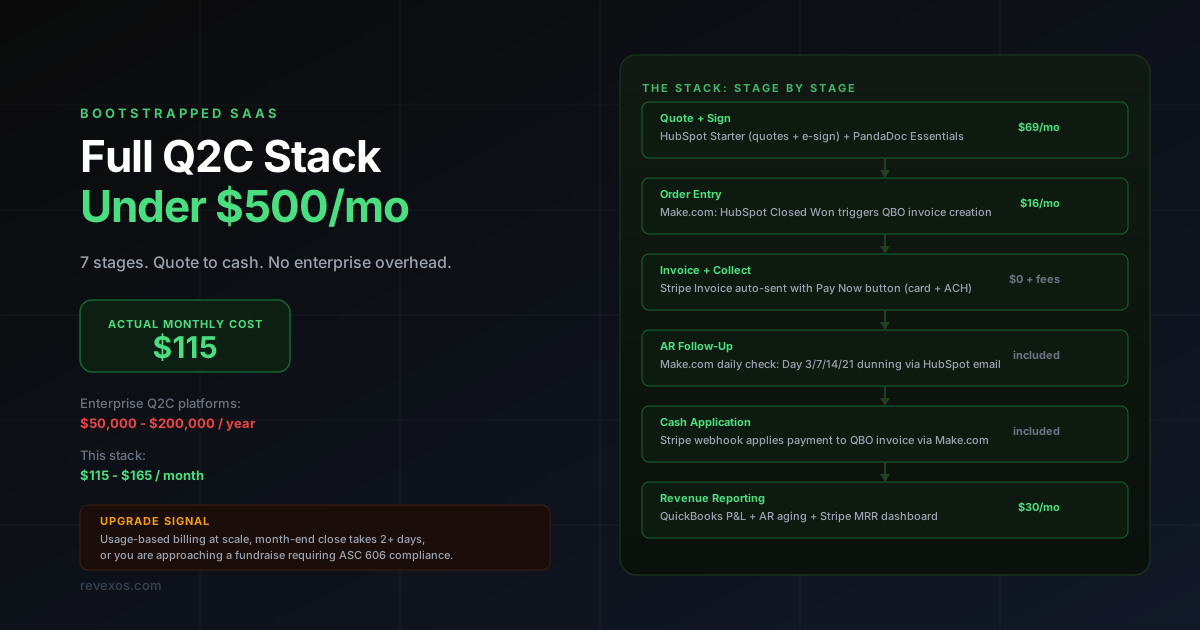
Enterprise Q2C platforms - Salesforce Revenue Cloud, SAP BRIM, Zuora - are built for companies processing hundreds of thousands of transactions per month. They are not built for you.
At $2-10M ARR, you do not need a system that handles billions of usage events per day. You need something that reliably turns a closed deal into an invoice, collects the payment without a manual step, follows up automatically when it is late, and gives you clean revenue numbers without a week of accounting work at month-end.
That is achievable for under $500/month. Here is exactly how.
What Q2C Actually Covers (The 7 Stages)
Quote-to-cash is the end-to-end process from the moment a prospect says yes to the moment cash lands in your bank account. Most teams only automate one or two stages and call it done. The full chain:
| Stage | What Happens | What Breaks Without Automation |
|---|---|---|
| 1. Quoting | Proposal or quote sent with pricing and terms | Manual quote creation with errors, version control chaos |
| 2. Contract/Signature | Customer signs the agreement | Paper-based or separate eSign tool not connected to CRM |
| 3. Order entry | Deal data flows into the billing system | Manual re-entry, line item errors, PO mismatches |
| 4. Invoice creation | Invoice generated with correct terms and amounts | Invoices created at month-end instead of deal-close |
| 5. Payment collection | Customer pays via card, ACH, or bank transfer | PDF invoices sent with no payment link |
| 6. AR follow-up | Reminders sent on unpaid invoices | Manual follow-up or no follow-up until cash crisis |
| 7. Revenue reporting | Revenue recognized and reported | Month-end scramble, spreadsheet reconciliation |
The goal of this stack is to automate stages 3 through 6 completely, and reduce stage 7 to a 30-minute review rather than a multi-day project.
Why Enterprise Q2C Platforms Cost What They Cost
Before getting to the tools, it helps to understand what you are not paying for - and why you do not need it yet.
Salesforce Revenue Cloud costs $75-$300/user/month. Zuora costs $25K-$100K/year base. SAP BRIM requires a full S/4HANA implementation at $500K+.
What those platforms handle that you do not need yet:
- Rating engines for billions of usage events per day
- Multi-entity, multi-currency invoicing at global scale
- Complex revenue allocation across 50-element contracts
- Regulatory compliance reporting across 40+ jurisdictions
- Dedicated audit trails for public company reporting (SOX compliance)
You need: deal closes, invoice goes out, payment comes in, reminder goes if it doesn't, numbers reconcile at month-end. That is a solvable problem at $123/month.
The Stack: Tool by Tool
CRM and Quoting: HubSpot Starter
Cost: $50/month (Starter CRM Suite, 2 seats)
HubSpot Starter gives you:
- Contact and company management
- Deal pipeline with custom stages
- HubSpot Quotes: professional quotes with line items from a product library
- HubSpot Payments (Stripe-powered): collect payment directly from a quote
- Native e-signature on quotes (no separate eSign tool required at this tier)
What to set up:
- Build your product library with your actual SKUs, prices, and billing frequencies
- Add custom deal properties: PO Number, Billing Contact Email, Billing Entity, Payment Terms
- Set deal stages: Proposal Sent, Contract Out, Closed Won, Invoice Sent, Paid
- Create a quote template that pulls from these properties
The key habit to enforce: every deal must have PO Number and Billing Entity filled before it can move to Closed Won. Use a required field rule on the deal form. A missing PO number is the single most common cause of invoice rejection in B2B billing.
eSign: PandaDoc (Optional)
Cost: $19/month (Essentials, 1 user)
HubSpot Quotes supports e-signature natively on Sales Hub Starter. If you need more sophisticated document workflows - conditional content, approval routing, multi-signer, branded templates - PandaDoc's Essentials plan is $19/month and connects to HubSpot via the App Marketplace.
PandaDoc's HubSpot integration creates a document from a deal, sends it for signature, and automatically updates the deal stage to Closed Won when all parties sign. That stage change is the trigger for everything downstream.
If HubSpot's native e-signature meets your needs, skip PandaDoc. The integration adds complexity for marginal benefit if your contracts are straightforward.
Billing and Payments: Stripe
Cost: 2.9% + $0.30 per card transaction, 0.8% capped at $5 per ACH transaction
Stripe handles:
- One-time invoice payment (via Stripe Payment Links or Stripe Invoices)
- Recurring subscriptions with failed payment retry logic (via Stripe Billing)
- ACH and bank transfer collection
- Dispute and refund handling
What Stripe does not handle: your accounting. A Stripe payment is a transaction record. You need QuickBooks to turn that into a recognized revenue entry and a closed AR item.
Setup in the context of this stack:
- Create Stripe products that mirror your HubSpot product library (same names, same codes)
- When a deal closes, a Make.com scenario creates a Stripe Invoice using the deal's line items and sends it to the billing contact
- Stripe sends the invoice via email with a "Pay Now" button (card and ACH options)
- On payment, Stripe fires a webhook that Make.com listens to for downstream actions
For subscription revenue, enable Stripe Billing's smart retry logic: it automatically retries failed cards on days 3, 5, 7, and 14 before marking a subscription as past due. This alone recovers 20-30% of failed renewals without any manual work.
Accounting and AR: QuickBooks Online Simple Start
Cost: $38/month (Intuit's list price; new subscribers are usually offered 50% off for the first 3 months)
QuickBooks Simple Start handles:
- Customer and invoice records
- Bank account connection and transaction matching
- Cash application (matching Stripe payments to QBO invoices)
- Basic accounts receivable aging report
- Revenue reporting (income statement, P&L)
What you need Make.com to do between Stripe and QuickBooks:
| Stripe Event | Make.com Action in QBO |
|---|---|
| Invoice created | Create QBO customer (if new) + create QBO invoice |
| Payment received | Create QBO payment record, apply to open invoice |
| Invoice voided | Create credit note in QBO |
| Refund issued | Create QBO refund receipt |
Getting this four-event mapping right eliminates manual reconciliation. Month-end becomes: open QBO, run the AR aging report, verify nothing looks wrong, close the month. Under 30 minutes.
Limitation to know: QuickBooks Simple Start doesn't support accrual-basis accounting or revenue recognition. If investors or auditors ask for GAAP revenue figures, you will need to either upgrade to QuickBooks Plus ($140/month) or add a dedicated revenue recognition tool. For most sub-$5M bootstrapped SaaS companies, cash-basis reporting is acceptable until that moment arrives.
Automation and Integration: Make.com
Cost: $16/month (Core, 10,000 operations)
Make.com is the connective tissue. For this stack, you need three scenarios:
Scenario 1: Deal Close - Create Invoice
Trigger: HubSpot Deal Stage changes to Closed Won
Actions:
- Get full deal details (company, contact, line items, PO number, payment terms, billing entity)
- Find or create customer record in QuickBooks (match by email to avoid duplicates)
- Create QuickBooks invoice with line items, due date based on payment terms, PO number in the memo field
- Create Stripe invoice for the same amount, attach to the Stripe customer record
- Send Stripe invoice (triggers the payment email with Pay Now button)
- Update HubSpot deal property: Invoice Sent Date = today, Invoice Number = QBO invoice number
Scenario 2: Payment Received - Close Invoice
Trigger: Stripe webhook - payment_intent.succeeded
Actions:
- Look up QBO invoice by Stripe invoice ID (you stored the mapping in step 6 above)
- Create QBO payment and apply it to the open invoice
- Update HubSpot deal property: Payment Received Date = today, Deal Stage = Paid
- Update HubSpot contact property: Last Payment Date = today
- Remove contact from any active dunning enrollment
Scenario 3: Daily Dunning Check
Trigger: Scheduled daily at 8:00 AM
Actions:
- Get all QuickBooks invoices where status = Open and due date is in the past
- For each overdue invoice, calculate days overdue
- Route by days overdue:
- 3 days: send "Friendly Reminder" email via HubSpot (template with invoice link)
- 7 days: send "Payment Overdue" email via HubSpot
- 14 days: create HubSpot task for deal owner to call the contact, log as "Collection Call Required"
- 21 days: send escalation email to both billing contact and finance contact, set deal property "Collections Risk" = true
- 30 days: create internal HubSpot task tagged "Pre-Legal Review"
10,000 Make.com operations per month is sufficient for a company with up to approximately 250-300 deals per month. If you exceed that, the Starter plan at $29/month gives you 40,000 operations.
Once invoice volume makes a hand-rolled Make.com dunning scenario hard to maintain, RevExOS's AR automation covers the same cash application and dunning logic as a managed layer instead of a scenario you own.
Revenue Reporting: Stripe Dashboard and QuickBooks Reports
Cost: $0 (included in tools above)
For MRR, churn, and subscription metrics: Stripe's built-in Dashboard covers the basics. You get MRR by product, net revenue retention, churn rate, and monthly revenue breakdown without a separate analytics tool.
Key Stripe Dashboard views to bookmark:
- Revenue: Monthly recurring revenue trend
- Customers: Active subscribers by plan
- Billing: Failed payment rate and recovery rate
For cash-basis revenue, AR aging, and P&L: QuickBooks reports cover it. The three reports to run at month-end:
- Accounts Receivable Aging Summary: outstanding by customer and days overdue
- Profit and Loss Statement: revenue vs. expenses for the month
- Sales by Customer Summary: revenue by customer for customer health tracking
If you want accrual-basis MRR data, add Baremetrics ($50/month, connects to Stripe) or ChartMogul ($100/month). But for most sub-$5M ARR companies, Stripe Dashboard + QBO is enough until a fundraise or audit forces the question.
Full Monthly Cost Breakdown
| Tool | Plan | Monthly Cost |
|---|---|---|
| HubSpot Starter (CRM + Quotes + Payments) | Starter CRM Suite, 2 seats | $50 |
| PandaDoc | Essentials | $19 |
| Stripe | Core product | $0 base + transaction % |
| QuickBooks Online | Simple Start | $38 |
| Make.com | Core (10K operations) | $16 |
| Baremetrics (optional) | Starter | $50 |
| Total without Baremetrics | $123/month | |
| Total with Baremetrics | $173/month |
The $500/month ceiling has substantial headroom. That headroom absorbs: upgrading to HubSpot Professional when you hire a second sales rep ($90/month for the seat), adding a dedicated AR follow-up tool like Chaser ($49/month) when invoice volume makes the Make.com dunning scenario impractical to manage, or adding Baremetrics for investor reporting.
What You Give Up vs. a $50K/Year Platform
Be clear-eyed about the trade-offs:
| Capability | This Stack | Enterprise Q2C |
|---|---|---|
| Usage-based billing at scale | Basic Stripe metered billing only | Native (Zuora, BRIM Convergent Charging) |
| Revenue recognition (ASC 606) | Manual in QBO or add-on tool needed | Native (Zuora Revenue, SAP RAR) |
| Multi-entity billing | Not supported in QBO Simple Start | Native |
| SOX audit trail | Limited | Full |
| Custom approval workflows | Not available | Available |
| Real-time AR dashboard | Basic QBO aging report | Advanced with drill-down |
| Dunning complexity | 5-step rule-based only | AI-driven, channel-adaptive |
| CPQ (complex pricing rules) | Not supported | Native |
The pattern: every enterprise Q2C feature is about volume, complexity, or compliance. If you have not yet hit those walls, the enterprise platform is overhead, not value.
When to Upgrade
Three clear signals that you have outgrown this stack:
Signal 1: Usage-based pricing is core to your model. Stripe Billing handles simple metered usage (per seat, per GB, basic tiers). When you need to rate multi-dimensional events, apply real-time pricing rules, or handle complex discount structures across product bundles, you need a proper usage billing engine. That conversation leads to Zuora or, if you are on SAP, BRIM.
Signal 2: Month-end close takes more than two days. If your Make.com-to-QBO sync is producing reconciliation errors that a bookkeeper has to manually fix, or if QBO reporting no longer covers what your investors or board need to see, you have exceeded the stack's reliability ceiling. Time for a proper ERP or dedicated AR platform.
Signal 3: You are approaching a fundraise or audit requiring ASC 606. QuickBooks does not recognize revenue under ASC 606 natively. When the audit question becomes serious - typically at Series B or when enterprise customers start asking for it during procurement - add Zuora Revenue or a dedicated rev-rec tool before the conversation, not during it.
Below those thresholds, you are paying for complexity you do not need. The $123/month stack is not a compromise. For a $3M ARR SaaS company billing 50 customers, it is the right tool.
For the underlying workflow logic behind each stage in this stack, see the full order-to-cash automation guide.
 QuickBooks Online
 Stripe
 HubSpot
 Zuora
Zuora SAP
SAP Make.com