Salesforce Revenue Cloud for Tech Companies (2026 Guide)
Salesforce Revenue Cloud unifies CPQ, billing, and revenue lifecycle management on one platform. See the architecture, capabilities, and real use cases.
RevExOS
Q2C Consulting
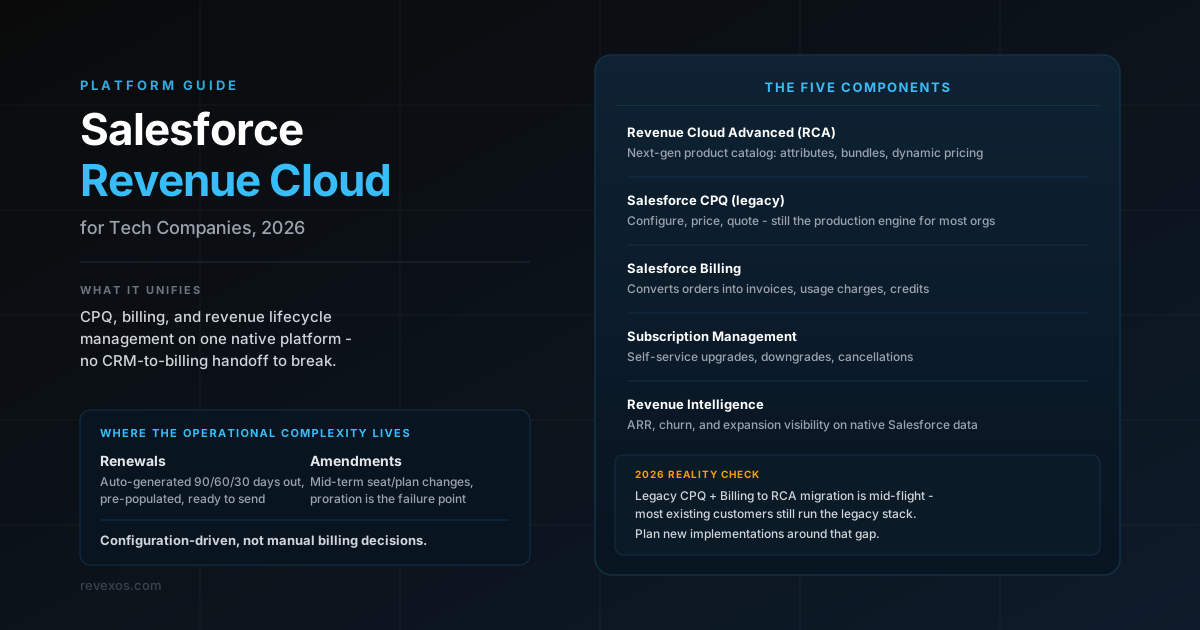
For most technology companies, Salesforce is already the center of the revenue universe. It is where opportunities are tracked, deals are closed, and customer relationships are managed. The gap that creates operational pain is what happens after the deal closes: the handoff from Salesforce to billing, from billing to finance, and from finance to cash collection is where data gets lost, manual work accumulates, and the automated Q2C process that was supposed to exist in theory fails to materialize in practice.
Salesforce Revenue Cloud is built to close that gap. It brings subscription billing, usage-based billing, and revenue lifecycle management directly onto the Salesforce platform, so that the handoff from CRM to billing is no longer a handoff at all - it is a native workflow within a unified system.
This post is a practical guide for tech companies evaluating Revenue Cloud for subscription and consumption-based pricing, implementing it, or trying to understand why their current Revenue Cloud deployment is not delivering the automation they expected. It covers what Revenue Cloud actually is (the answer has changed significantly in the last two years), how it handles the pricing models that matter most to technology companies, and what a realistic implementation picture looks like.
What Salesforce Revenue Cloud Actually Is in 2026
Salesforce has reorganized and renamed its revenue management products multiple times. The current Revenue Cloud is a consolidation of what was previously Salesforce CPQ, Salesforce Billing, and several adjacent products into a unified Revenue Lifecycle Management (RLM) platform.
The components that matter for tech companies are:
Revenue Cloud Advanced (RCA) The next-generation product catalog and order management layer. RCA introduces a new data model - Products, Attributes, Product Relationships, and Pricing - that is more flexible than the legacy CPQ product catalog. It supports dynamic product configuration, attribute-based pricing, and complex bundle structures that the original CPQ catalog struggled with.
Salesforce CPQ (Salesforce Configure, Price, Quote) The legacy quoting engine that most Salesforce customers know. Still in production for most existing deployments, but being migrated toward the RCA model. CPQ handles product configuration, pricing rules, discounting, approval workflows, and quote generation. For subscription pricing, CPQ manages subscription terms, renewal quoting, and amendment processing.
Salesforce Billing The billing execution layer. Salesforce Billing takes orders from CPQ or RCA and generates invoices, manages payment collection, processes usage charges, and handles credits and adjustments. It is the operational engine that converts a sold contract into a recurring billing relationship.
Revenue Intelligence Analytics and reporting built on Salesforce data, providing visibility into ARR, churn, expansion, and billing health. Not an operational component but increasingly important for finance and RevOps leaders who want pipeline-to-revenue visibility without building a separate BI layer.
Subscription Management A self-service layer that allows customers to manage their own subscriptions: upgrades, downgrades, seat additions, and cancellations, through a customer portal, without requiring a sales rep to process every change. For tech companies with a high volume of smaller accounts, self-service subscription management reduces support overhead significantly.
The important thing to understand about Revenue Cloud in 2026 is that Salesforce is actively in the middle of a product transition from the legacy CPQ + Billing model to the new RCA model. Most existing customers are still running the legacy stack. New implementations can start on RCA, but the feature parity with legacy CPQ is still being completed in certain areas. This matters for implementation planning.
How Revenue Cloud Handles Subscription Billing
Subscription billing in Revenue Cloud follows the arc of the Salesforce sales process: the customer's subscription begins as a product on a quote, becomes an order when the quote is signed, and then becomes a billing schedule that drives recurring invoices.
Subscription Products and Terms
In Revenue Cloud, a subscription product is defined with a subscription term (monthly, annual, multi-year), a pricing model (flat fee per period, per-seat per period, tiered by seat count), and a set of subscription rules that control how the product behaves through its lifecycle.
Subscription rules govern:
- Renewals: Does this product auto-renew? What is the renewal pricing (same as original, plus a percentage uplift, or quoted fresh)?
- Amendments: When a customer adds seats mid-subscription, how is the proration calculated? What triggers a new order versus a change order on the existing subscription?
- Cotermination: When a customer buys a new product to add to an existing subscription, do the terms co-terminate with the original end date (requiring proration) or start a new independent term?
- Cancellation: What is the billing treatment when a subscription is cancelled mid-term?
These rules are configured once in the product catalog and applied automatically when sales reps create quotes and amendments. The result is that the operational behavior of the subscription, including renewals, amendments, and cancellations, is driven by configuration rather than by manual billing decisions made at the time of each event.
Renewal Automation
For tech companies with a large subscription portfolio, renewal management is one of the highest-leverage areas for automation. Revenue Cloud's renewal processing can automatically generate renewal opportunities and quotes 90, 60, or 30 days before contract expiration, pre-populated with the customer's current subscription, current pricing (plus any configured uplift), and the renewal term.
Sales reps receive a renewal quote that is ready to send with no manual data entry. If the customer signs without changes, the renewal processes automatically into a new billing period. If the customer expands or reduces, the rep amends the renewal quote and the billing schedule updates accordingly.
Companies that implement renewal automation well see two immediate operational benefits: the renewal pipeline becomes visible and trackable in Salesforce (eliminating the spreadsheet-driven renewal management that most companies start with), and the cycle time from renewal opportunity to signed order shortens, reducing the at-risk period when lapsed subscriptions create revenue uncertainty.
Mid-Period Amendments
The operational complexity in subscription billing is not the steady-state renewal - it is the mid-period change. A customer adds 10 seats on day 15 of a 30-day billing period. A customer upgrades from Professional to Enterprise on day 8 of an annual subscription. A customer removes an add-on module they are no longer using.
Revenue Cloud handles amendments through a formal amendment quote process: the rep creates an amendment to the existing subscription order, Revenue Cloud calculates the prorated impact, and the approved amendment generates a billing adjustment or a new billing schedule line for the remainder of the term.
The proration logic is configurable, and this is where many implementations run into trouble. The default proration behavior (day-based proration against the remaining contract days) is correct for many scenarios but not all. Companies with more complex proration requirements, like per-seat billing with daily seat count tracking, or entitlement-based billing where usage rights activate at specific dates, need custom proration rules or a supplemental metering layer.
How Revenue Cloud Handles Consumption-Based Billing
This is the area where Revenue Cloud has invested most aggressively in recent years, and where the gap between its stated capabilities and what most implementations actually deliver is widest.
Usage-Based Pricing Architecture
Revenue Cloud handles usage-based billing through a combination of usage summaries (aggregated consumption records) and usage-based pricing rules. The flow works as follows:
- Usage data from the product arrives in Salesforce as usage records or is ingested through the API
- Usage records are summarized by billing period and matched to the customer's active subscription
- At the billing date, Salesforce Billing processes the usage summary against the usage pricing rules to calculate the charge
- The charge is added to the invoice for the billing period
This works well for straightforward usage models: a flat per-unit rate on monthly consumption, for example. The limitations appear when pricing is more complex.
Tiered consumption billing is technically supported but requires careful implementation. Revenue Cloud can apply tiered pricing if the usage summary includes the relevant volume metrics and the pricing rules are configured to apply different rates at different thresholds. However, mid-period tier tracking, where the applicable rate changes as the customer's cumulative consumption crosses a tier boundary during the billing period, requires custom logic or a third-party metering tool.
Real-time consumption tracking is outside Revenue Cloud's native scope. Revenue Cloud is a billing system, not a metering system. It processes usage data that arrives from outside the system; it does not collect telemetry, rate events in real-time, or manage high-frequency event streams. For tech companies where billing must reflect consumption at near-real-time granularity, an upstream metering platform (Amberflo, m3ter, Lago, or Snowflake-based custom metering) feeds consumption summaries into Revenue Cloud rather than Revenue Cloud managing the metering itself.
Overage billing on committed plans requires explicit implementation. When a customer has a committed consumption level (e.g., 100,000 API calls per month included) and bills at an overage rate above that threshold, the implementation must model the commitment as a subscription component and the overage as a separate usage component with the threshold correctly configured. Out-of-the-box Revenue Cloud does not automatically recognize the commitment drawdown and switch to overage pricing - that logic must be implemented explicitly.
Usage Data Ingestion
Usage data reaches Salesforce Billing through one of three paths:
Native usage records via API: The product or a middleware system pushes usage records to the Salesforce Billing Usage API. Records include the subscriber ID, the product identifier, the quantity, and the measurement date. Salesforce aggregates these into usage summaries that drive billing.
Third-party metering integration: A metering platform like Amberflo, m3ter, or Lago handles the collection, aggregation, and rating of raw events, then pushes finalized usage summaries or charge amounts to Revenue Cloud for invoicing. This is the recommended pattern for high-volume or complex tiered pricing, because it keeps the metering complexity in a system purpose-built for it and uses Revenue Cloud for billing and invoicing only.
Batch file ingestion: Usage data arrives as periodic batch files (daily, weekly) that are loaded into Salesforce. Common in environments where the product telemetry is processed in a data warehouse and summarized for billing. This is the lowest-integration-effort approach but creates billing latency, since the invoice cannot be generated until the batch is processed.
The choice of ingestion pattern has significant operational implications. Native API ingestion is the tightest integration but requires engineering resources to build and maintain the push. Third-party metering adds a system to the stack but substantially simplifies the Revenue Cloud configuration. Batch file ingestion is easiest to implement but creates a manual process dependency that reintroduces operational overhead.
The Q2C Advantage: Billing on the CRM Platform
Revenue Cloud's most significant structural advantage over standalone billing platforms is that it runs on the same platform as Salesforce CRM. For tech companies where Salesforce is the system of record for customer relationships, this eliminates the most common source of billing errors: the integration between CRM and billing.
The Quote-to-Order-to-Bill Handoff
In a Salesforce Revenue Cloud implementation, the data that drives billing is created during the quoting process. When a sales rep builds a quote in CPQ, the product selections, pricing, subscription terms, and discounts are defined on the Salesforce object model. When the quote is accepted and converted to an order, those same objects become the source of truth for billing. No data needs to be exported from Salesforce and imported into a billing system. No custom integration needs to transform CRM data into billing data. The quote and the billing contract are the same data, in the same system.
This matters because the most common source of billing errors in disconnected Q2C stacks is not the billing system itself - it is the data quality of what gets into the billing system. Custom integrations between Salesforce and external billing platforms (Zuora, Chargebee, NetSuite) drift over time. Field mappings break when either system updates. Objects that exist in CRM do not have a clean equivalent in billing. Sales reps discover workarounds that bypass the integration. The result is a billing system that does not reflect the actual state of the customer's agreement, generating invoices that do not match what the customer expects.
Revenue Cloud eliminates this category of problem by construction. When the billing contract is the same Salesforce object as the signed quote, the data cannot get out of sync because there is no integration to maintain.
Visibility Across the Revenue Lifecycle
For revenue operations and finance leaders, the platform consolidation creates a unified view that is operationally valuable. The same Salesforce instance that shows open opportunities, won deals, and renewal pipeline also shows billing health, invoice status, and payment collection.
In a practical sense, this means:
- Customer Success can see a customer's billing history, outstanding invoices, and subscription changes directly in the account record, without switching to a billing system
- Revenue operations can build Salesforce reports and dashboards that span the entire funnel from pipeline through ARR through billed and collected revenue
- Finance can use Salesforce data for revenue recognition, deferred revenue reporting, and audit support without extracting data from a separate billing system
- Sales reps can see renewal status, billing disputes, and payment history for accounts they own without requesting reports from finance
This visibility is not magic - it requires disciplined data hygiene and correctly configured flows. But the infrastructure for it exists natively on the Salesforce platform in a way that is not replicable in disconnected systems without significant custom integration.
Revenue Recognition in Revenue Cloud
Revenue Cloud's native revenue recognition capability (Salesforce Revenue Recognition, built on Salesforce Billing) handles straightforward subscription revenue recognition: recognizing subscription revenue ratably over the subscription term, managing deferred revenue balances, and posting recognition entries.
For technology companies with ASC 606 complexity, the native Revenue Cloud RevRec has limitations that matter:
Multi-element arrangement allocation: When a customer purchases a bundle of subscription products at a discounted total price, ASC 606 requires allocating the total transaction price to each distinct performance obligation based on standalone selling prices. Revenue Cloud can model SSP values and apply allocation logic, but the configuration is non-trivial and the audit documentation must be built alongside the system configuration.
Variable consideration: Usage-based revenue involves variable consideration - the total amount is not known until the usage period closes. Revenue Cloud's recognition module handles the recognition of finalized usage charges, but the ASC 606 requirement to estimate variable consideration at contract inception and constrain revenue that is likely to reverse requires process-level controls, not just system configuration.
Contract modifications: When a customer amends their subscription mid-term - adding products, changing terms, or renegotiating pricing - Revenue Cloud's amendment process creates a new order. Whether that amendment triggers a prospective modification (new treatment going forward), a separate contract, or a full contract reallocation depends on the specific amendment terms. Revenue Cloud does not automatically determine the correct ASC 606 modification treatment; finance must apply judgment and configure the system accordingly.
For many mid-market tech companies, Revenue Cloud's native RevRec is sufficient. For enterprise tech companies with complex multi-element arrangements, significant variable consideration, or frequent contract modifications, a dedicated RevRec tool (Zuora Revenue, NetSuite ARM, or a custom RevRec model in the ERP) will supplement Revenue Cloud's billing output with more rigorous recognition logic.
Where Revenue Cloud Fits in the Modern Tech Q2C Stack
| Phase | Revenue Cloud Native | Common Supplement |
|---|---|---|
| Opportunity management | Salesforce CRM | - |
| Configure, price, quote | Salesforce CPQ / RCA | - |
| Contract management | Salesforce CLM or DocuSign | DocuSign CLM |
| Subscription management | Salesforce Billing | - |
| Usage metering and rating | Usage summaries (basic) | Amberflo, m3ter, Lago |
| Invoicing | Salesforce Billing | - |
| Payment collection | Stripe, Adyen (integrated) | - |
| Revenue recognition | Revenue Cloud RevRec (basic) | Zuora Revenue, NetSuite ARM |
| General ledger | Integration required | NetSuite, SAP, Sage Intacct |
The key takeaway from this table: Revenue Cloud is excellent from opportunity through invoice. The integration points that require careful architecture are downstream (ERP integration for GL posting and RevRec) and upstream for complex usage billing (metering platforms).
Real-World Use Cases for Tech Companies
Enterprise SaaS with Seat-Based Subscriptions
A B2B SaaS company sells annual subscriptions priced per seat, with a Professional tier and an Enterprise tier. Sales negotiations frequently involve custom pricing, multi-year terms, and ramp schedules.
Revenue Cloud fits this profile tightly. CPQ manages custom pricing and approval workflows. Subscription terms are configured once in the product catalog. Amendment processing handles mid-year seat additions with automatic proration. Renewal automation generates renewal quotes 60 days before expiration. The annual invoice is generated automatically on the contract anniversary with no billing team involvement.
The ROI in this scenario is measured in hours per account per year that are no longer spent on manual billing and renewal management.
API Platform with Consumption-Based Billing
A developer platform charges customers based on API call volume, with pricing tiers at different volume bands. Enterprise customers have committed use plans with overage.
Revenue Cloud with a metering integration handles this. The metering platform (m3ter, Amberflo, or custom-built on a data warehouse) rates raw API events in real-time, aggregates daily usage summaries, and pushes finalized monthly consumption data to Revenue Cloud via API. Revenue Cloud generates a monthly invoice that shows the committed plan, the actual consumption against the commitment, and any overage charges.
The distinction from a pure subscription model is in the metering layer: Revenue Cloud handles billing and invoicing; the metering platform handles the high-frequency event processing that Revenue Cloud is not designed for.
Hybrid Subscription and Usage Model
A cloud data platform charges a base subscription fee for platform access (annual, billed upfront) plus a monthly consumption charge for compute and storage. Enterprise customers negotiate custom committed use discounts.
Revenue Cloud models this as a bundle: the base subscription is a standard subscription product; the compute and storage are usage products billed monthly in arrears. The annual upfront invoice covers the platform fee; a separate monthly invoice covers the consumption charges. Committed use discounts are modeled as pricing conditions that apply to consumption charges up to the commitment threshold, with standard rates above it.
This hybrid model is where Revenue Cloud's CRM integration pays dividends: the sales rep configures both the subscription and the committed use terms in a single quote, the customer signs once, and Revenue Cloud manages two parallel billing streams against the same account without manual coordination between billing streams.
Common Implementation Mistakes
Treating Revenue Cloud as a Billing-Only Upgrade
Companies that implement Revenue Cloud only in the billing module, without connecting it to CPQ and subscription management, miss the primary value driver: the closed loop from quote to bill. If sales reps are still entering orders manually into a billing system, or if the CPQ and Billing modules are not properly integrated, the operational friction that Revenue Cloud was supposed to eliminate persists.
Underestimating the Product Catalog Redesign
The CPQ product catalog is the foundation of everything Revenue Cloud does downstream. Product structures that were adequate for quoting but not designed for billing - for example, products modeled as one-time charges that should be subscriptions, or bundles that include subscription and non-subscription components without clear term definitions - break down when billing automation is introduced.
Most Revenue Cloud implementations require a substantial product catalog redesign before billing automation can be enabled. Companies that try to retrofit billing onto an existing CPQ catalog without redesigning the catalog structure first spend months in implementation and still end up with manual workarounds.
No Metering Strategy for Usage Billing
Revenue Cloud does not meter usage natively. Companies that want consumption-based billing and assume Revenue Cloud will handle the full pipeline - from product telemetry to rated charge - discover that they need a separate metering solution. Identifying and integrating that metering solution is the longest-lead item in a consumption billing implementation, and it is frequently not scoped at the start of the project.
Insufficient Finance Involvement
Revenue Cloud implementations are typically driven by sales operations or IT. Finance is often brought in late, after the system design is complete, to approve the revenue recognition configuration. This ordering creates problems: RevRec requirements that were not considered in the data model design require rework, SSP documentation that should have been completed before go-live is rushed, and the audit trail for complex modifications does not satisfy the auditors.
Finance must be involved from the product catalog design stage, not from the go-live preparation stage.
Should Your Tech Company Use Revenue Cloud?
Revenue Cloud is the right choice if:
- Salesforce CRM is already your system of record for customer relationships and you want to eliminate the CRM-to-billing integration entirely
- Your pricing is primarily subscription-based with some consumption components, and consumption volume is in the tens of thousands to low millions of events per month
- You have a sales-led growth motion where CPQ is central to your deal process
- You want a unified platform for sales, billing, and customer success visibility without managing multiple vendor relationships
Revenue Cloud is probably not the right choice if:
- Your billing volume is primarily consumption-based with billions of events per month and complex real-time tiered pricing - SAP BRIM or a dedicated telco-grade rating engine will serve you better
- Salesforce is not already your CRM - adopting Salesforce CRM plus Revenue Cloud simultaneously is a much larger project than adding Revenue Cloud to an existing Salesforce org
- You need complex multi-element RevRec with automated SSP allocation at scale - you will need a supplemental RevRec tool regardless
- Your billing needs are simple and you have a small account base - Stripe Billing or Chargebee will deliver 80% of the value at 20% of the implementation cost and timeline
What RevExOS Does in Revenue Cloud Environments
Revenue Cloud environments typically have strong quoting capability and reasonable billing capability. What they frequently lack is a clean implementation of the full cycle: product catalog structures that actually support billing automation, usage billing integrations that are designed for scale rather than patched together, RevRec configuration that satisfies audit requirements, and reconciliation frameworks that catch billing errors before they reach customers.
RevExOS works with Revenue Cloud implementations to:
- Audit the CPQ-to-Billing data flow to identify where manual work has been introduced as a workaround to integration gaps
- Design the product catalog structure for both subscription and consumption products so that billing automation works without exceptions
- Architect the metering integration for usage-based billing, selecting and implementing the right upstream tool based on volume and pricing complexity
- Configure revenue recognition in collaboration with the finance team and auditors, ensuring SSP documentation, variable consideration handling, and modification accounting are all properly supported
- Build the reconciliation layer that monitors billing health in real-time and surfaces anomalies before they become customer-facing invoice errors
If your Revenue Cloud implementation is live but the automation you expected is not fully working, or you are starting a new one and want to avoid the common failure modes, the Salesforce platform page collects the related guides. Stuck on a specific failure mode? Ask me.
Frequently Asked Questions
What is Salesforce Revenue Cloud?
Salesforce Revenue Cloud is Salesforce's integrated platform for subscription billing, consumption billing, CPQ (configure, price, quote), and revenue lifecycle management. It brings the full quote-to-cash process onto the Salesforce platform, eliminating the CRM-to-billing integration that creates data loss and manual work in disconnected Q2C stacks.
How is Revenue Cloud different from Salesforce CPQ?
Salesforce CPQ is the quoting and pricing engine - it handles product configuration, pricing rules, discount approvals, and quote generation. Revenue Cloud includes CPQ plus Salesforce Billing (recurring invoices, payment collection, usage billing) and revenue recognition. Revenue Cloud is the broader commercial package; CPQ is one component of it.
Can Revenue Cloud handle usage-based pricing?
Revenue Cloud handles usage-based billing through usage summaries: aggregated consumption records are fed into Salesforce Billing and rated against usage pricing rules to generate charges. For high-volume, complex tiered pricing, most implementations pair Revenue Cloud with an upstream metering platform (Amberflo, m3ter, Lago) that handles event-level rating and feeds finalized usage summaries to Revenue Cloud for invoicing.
Does Revenue Cloud do revenue recognition?
Revenue Cloud includes a native revenue recognition module that handles ratable subscription revenue recognition and basic usage revenue recognition. For ASC 606 compliance with complex multi-element arrangements, significant variable consideration, or frequent contract modifications, many tech companies supplement Revenue Cloud with a dedicated RevRec tool like Zuora Revenue or NetSuite ARM.
How long does a Revenue Cloud implementation take?
A Revenue Cloud implementation that includes CPQ, Billing, and a usage billing integration typically takes 6-12 months for a mid-sized tech company, depending on the complexity of the product catalog, the number of pricing rules, and the usage billing architecture. Companies that are adding Billing to an existing CPQ implementation can often complete in 3-6 months.
What ERP systems does Revenue Cloud integrate with?
Revenue Cloud integrates with most major ERP systems through standard APIs. Common integrations are with NetSuite, SAP S/4HANA, Sage Intacct, and QuickBooks. The integration complexity depends on the level of financial detail required: a simple integration passes invoice totals; a full integration passes line-level charge detail for RevRec and sub-ledger management.
RevExOS is a free learning hub for quote-to-cash automation: guides, tools and real projects. See the lead-to-cash map for more on each step.
 NetSuite
 Salesforce
 Zuora
Zuora SAP
SAP