Introducing Spend: Track Expenses and Subscriptions from Telegram
Meet Spend by RevExOS — a personal finance tracker built for people who want real visibility into where their money goes without app friction. Log expenses via Telegram, track subscriptions across all frequencies, multi-currency support, and analytics built in.
RevExOS
Q2C Consulting

Introducing Spend by RevExOS
Most people do not have a clear picture of where their money goes. Not because they do not care, but because tracking is friction — another app to open, another form to fill, another thing to remember.
We built Spend to remove that friction.
Spend is a personal expense and subscription tracker with a Telegram-first interface: you message your expense as it happens, and it is logged. No app switch, no multi-step form. The insight happens in the background while the logging happens in seconds.
Why We Built It
We tried the standard expense tracking apps. Some were too complex, designed for accountants rather than everyday use. Some lacked the specific features we needed — subscription tracking, multi-currency support, or a way to log expenses without opening a dedicated app. Most focused on categories and charts but made the logging process itself too slow to sustain as a habit.
The insight that drove Spend's design: the bottleneck in personal finance tracking is not analysis — it is input. People do not stop tracking because the charts are bad. They stop because logging an expense takes longer than the expense itself seems to warrant.
Spend's core design principle is that logging should take five seconds or less. Everything else — categorisation, analytics, subscription management — flows from that.
What Spend Does
Telegram-First Expense Logging
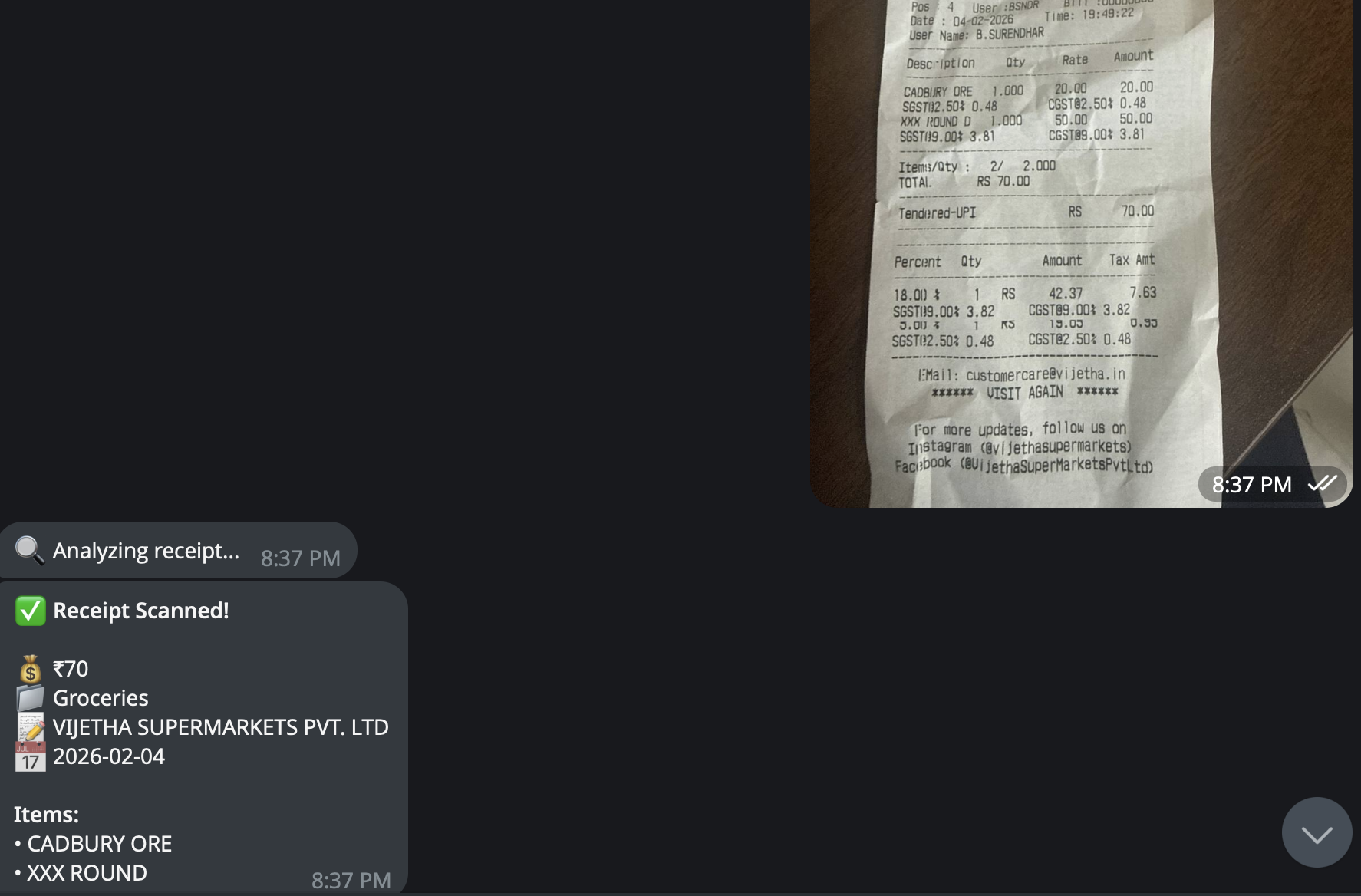
The Spend Telegram bot (@spendntypebot) is connected to your Spend account. To log an expense, you send a message to the bot with the amount and a brief description. The bot logs it, categorises it, and confirms.
You do not open the app. You do not navigate to a form. You send a message — which you are probably already doing on your phone — and the expense is recorded.
This removes the primary reason people stop tracking: the effort-to-value ratio of logging. When logging is as fast as sending a text, the habit sustains.
Expense and Subscription Tracking in One Place
Most apps force a choice between tracking daily expenses and managing recurring subscriptions. Spend handles both in the same system.
For one-time expenses: Log with description, amount, currency, category, tags, and date. All fields are optional beyond amount — the faster the logging, the more likely it actually happens.
For subscriptions: Define the amount, frequency, and start date. Spend generates the recurring expense automatically on each due date. Supported frequencies:
- Weekly
- Every 28 days
- Monthly
- Quarterly
- Semi-annual
- Annual
Subscriptions auto-renew and create expense entries on schedule. You can pause, resume, or edit a subscription at any time. The upcoming dues widget shows what is coming before it hits your bank account — which is where most people first notice they are paying for something they forgot about.
Multi-Currency Support
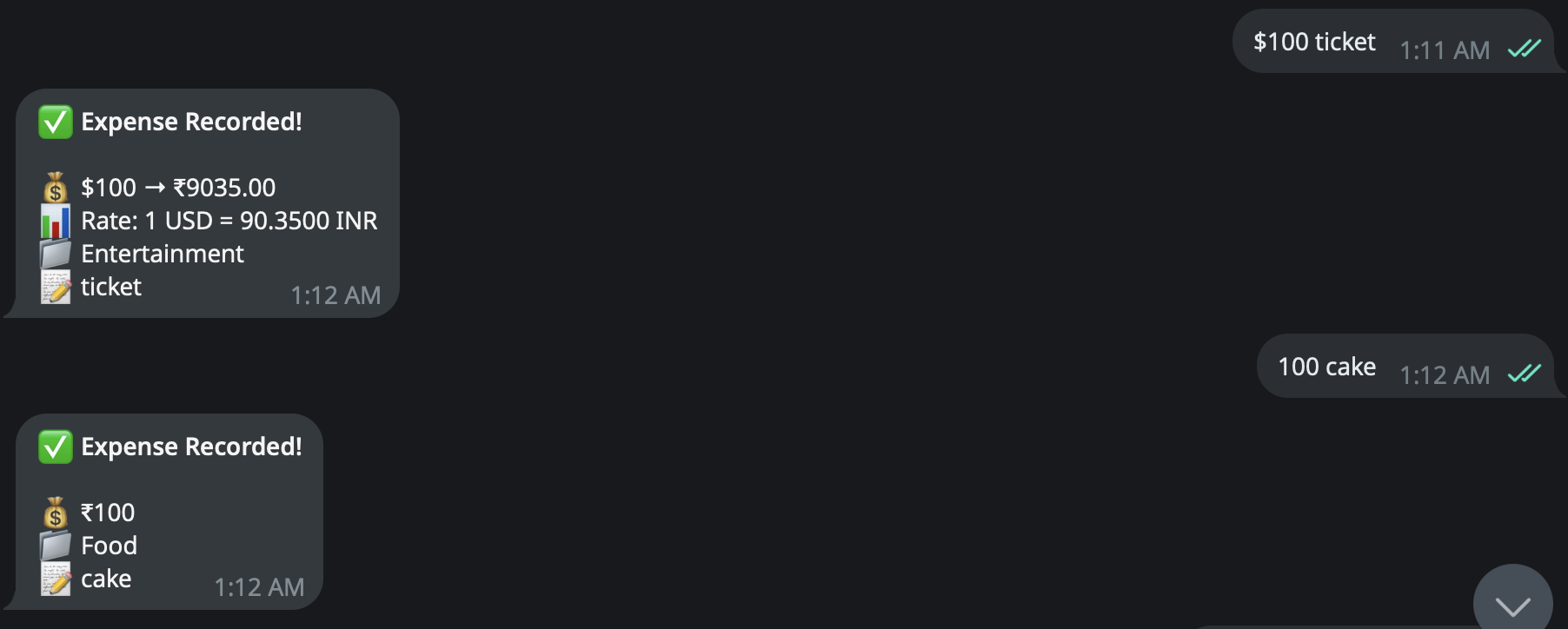
Spend supports 10 major currencies: USD, EUR, GBP, INR, JPY, AUD, CAD, SGD, AED, and CNY.
You can set a default currency and log expenses in any supported currency. Server-side conversion handles the normalisation for reporting while preserving the original amounts for accurate records. This matters for frequent travelers, remote workers with international subscriptions, or anyone managing expenses across multiple countries.
Flexible Dashboard
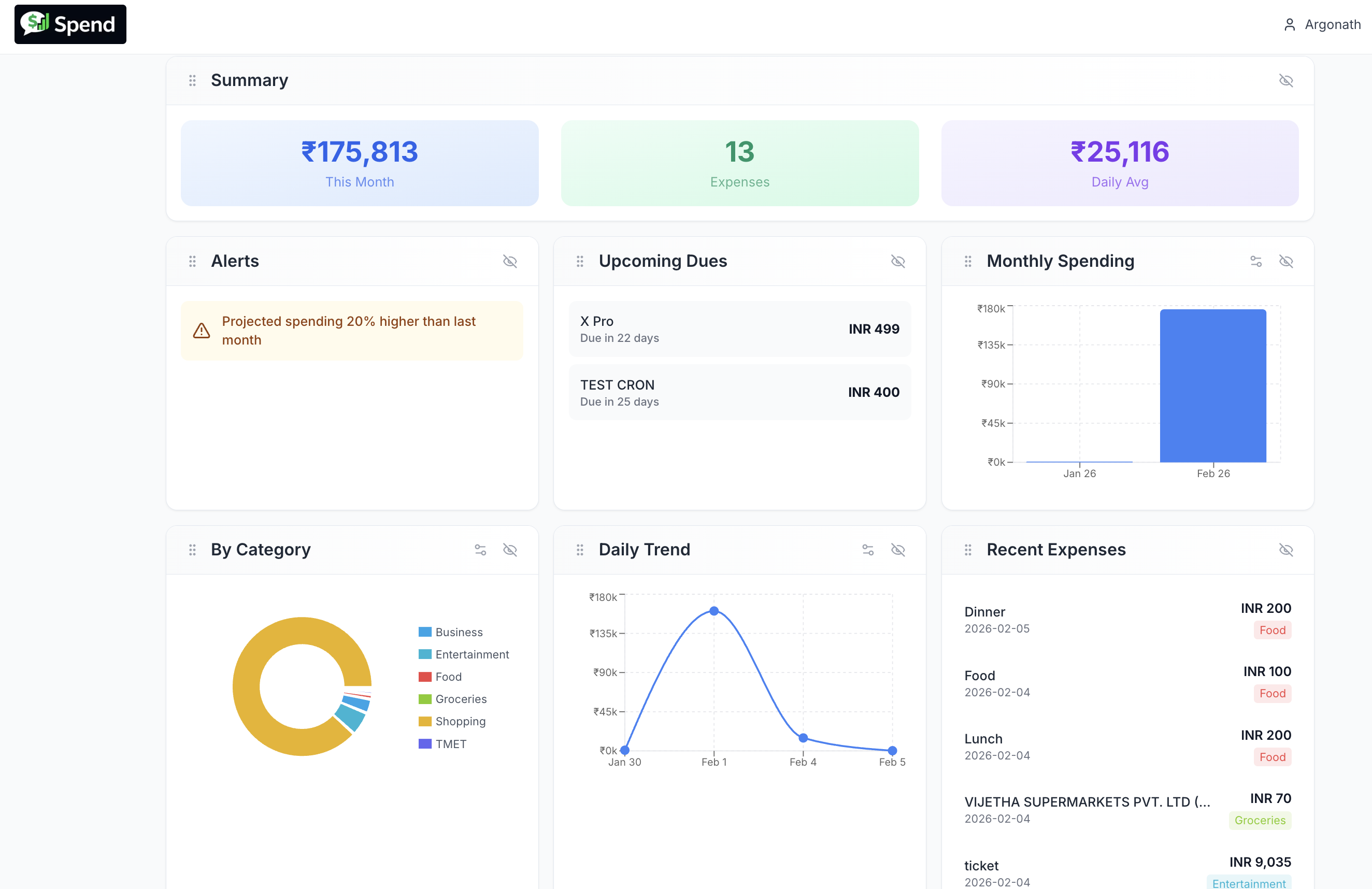
The dashboard uses a widget-based layout that adapts to how you work. You can reorder and show or hide widgets to surface what matters most to you: monthly summaries, upcoming subscription dues, recent expenses, or alerts.
The design principle is the same as logging: reduce friction. A dashboard that shows you everything by default becomes noise. A dashboard you have configured to show what you actually monitor becomes a useful daily reference.
Analytics Without Complexity
The analytics layer goes beyond totals.
With built-in charting, you can:
- Create bar, line, and pie charts for any combination of data
- Group by time period, category, or tag
- Filter to specific categories or custom tags
- View daily, weekly, monthly, or yearly aggregations
- Track totals, averages, or expense count trends
Custom charts persist across sessions in the Pro plan, so your standard views do not need to be rebuilt each time.
The goal is to answer the questions that matter in personal finance: Where did the most money go this month? Has food spending trended up over six months? How much do subscriptions cost per year in aggregate?
Categories and Tags
Spend includes 13 built-in categories: Food, Travel, Rent, Utilities, Groceries, Entertainment, Health, Shopping, Transport, Education, Personal Care, Business, and Other.
You can create custom categories with your own colour coding. Tags add a second dimension — you might categorise an expense as Food but tag it as Work, Personal, or Family to slice it separately in analytics.
Getting Started
Getting set up takes under two minutes:
- Sign in with your Google account at spend.revexos.com
- Connect Telegram — click the bot link, send
/startor/link, and follow the prompt to connect your account - Set preferences — default currency, timezone, and organisation name in Settings
- Log your first expense via Telegram or the web interface
- Add subscriptions for recurring charges you want to track automatically
- Customise the dashboard by showing or hiding widgets based on what you actually check
Free vs Pro
| Feature | Free | Pro |
| One-time expense tracking | Yes | Yes |
| Subscription tracking | Yes | Yes |
| Telegram integration | Yes | Yes |
| Custom categories and tags | Yes | Yes |
| Multi-currency support | Yes | Yes |
| Receipt image upload | No | Yes |
| Advanced analytics | No | Yes |
| Custom dashboard charts | No | Yes |
Pro pricing: $4.99/month or $49.99/year (save 17%).
Start free. Upgrade when you want more depth in the analytics layer.
What's Built On
Spend is built on Next.js, Supabase (authentication and data), Tailwind CSS and Radix UI (interface), Recharts (data visualisation), and deployed on Vercel. Data is encrypted at rest and in transit with row-level security on all user data.
What's Coming Next
Current roadmap includes:
- iOS and Android native apps
- Budget goals by category
- Shared and split expense tracking
- CSV and PDF exports
- WhatsApp and Slack integrations for expense logging
Start Tracking
If you have ever reached month-end wondering where the money went, Spend is built for that.
Sign up free at spend.revexos.com — and if you have feedback or run into anything, reach out. We build quickly and take every piece of feedback seriously.