OTR Workflow Automation: What Finance Teams Get Wrong
Most attempts to automate the order-to-revenue workflow fail because teams automate the wrong steps first, or automate one step without fixing what feeds it. Here is what actually breaks, and what a working OTR automation setup looks like.
RevExOS
Q2C Consulting
OTR Workflow Automation: What Finance Teams Get Wrong
Finance teams attempting to automate their order-to-revenue workflow almost always start with the wrong step.
The most common first move is AR automation - buying a dunning tool, setting up reminder sequences, configuring escalation paths for overdue invoices. This is the most visible part of the OTR cycle and it has well-understood software solutions. It feels like the obvious place to start.
The problem: dunning automation sits at the end of the cycle. If the invoices feeding into your AR workflow are wrong - late, incorrectly addressed, with the wrong PO number, missing contract terms - the dunning tool is sending better reminders for invoices that were never going to get paid cleanly.
This is the core mistake in OTR automation: fixing the symptom rather than the upstream cause.
Why Most OTR Automation Projects Fail
There are four failure patterns that account for the majority of unsuccessful OTR automation projects.
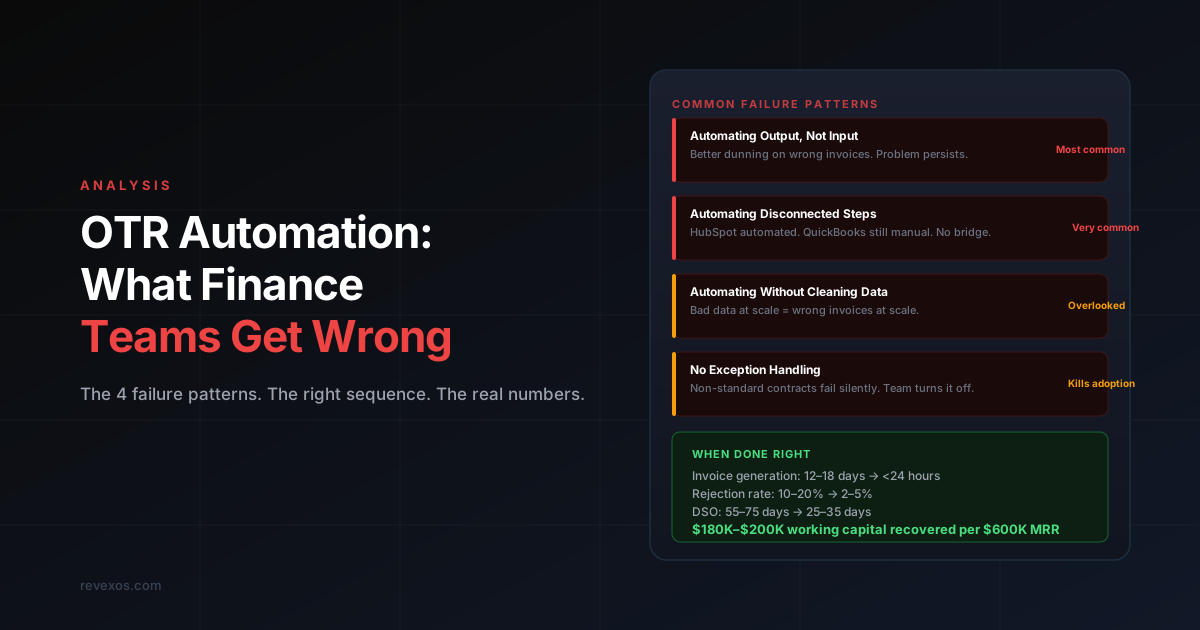
Failure Pattern 1: Automating Output Without Fixing Input
AR automation tools work well when the invoices entering the AR cycle are accurate. They work poorly when invoices are wrong at the point of generation.
A company with a 15% invoice rejection rate buys a dunning platform. The platform sends reminders on day 1, 7, and 14 after the due date. The rejected invoices - which never got to AP at the client because they were rejected before reaching the payment queue - are still sitting as disputed items. The dunning tool does not know an invoice was rejected. It sends reminders for invoices that the client has already bounced back.
The accounting team is now spending time managing the dunning tool's output (overdue reports, escalation queues) while the actual problem - invoice rejection - is unchanged.
The fix is not a better dunning tool. The fix is identifying why invoices are being rejected and building the automation upstream of invoice generation.
Failure Pattern 2: Automating Disconnected Steps
Most mid-market companies have three to five systems that touch the OTR cycle: a CRM, a contract management tool, a project management system, an invoicing tool, and an accounting system. When companies automate, they typically automate within one system - setting up HubSpot workflows, or configuring QuickBooks recurring invoices - without connecting the systems to each other.
The result is automation that works in isolation but fails at the handoffs. HubSpot automatically moves deals to "Closed Won." Finance still manually checks HubSpot to find new deals and manually creates invoices in QuickBooks. The automation saved the sales team a step. It saved finance nothing.
Effective OTR automation is automation of the connections between systems, not automation within individual systems. For an example of how this plays out in a common stack, see HubSpot to QuickBooks Invoice Automation: Why the Native Integration Falls Short.
Failure Pattern 3: Automating Without Cleaning the Data
Automation amplifies data quality. If the underlying data is clean - correct billing contacts, accurate payment terms, current PO numbers - automation sends correct invoices at high volume. If the data is inconsistent - some deals with payment terms, some without, some with billing contacts that are no longer current - automation sends incorrect invoices at high volume.
A company with 200 customer records in QuickBooks, built up over four years by different people with different data entry habits, cannot simply turn on invoice automation and expect it to work. The payment terms across those records will be inconsistent. Billing contacts will be outdated. Some records will have incomplete fields that the automation cannot handle.
The prerequisite for OTR automation is a data cleanup pass: audit your customer records, standardise your deal data structure in the CRM, and establish a source of truth for contract terms before automation reads from it.
Failure Pattern 4: No Exception Handling
Every automation produces exceptions - invoices that do not match a template, orders that fall outside the normal structure, contracts with terms the system has not seen before. Finance teams that do not plan for exceptions end up with one of two outcomes: either exceptions fail silently and nobody notices until a client complains, or the automation is turned off because the exception volume is too high to manage.
Effective OTR automation requires an explicit exception queue - a place where non-standard items land for human review, with enough context for the reviewer to act without having to research from scratch. The goal is not to eliminate human judgment from OTR. It is to direct human judgment at the cases that require it, rather than spending it on cases that do not.
The Right Sequence for OTR Automation
The correct sequencing for OTR automation follows the flow of the cycle, upstream to downstream. Each step creates the data quality that makes the next step reliable.
Step 1: Fix Order Capture
Before you can automate anything downstream, you need a reliable, structured record of every order as it comes in. This means a CRM deal record with complete fields: billing entity, billing contact, payment terms, PO number, pricing, and contract reference.
The automation at this stage is a set of validation rules on the CRM deal: a deal cannot move to Closed Won without required billing fields being populated. This is not sophisticated technology - it is a workflow configuration in your existing CRM. But it creates the data foundation that makes everything downstream possible.
If you have a backlog of deals with incomplete data, start with a one-time audit of active contracts. Map each contract to the billing fields your invoicing system needs. Fill the gaps manually. Going forward, the validation rules prevent new gaps from forming.
This step takes one to two weeks and does not require any new software.
Step 2: Connect CRM to Billing
Once deal data is structured, connect it to your billing system so new orders create billing records automatically. This eliminates the data entry step between CRM and accounting - the step where most field-level errors originate.
The integration needs to be bi-directional for some fields: if a client's billing contact changes in your accounting system (because accounts payable called with a different address), that change should be visible in the CRM. If a deal is amended in the CRM, the billing record should update.
For most stacks, this integration is built once and maintained passively. It is not a weekly configuration task. The upfront build takes one to two weeks. After that, it runs without attention unless a CRM or billing system update changes the field structure.
Step 3: Automate Invoice Triggers
With clean order data flowing into your billing system, the next step is defining what causes an invoice to generate and automating that trigger.
For retainer contracts, the trigger is time-based: the first of the month, the first of the quarter, or a specific date in the contract. This is the simplest case and is often already partially automated.
For milestone-based contracts, the trigger is a completion event: a deliverable marked complete in your project management system, a phase sign-off recorded in your contract system, or a client acceptance logged in a specific workflow. The automation listens for that event and generates the invoice when it fires.
For usage-based contracts, the trigger is a consumption threshold: a usage metric crossing a defined level, pulled from your product or service delivery system.
The accountant reviews the generated invoice before it sends. This is not a step to remove - it is where judgment applies. The goal is to have the invoice arrive in the review queue correct rather than requiring the accountant to build it.
The DSO impact of this step is direct and measurable. Invoices that previously went out 12–18 days after a trigger event now go out within 24 hours. That difference shows up in cash flow within one billing cycle.
Step 4: Automate AR Follow-Up
With invoices generating accurately and on time, AR automation can be applied effectively. Reminder sequences, escalation paths, and dispute management workflows work as intended when the invoices entering the cycle are clean.
The configuration decisions at this step:
Timing. When does the first reminder go out - at due date, or before? Most effective AR sequences include a pre-due reminder 3–5 days before the invoice is due, a same-day notice on the due date, and a post-due escalation sequence.
Segmentation. Strategic accounts with complex relationships should not receive the same automated sequence as transactional clients. The automation should support different tracks for different client types.
Escalation thresholds. At what point does an overdue invoice move from an automated sequence to a human touchpoint - a call from the account manager, an escalation to the controller? Define these thresholds explicitly and build them into the workflow.
Dispute detection. A client who responds to an invoice with a dispute should exit the reminder sequence automatically and enter a dispute resolution workflow. Continuing to send automated payment reminders to a client who has raised a dispute is operationally poor and damages the relationship.
Step 5: Automate Cash Application
Cash application automation requires remittance data - invoice references included with the payment. The more structured the remittance data, the higher the automation match rate.
If your clients pay through a payment portal, the portal captures the invoice reference automatically. Match rates of 95–99% are achievable.
If clients pay by wire or ACH with minimal remittance data, the match rate depends on how well the automation can infer from available signals: amount, client name, payment date, historical payment patterns. Realistic match rates without structured remittance data are 75–90%. The unmatched payments require human review, but this is substantially less work than applying all payments manually.
The process improvement here is not just time saved - it is real-time visibility. When cash application runs continuously as payments arrive, your AR aging is always current. When it runs in weekly or monthly batches, your view of outstanding receivables is always stale.
What OTR Automation Cannot Fix
There are three things that OTR automation does not solve, and it is worth being clear about this before beginning an implementation.
Pricing decisions. If your pricing structure is inconsistent - custom discounts negotiated by different salespeople, non-standard terms agreed informally, pricing that is not recorded in the CRM - automation will surface this inconsistency rather than resolve it. The fix is a pricing discipline issue, not an automation issue.
Client relationship problems. A client who does not pay on time because of a relationship dispute, a service quality concern, or a strategic decision to use you as a revolving credit facility will not be fixed by a better AR sequence. These cases require human intervention. Automation can identify them faster, but it cannot resolve them.
Underlying revenue recognition complexity. If your contracts involve complex multi-element arrangements, variable consideration, or significant financing components, the judgment required for correct revenue recognition under ASC 606 is accounting judgment. Automation can maintain the schedule and generate the journal entries once the judgment is made. It cannot make the judgment.
What the Numbers Look Like
Finance teams that have sequenced OTR automation correctly typically see:
| Metric | Before | After | Timeframe |
| Invoice generation time | 12–18 days after trigger | < 24 hours | First billing cycle |
| Invoice rejection rate | 10–20% | 2–5% | 60–90 days |
| Finance hours on OTR tasks | 40–80 hrs/month | 10–20 hrs/month | 90 days |
| DSO | 55–75 days | 25–35 days | 90–120 days |
| Cash application match rate | Manual (100% time) | 85–95% automated | 30 days |
The cash flow impact is the figure most CFOs focus on. A 30-day DSO reduction on $600K monthly revenue is $180K–$200K of working capital recovered. That cash was already earned. It was sitting in the AR cycle because the OTR workflow was creating delays that kept it there.
Common Questions
Do we need to replace our accounting system?
No. OTR automation runs as a layer on top of your existing systems - CRM, accounting software, contract management, project tracking. The goal is to connect what you have and automate the handoffs, not to replace the underlying tools.
How long does implementation take?
A full OTR automation build - order capture validation, CRM-to-billing integration, invoice trigger automation, AR sequences, cash application - takes 4–8 weeks for a typical mid-market company. The first visible results (faster invoice generation, reduced rejection rate) usually appear within the first billing cycle after go-live.
What if our contract terms are non-standard?
Non-standard contracts are handled through exception workflows. The automation handles the standard cases automatically. Contracts that fall outside the defined rules go to a review queue with enough context for an accountant to act quickly. As the exception patterns repeat, they can be added to the automation rules. Most companies find that 70–80% of their contracts are standard enough to automate fully, even when they believed their contract mix was too varied.
Where should we start?
With an audit of your current OTR cycle - which steps are manual, where errors occur most often, and what the downstream cost of those errors is. The audit tells you which automation step will produce the fastest ROI. For most companies, that is invoice trigger automation. For others with high rejection rates, it is contract data extraction and validation.
Request a free Q2C audit to get a specific sequencing plan based on your current systems and contract structure.