HubSpot QuickBooks Invoice Automation: What Actually Works
The native HubSpot QuickBooks integration can't auto-create invoices from closed deals. Here's the workflow that actually bridges the gap - without custom dev.
RevExOS
Q2C Consulting
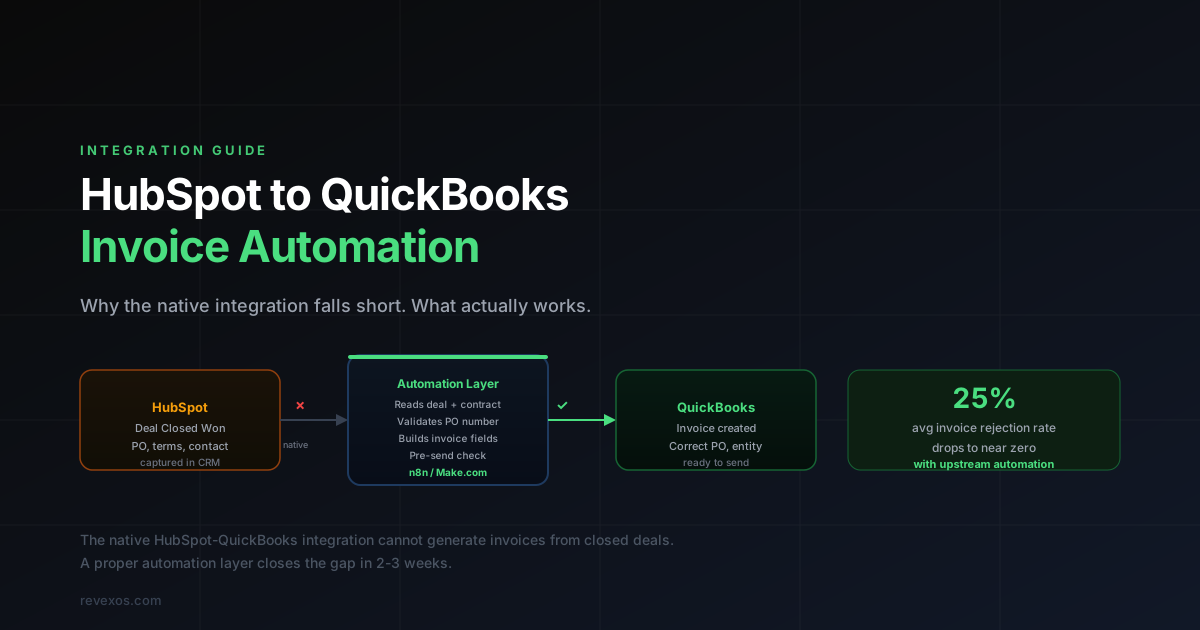
HubSpot to QuickBooks Invoice Automation: Why the Native Integration Falls Short
If you use HubSpot as your CRM and QuickBooks Online for accounting, you have probably noticed the gap. A deal closes in HubSpot. Someone then has to manually create an invoice in QuickBooks, re-enter the line items, check the payment terms, add the PO number, find the right billing contact, and send it.
Every step in that process is a chance for something to go wrong. And wrong invoices come back rejected, adding weeks to your collection cycle.
This guide covers what the native integration actually does, why it frustrates most teams, and the three approaches to building proper automation — including the specific field mappings and workflow logic required for each.
What the Native HubSpot QuickBooks Integration Actually Does
The native integration, available through the HubSpot App Marketplace, handles a narrow set of tasks:
- Syncing customer and contact records between HubSpot and QuickBooks
- Displaying QuickBooks invoice status inside HubSpot deal records
- Creating basic invoices manually from within HubSpot
What it does not do:
- Automatically generate an invoice when a deal moves to Closed Won
- Pull contract terms, PO numbers, or billing entity details from the deal record
- Validate invoice line items against what was agreed in the deal
- Handle milestone-based or retainer billing structures
- Distinguish between billing entity and contracting entity when they differ
- Map custom deal properties to QuickBooks invoice fields
The result is that your finance team is still manually initiating every invoice. They are just doing it in a slightly more connected environment.
Why Users Rate It 2.5 Out of 5
The reviews are consistent across G2 and Capterra. The main complaints are:
Sync delays. Changes made in one system take time to reflect in the other. For a finance team trying to close the month, a 15-minute sync delay on a payment confirmation is a problem.
Limited field mapping. The native integration maps a fixed set of fields. Custom deal properties in HubSpot — which is where most firms store PO numbers, billing instructions, and contract terms — do not sync automatically. You either map them manually in every deal or they do not make it to the invoice.
No invoice generation triggers. There is no native workflow action that creates a QuickBooks invoice when a HubSpot deal stage changes. This is the core automation that most firms want and it does not exist out of the box.
Duplicate record issues. When the same contact exists in both systems with slightly different formatting, the integration creates duplicates rather than merging them. Finance teams end up with two customer records in QuickBooks for the same client, and payments start landing on the wrong account.
No PO or billing entity awareness. The native integration has no concept of your client's purchase order number or the difference between a contracting entity and a billing entity. These gaps cause invoice rejections that add 20–30 days to your DSO.
The Critical Fields That Need to Flow
Before comparing approaches, it helps to understand exactly which fields need to travel from HubSpot to QuickBooks to produce a valid, non-rejectable invoice.
| HubSpot Field | Maps to QuickBooks | Why It Matters |
deal.amount | Invoice total | The base billable amount |
deal.line_items | Invoice line items | Services/products billed |
deal.closedate | Invoice date | Sets the billing clock |
contact.billing_email | Send-to address | Goes to AP, not the main contact |
company.billing_entity | Customer name on invoice | May differ from contracting entity |
deal.po_number (custom) | Invoice PO field | Required by most enterprise AP systems |
deal.payment_terms (custom) | Payment terms | Net 30 vs Net 45 vs Net 60 |
deal.billing_contact (custom) | Bill-to name | Specific AP contact, not deal contact |
deal.contract_end_date (custom) | Memo / reference | Helps AP match to approved contracts |
deal.invoice_memo (custom) | Memo field | Special billing instructions |
The native integration maps roughly the top three rows. The rest require custom field mapping, which means either a middleware tool, a custom automation, or a manual step each time.
The PO number field is where most invoice rejections originate. Enterprise clients require a valid PO on every invoice. When the PO expires or gets replaced mid-engagement and nobody updates it in HubSpot, every subsequent invoice gets auto-rejected by the client's AP system without any notification. Your DSO clock resets with no warning.
The Three Approaches to Fixing It
Option 1: Third-Party Integration Tools (Invoice Stack, SyncQ, Breadwinner)
These tools add a mapping layer between HubSpot and QuickBooks. They can map custom deal properties to invoice fields, trigger invoice creation on deal stage changes, and handle more complex billing structures than the native integration.
How they work: You configure field mappings in the tool's UI. When a deal reaches Closed Won (or a custom trigger stage you define), the tool reads the mapped HubSpot fields and creates a QuickBooks invoice with those values.
What they handle well: Simple to moderate billing structures. If your deals are mostly fixed-fee with consistent payment terms, a tool like Breadwinner or SyncQ gets you 80% of the way there in a few days of setup.
Where they break down: Multi-entity billing. Milestone-based invoicing. Deals where the PO number or billing contact changes after signing. Contract-level validation before invoice send. These tools work from the HubSpot data at the time the trigger fires — they cannot reach into DocuSign to verify the current PO, or check your project management tool for scope changes.
Cost: $100–$500/month depending on volume and features.
Best for: Teams that want a quick fix for simple billing models and have someone to handle the configuration and maintenance.
Option 2: Automation Platforms (n8n, Make.com, Zapier)
Tools like n8n and Make.com let you build custom workflows that connect HubSpot and QuickBooks at the API level. A workflow can trigger on a deal stage change in HubSpot, read the deal properties, fetch the contract from DocuSign, validate the PO number, build the invoice line items, and push the invoice to QuickBooks with the correct billing contact and payment terms.
How they work: You build a multi-step workflow that fires when a HubSpot trigger condition is met. Each step calls an API: HubSpot to read deal data, DocuSign to pull contract terms, QuickBooks to create the invoice.
A working workflow structure for HubSpot → QuickBooks looks like this:
- Trigger: HubSpot deal stage changes to
Closed Won - Read deal: Fetch all custom properties including
po_number,billing_entity,payment_terms,billing_contact - Validate PO: Cross-check the PO number against the most recent signed contract in DocuSign
- Fetch line items: Read the deal's products/line items from HubSpot
- Look up or create customer: Find the billing entity in QuickBooks (by company name + billing address), create if missing
- Build invoice: Construct the QuickBooks invoice object with validated fields
- Pre-send check: If PO is missing, payment terms are undefined, or billing entity is not found, route to a Slack/email alert for manual review instead of sending a broken invoice
- Create invoice in QuickBooks: Push the validated invoice; set status to
Pending Send - Update HubSpot: Write the QuickBooks invoice ID back to the HubSpot deal record for tracking
This approach is more powerful than middleware tools because it can incorporate contract data, project management data, and any other system in your stack. The tradeoff is that it requires someone who can build and maintain the workflow — and workflows break when APIs change or field names shift.
Cost: Platform cost is $20–$100/month. Build time is 2–5 days for someone experienced with these tools. Ongoing maintenance is real.
Best for: Teams with an ops or RevOps person who can own the build and keep it running.
Option 3: Done-for-You Build and Operate
For firms that want the outcome without managing the technical implementation, a done-for-you engagement handles the build and ongoing operation. The automation is configured to your specific deal structure, billing model, and client requirements. Your finance team uses the output. Nobody on your team maintains the system.
How it works: An external team (like RevExOS) audits your current HubSpot setup, identifies the field gaps, maps the billing logic, builds the automation on your stack, and runs it. When something breaks or a new billing scenario appears, they handle it.
What this unlocks: Full contract-aware invoicing. The automation can read from DocuSign, handle milestone billing, manage multi-entity invoicing, and validate every invoice against contracted terms before it reaches the client. This is not possible with a self-serve tool.
Best for: Professional services firms, agencies, and B2B SaaS companies that have complex billing structures and cannot afford the DSO impact of rejected invoices. This is the model behind RevExOS's invoice automation.
Comparison: All Four Approaches at a Glance
| Native Integration | Middleware Tools | Automation Platforms | Done-for-You | |
| Invoice trigger on deal close | Manual only | Yes | Yes | Yes |
| Custom field mapping | No | Limited | Full | Full |
| PO number validation | No | No | Possible | Yes, contract-aware |
| Multi-entity billing | No | No | Possible | Yes |
| Contract-aware validation | No | No | With custom build | Yes |
| Milestone billing | No | Partial | Possible | Yes |
| Setup time | Days | Days | Days–weeks | Weeks |
| Ongoing maintenance | Minimal | Low | Medium | Outsourced |
| Cost | Included | $100–500/mo | $20–100/mo + build | Project-based |
| Who owns it | Your team | Your team | Your team | External |
What a Working Setup Looks Like
A properly configured HubSpot to QuickBooks invoice automation flow covers the following:
- Deal moves to Closed Won in HubSpot
- Workflow reads deal properties: line items, payment terms, PO number, billing contact, billing entity
- Contract is read via DocuSign API to validate terms and extract any additional billing rules
- Invoice is built with validated line items, correct billing entity, current PO number, and contracted payment terms
- Pre-send validation checks the invoice against the contract before it reaches the client
- Invoice is created in QuickBooks and sent to the correct contact at the client's AP department
- Any discrepancies (wrong PO, mismatched line items, missing approval) are flagged before sending, not after rejection
The difference between this and the native integration is that invoices go out correct the first time. Rejection rates drop. DSO drops with them.
Troubleshooting: Why Your HubSpot QuickBooks Sync Isn't Working
If you already have the native integration or a middleware tool installed and it is not working as expected, these are the most common root causes:
"Invoice not created when deal closes" The native integration does not have a deal-close trigger. You need either a middleware tool or a custom automation. Check whether you have a workflow action configured for the Closed Won stage.
"Customer shows as duplicate in QuickBooks" This happens when HubSpot and QuickBooks use different formats for the same company name (e.g., "Acme Inc" vs "Acme, Inc."). The integration creates a new record instead of matching. Fix by standardising company names in HubSpot before the sync runs, or configure exact-match rules in your middleware tool.
"PO number isn't showing up on the invoice" The PO number is almost certainly in a custom HubSpot property that the native integration does not map. You need either Breadwinner/SyncQ (which allows custom field mapping) or a custom workflow that reads the property and writes it to the correct QuickBooks field.
"Wrong billing contact on the invoice"
By default, the native integration uses the primary HubSpot contact on the deal. If your deals involve enterprise clients where the AP contact is different from the deal contact, you need a custom billing_contact property in HubSpot and a mapping rule that writes it to the QuickBooks Bill to field.
"Payment terms defaulting to Net 30 when contract says Net 45"
QuickBooks uses the customer's default payment terms unless the invoice creation explicitly overrides them. The native integration does not pass payment terms from HubSpot. Add a payment_terms custom property to your HubSpot deals and map it explicitly in your automation.
"Invoice sent to wrong entity — parent company instead of subsidiary"
Multi-entity billing requires separate customer records in QuickBooks for each billing entity. Your HubSpot deal needs a billing_entity field that identifies which QuickBooks customer the invoice should go to. Without this, invoices default to the primary company record.
"Sync stopped working after a QuickBooks plan upgrade" QuickBooks API scopes and available fields differ between Simple Start, Essentials, Plus, and Advanced plans. If you upgraded your QuickBooks plan, recheck whether the fields your automation reads are still available in the new plan tier.
The Numbers Behind Getting This Right
The average B2B invoice rejection rate is around 25 percent. For professional services firms, it is often higher because of PO dependencies and complex billing structures — here is why that happens and how to fix it.
Each rejected invoice adds 20 to 30 days to your collection cycle for that invoice. Across a firm sending 100 invoices a month with a 25 percent rejection rate, that is 25 invoices per month each losing nearly a month of collection time.
On $500K of monthly invoicing, a 25 percent rejection rate at 25 added days per rejected invoice translates to roughly $100K of permanently delayed receivables at any point in time — capital your business is funding through its own reserves or credit lines.
Fixing the upstream data flow is what changes the rejection rate. Reminder sequences and collections software do not fix an invoice that was wrong before it left your building.
Is This the Right Priority for Your Business?
If you are sending fewer than 20 invoices per month and your billing is simple (fixed-fee, consistent payment terms, single billing contact), the native integration with manual cleanup may be fine for now.
If you are sending 50+ invoices per month, have enterprise clients with PO requirements, or bill on milestones or retainers, the rejection rate and DSO impact from broken invoice data are almost certainly larger than the cost of fixing the integration.
The audit that tells you which situation you are in takes two weeks and costs nothing. It surfaces the specific dollar amount of delayed or rejected invoices and traces each one to its root cause — wrong PO, wrong billing entity, payment terms mismatch, or missing field.
Request a free revenue audit to see the specific dollar amount sitting uncollected in your current cycle.
Frequently Asked Questions
- Can HubSpot automatically create a QuickBooks invoice when a deal closes?
- Not with the native integration. It syncs contacts and shows invoice status in HubSpot, but has no deal-close trigger that creates a QuickBooks invoice automatically - that requires a middleware tool, an automation platform like Make.com or Zapier, or a custom workflow.
- Why isn't my PO number showing up on QuickBooks invoices from HubSpot?
- The PO number is almost always stored in a custom HubSpot property that the native integration doesn't map. You need a middleware tool like Breadwinner or SyncQ that supports custom field mapping, or a custom automation that reads the property and writes it to the correct QuickBooks field.
- What's the average B2B invoice rejection rate, and why does it matter?
- Around 25%, often higher for professional services firms with PO dependencies. Each rejected invoice adds 20-30 days to the collection cycle, so a firm sending 100 invoices a month at a 25% rejection rate loses roughly a month of collection time across 25 invoices every month.
- How long does it take to fix HubSpot to QuickBooks invoice automation?
- A middleware tool takes days to configure. A custom n8n or Make.com workflow takes 2-5 days to build. A done-for-you engagement, which also adds contract-aware validation, typically takes a few weeks.