AR Automation for Professional Services Firms: What Actually Works
AR automation for agencies, consultants, and staffing firms is fundamentally different from product businesses. The standard software tools miss the real problem. Here is what works and why.
RevExOS
Q2C Consulting
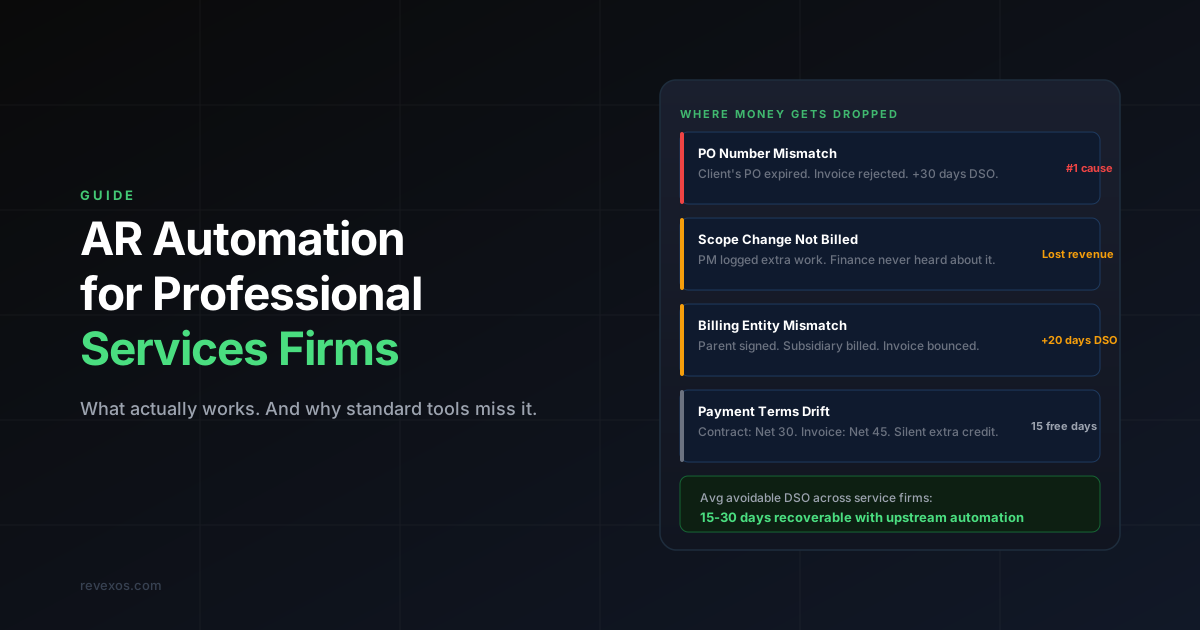
Most AR automation content is written for product companies. Subscription billing, recurring invoices, fixed pricing per seat. If you run an agency, consulting practice, staffing firm, or any other service business where every engagement looks different, that content does not apply to you.
Your AR problem is different in structure. The failure points are upstream of invoicing. And the fix — if it actually works — addresses data quality and contract awareness, not just reminder sequences.
Why Professional Services AR Is Harder
A SaaS company bills the same amount to the same contact on the first of every month. The invoice is predictable. The approval path is predictable. The amount never changes unless the customer upgrades.
A professional services firm bills based on:
- Hours worked against a SOW
- Milestone completions tied to a project timeline
- Retainer amounts that shift when scope changes
- PO numbers issued by the client that must appear on every invoice
- Billing entities that are sometimes different from the contracting entity
- Approval chains that vary by client size and industry
Every one of those variables is a potential point of failure. And every failure adds days — sometimes weeks — to your DSO.
The reason standard AR automation tools underperform for service firms is that they sit at the end of the cycle, inside your accounting system, and try to work backwards. They can send reminders. They can flag overdue invoices. But they cannot fix an invoice that was wrong before it left your building. By the time the tool sees the problem, the client has already rejected the invoice and your payment clock has already reset.
The Four Failure Points That Standard Tools Miss
1. The PO Mismatch
Your client issues a PO at contract signing. Six months into the engagement, that PO expires or gets replaced. Nobody tells your finance team. The next invoice goes out with the old PO number. The client's AP system auto-rejects it. The payment clock resets.
You have just added 30 days to your DSO through no fault of your own — and you may not even know it happened until someone checks the aging report two weeks later.
AR automation software does not know what PO your client has on file. It lives in their procurement system. The fix requires connecting your CRM or contract to your billing engine, so the current PO is always pulled from the source of truth. If you use HubSpot and QuickBooks, read how to wire that connection properly.
At larger clients, PO numbers are rotated quarterly or annually as a matter of policy. Firms that do not have an automated PO-validation step get caught by this repeatedly.
2. The Scope Change That Never Reached Billing
Your delivery team agreed to two extra weeks of work. The project manager updated the task board. Finance was not copied. The next invoice goes out for the original contracted amount. The revenue from that extra work either gets invoiced late, billed incorrectly, or never billed at all.
This is one of the most common and least visible forms of revenue leakage in professional services. It does not show up in your accounting system because from accounting's perspective, the invoice matched the contract. The problem was upstream — in the gap between what was actually delivered and what billing knew about.
A realistic estimate for most consulting and agency firms: 5–15% of delivered work is underbilled or unbilled due to scope drift that was never communicated to finance. On $5M of annual revenue, that is $250K–$750K of work you did for free.
The fix requires a structured trigger from your project management or delivery system into your billing workflow whenever work is logged outside the original SOW scope. Not a manual process — an automated alert that fires the moment the discrepancy appears.
3. The Billing Entity Mismatch
The parent company signed your contract. But the actual work is being done for a subsidiary. The subsidiary has a different AP system, a different billing contact, and different payment terms. The invoice that goes to the parent gets forwarded to the subsidiary, sits in someone's inbox for three weeks, and then comes back with a rejection note about the wrong billing address.
Standard AR tools have no visibility into your contract. They work from what is in QuickBooks or Xero. The customer record in your accounting system was created at deal-close and may not reflect the billing entity specified in the contract's invoice instructions.
Enterprise clients — particularly those with complex legal structures, holding companies, or regional operating entities — require invoice-level awareness of entity routing. This cannot be done manually at scale. It requires reading the contract at the point of invoice generation.
4. Payment Terms That Drift Between Signing and Billing
Your contract says Net 30. Your accounting system defaulted to Net 45 when someone set up the customer record. The client pays on Net 45. You have effectively given every client an extra two weeks of free credit without realising it.
Multiply that across 50 clients and you have just explained 15 of your DSO days.
Payment terms drift because accounting systems default to whatever terms were set at customer creation, and nobody checks whether those terms match the signed contract. It is a silent problem — the client is paying on the terms they received, so there are no rejection notices and no obvious signal that something is wrong.
What Professional Services DSO Actually Looks Like
Here is a realistic breakdown of DSO components for a 50-person agency or consulting firm:
| DSO Component | Typical Days Lost | Fixable? |
| Invoice sent late (month-end batching) | 12–18 days | Yes — trigger on delivery |
| PO mismatch rejections | 5–10 days per affected invoice | Yes — PO validation |
| Wrong billing entity | 15–30 days per affected invoice | Yes — contract reading |
| Payment terms drift | 10–15 days across all clients | Yes — terms enforcement |
| No dunning sequence | 15–25 days for late payers | Yes — automated sequences |
| Manual cash application lag | 2–5 days per payment | Yes — automated matching |
| Total avoidable DSO | ~59–103 days |
A firm with a DSO of 65 days should, with proper automation, be collecting in 25–35 days. That difference on $500K of monthly revenue is $150K–$250K of working capital unlocked — without winning a single new client.
What Actually Works for Professional Services AR
The effective approach has three components that most AR tools do not address.
Connect Upstream Data to Billing
Your CRM closes a deal. That deal has a PO number, a billing contact, a billing entity, payment terms, and a fee structure. All of that should flow directly into your invoicing system without anyone retyping it.
The moment it gets retyped, it can be wrong. And in professional services, even small discrepancies — a slightly different company name, last year's PO number, a defaulted payment term — are enough for enterprise AP systems to reject the invoice automatically.
The connection between CRM and billing does not require replacing either system. It runs as an automation layer that reads from your CRM when an invoice is generated and populates the invoice fields from the deal record, not from manual entry or accounting system defaults.
Read the Contract at Invoice Time
AI contract readers can extract milestone triggers, retainer amounts, scope boundaries, and payment terms from a signed document and feed them into your billing engine. This means:
- The invoice PO number is validated against the most recently signed amendment, not the original contract
- Milestone invoices only generate when the delivery system confirms the milestone is complete
- Payment terms on the invoice match the signed terms, not the accounting system default
- Billing entity is confirmed against the invoice instructions section of the contract
This is not as complex as it sounds and does not require replacing your existing systems. It runs as a layer between DocuSign or PandaDoc and QuickBooks or Xero, checking each invoice before it sends.
Flag Scope Changes Before the Next Billing Cycle
When your project management tool shows work logged outside the original SOW — hours beyond the estimate, tasks added outside the scope document, milestones extended — that should automatically create a billing review task in finance.
Not a manual process. Not a Friday afternoon email from the project manager. An automated alert that fires the moment the discrepancy appears, with enough context (which client, which project, how many hours, what the SOW says) for finance to make a billing decision before the next invoice cycle closes.
The Staffing Firm Variation
For staffing firms, the AR problem has additional dimensions:
Timesheet validation. Invoices are generated from approved timesheets. If the approval workflow is slow or inconsistent, invoices are delayed. If timesheets are disputed post-invoice, invoices are rejected. The connection between your VMS (vendor management system) and your billing system needs to be automatic and validated.
Rate card accuracy. Staffing firms often have different bill rates for different roles, clients, and locations. Rate card errors generate rejected invoices immediately. The rate that appears on the invoice must match the rate in the signed MSA or SOW — which changes with contract amendments.
Consolidated billing. Many enterprise clients require a single monthly invoice covering all placed workers, even if those workers are on different assignments, rate cards, and billing cycles. This requires aggregation logic that standard billing tools do not handle natively.
How Long It Takes to See Results
A revenue audit typically takes one to two weeks. It surfaces the specific dollar amounts sitting in delayed or rejected invoices and traces each one to its root cause — PO mismatch, billing entity error, payment terms drift, or unbilled scope change.
The build takes two to four weeks depending on complexity. The automation is built on top of your existing tools — CRM, contract system, project management, accounting. Nothing gets replaced.
Within the first billing cycle after go-live, most professional services firms see a measurable reduction in invoice rejections. DSO improvement typically follows within 30 to 60 days as the backlog of corrected invoices clears and new invoices go out clean.
For a detailed breakdown of what drives DSO and how to measure it, see Why Your DSO Is Too High.
Why Standard AR Software Falls Short Here
To be clear about what off-the-shelf AR tools (Gaviti, Chaser, Invoiced, Kolleno) actually do: they manage the post-invoice workflow. Reminder sequences, escalation paths, aging dashboards, customer payment portals.
This is useful. But it is the wrong layer for professional services firms. Your problem is not that clients are not being reminded. Your problem is that invoices arrive at AP systems wrong, get rejected silently, and the payment clock resets before anyone notices.
Fixing the reminder workflow on top of a broken invoice generation process is like sending better collection emails for invoices that were never going to get paid in the first place.
For a full comparison of what off-the-shelf tools handle versus what requires custom infrastructure, see AR Automation Software vs. Custom AR Infrastructure.
The Done-for-You Difference
Most AR automation tools are self-serve. You buy the software, configure the integrations, train your team, and maintain the system. For a 20 to 150 person service firm without a dedicated RevOps function, that is not realistic. The configuration alone takes weeks. Maintenance falls on whoever set it up.
A done-for-you engagement means the audit, the build, and the ongoing operation are all handled externally. Your finance team uses the output — clean invoices, automated dunning, matched payments. They do not manage the system that produces it. See what RevExOS's AR automation service covers end to end, or the fuller breakdown of software vs. service as a decision if you're still weighing the two models. If your firm is actually an accounting or bookkeeping practice managing this across several clients' books rather than your own, that's a related but distinct problem.
If your AR cycle is costing you more than 15 days of avoidable DSO, or if you are seeing consistent invoice rejection rates above 10%, a free audit will show you exactly where it is happening and what it is worth to fix it.
Request a free revenue audit to see what is sitting uncollected in your current cycle.