Order-to-Revenue Automation for Accountants: A Practical Guide
Most accountants spend 40% of their time on OTR tasks that should run automatically. This guide covers every step of the order-to-revenue process, where manual work is still happening, and exactly how automation closes each gap.
RevExOS
Q2C Consulting
Order-to-Revenue Automation for Accountants: A Practical Guide
The order-to-revenue cycle is where most B2B revenue leaks happen. Not in collections, not in pricing, but in the sequence of steps between a signed contract and a paid invoice - steps that most finance teams are still running manually.
This is not an efficiency complaint. It is a revenue accuracy problem. When OTR steps are manual, they are also inconsistent. Inconsistency in billing means rejected invoices, missed revenue triggers, and DSO that is higher than it needs to be.
This guide covers the full OTR process from an accountant's perspective: what each step involves, where manual work persists, and what automation looks like at each stage.
What Order-to-Revenue Actually Covers
OTR is frequently described as a sales process. It is not. Sales ends at contract signature. OTR is everything that comes after - the finance and operations work that converts a signed deal into collected cash.
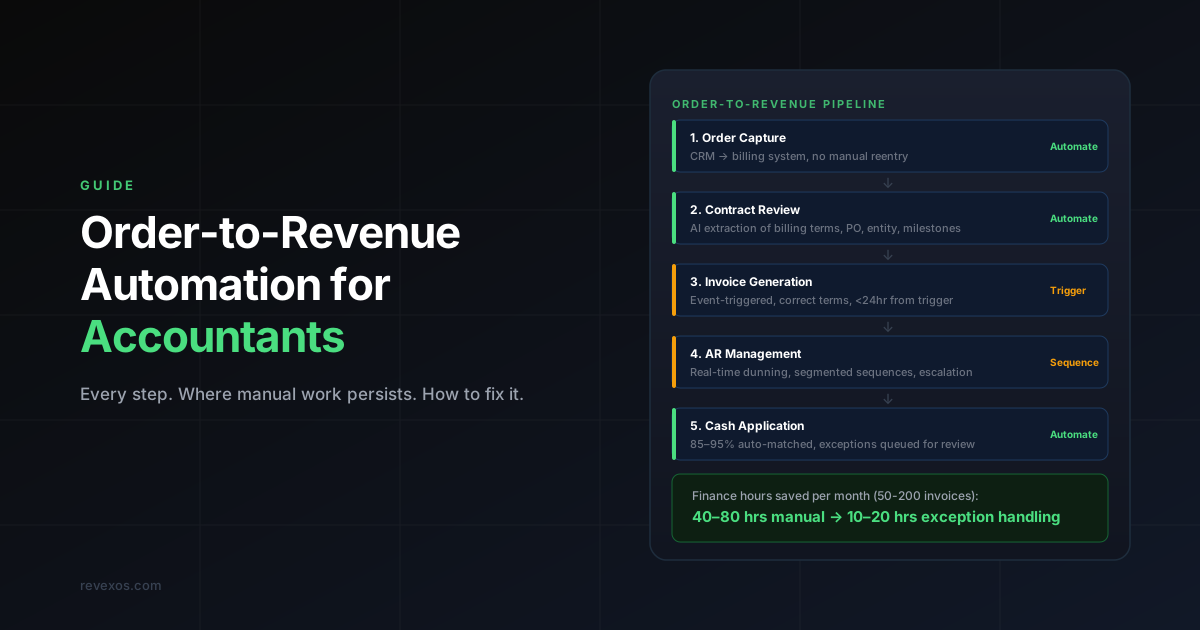
The full cycle has seven stages:
- Order capture - recording what was sold, at what price, on what terms
- Contract review - extracting billing terms, PO numbers, payment schedules, and entity information
- Revenue scheduling - building the timeline of when revenue should be recognised and when invoices should generate
- Invoice generation - creating accurate invoices at the right time, to the right contact, with the correct terms
- Accounts receivable management - tracking what is owed, following up on late payments, resolving disputes
- Cash application - matching incoming payments to open invoices
- Revenue recognition - recording revenue in the correct period per ASC 606 or IFRS 15
In most B2B companies, steps 1 through 3 are manual. Step 4 is semi-automated but error-prone. Step 5 relies on periodic review rather than real-time triggers. Steps 6 and 7 are partially automated in accounting software but require significant manual cleanup.
The result: a finance team that spends its time on data entry, reconciliation, and manual tracking rather than analysis.
Step 1: Order Capture
What Happens Manually
A deal closes in the CRM. Someone - often an account manager or operations coordinator - transfers the deal data into the accounting system. Product codes, pricing, quantity, billing frequency, payment terms, PO number. This retyping happens every time a new order comes in.
The error rate on manual order entry is not trivial. A 2024 study of mid-market B2B billing operations found that 7–12% of manually entered orders contained at least one material error. Most of those errors were in payment terms, billing contact, or pricing tier.
What Automation Does
A connected OTR system reads the closed deal directly from the CRM - HubSpot, Salesforce, Pipedrive - and creates the order record in your billing or accounting system without human reentry. The mapping is deterministic: deal stage triggers order creation, specific CRM fields map to specific billing fields.
The accountant's role shifts from data entry to exception handling. When the CRM record is missing required fields, the automation flags it for review. When the record is complete, it flows through without touching finance's queue.
Time saved: 20–45 minutes per order, depending on complexity.
Step 2: Contract Review
What Happens Manually
Signed contracts contain information that does not live in the CRM: milestone schedules, billing entity names, PO validity windows, discount expiry dates, volume thresholds, and specific invoice instructions (remittance addresses, required reference numbers, multi-page invoice formats).
In most finance teams, a senior accountant or controller reviews each new contract before the first invoice generates. This takes 30–90 minutes per contract. For teams closing 10–20 contracts per month, this is 5–30 hours of senior finance time per month spent reading contracts rather than doing analysis.
The bigger problem: amendments. When a contract is amended - scope change, pricing adjustment, renewal with new terms - the amended document needs to be reviewed and the billing record updated. This step is frequently missed. Finance hears about amendments from delivery teams, inconsistently, weeks after the fact.
What Automation Does
AI document extraction can read a signed contract or amendment and output structured data: billing entity, payment terms, PO number, milestone dates, discount schedules, and invoice instructions. This data feeds directly into the billing engine.
The accountant reviews an extracted summary rather than a 40-page contract. Exceptions - ambiguous clauses, conflicting terms, missing fields - are flagged for human review. Standard contracts flow through in minutes.
Amendment handling improves significantly. When a new document is signed, the extraction runs automatically, the delta is surfaced to finance, and billing records are updated before the next invoice cycle rather than weeks after.
Time saved: 2–6 hours per contract, 80–90% reduction for standard contract structures.
Step 3: Revenue Scheduling
What Happens Manually
Revenue scheduling is where OTR becomes genuinely complex. For a fixed-fee engagement, the schedule is straightforward. For contracts involving:
- Milestone-based billing with variable completion dates
- Retainers with monthly true-ups
- Usage-based components with consumption thresholds
- Multi-element arrangements where services are delivered over different timelines
- Contracts with variable consideration (bonuses, penalties, clawbacks)
...the schedule requires careful interpretation of both the contract and the current delivery state.
Most finance teams build revenue schedules in spreadsheets. Updated monthly. Reconciled against actuals. Adjusted when delivery changes. This works until it doesn't - which is when a key person leaves, a spreadsheet formula breaks, or a contract amendment is not reflected in time for month-end close.
ASC 606 added complexity to this problem. Multi-element arrangements require identifying performance obligations, allocating transaction price to each obligation, and recognising revenue when each obligation is satisfied. For teams doing this in spreadsheets, the risk of non-compliance is material.
What Automation Does
A revenue scheduling engine reads the contract terms and delivery events and maintains the schedule automatically. When a milestone is completed, the schedule updates. When a retainer is adjusted, the schedule reflects the amendment. When a usage component crosses a threshold, it flags the billing trigger.
The output is a forward-looking view of what revenue is expected, when, and what conditions must be met for each recognition event. Accountants review the schedule rather than build it. Month-end close involves confirming completion events rather than reconstructing what happened.
For ASC 606 compliance, the system maintains the performance obligation allocation and tracks satisfaction against delivery - creating an audit trail that is difficult to produce from spreadsheets.
Time saved: 3–10 hours per month for a team managing 20–50 active contracts.
Step 4: Invoice Generation
What Happens Manually
Invoice generation seems like a solved problem. Most accounting systems - QuickBooks, Xero, NetSuite - can generate invoices. The issue is not the generation; it is the triggering.
In a contract with milestone-based billing, the invoice should generate when the milestone is confirmed complete. Who confirms it? The project manager. When do they tell finance? When they remember. In practice, invoices for completed milestones are sent an average of 12–18 days after the trigger event in teams without automated connections between delivery and billing.
That 12–18 day gap is your billing delay. It shows up directly in your DSO.
For retainer contracts, the problem is different. Retainer invoices often go out on the first of the month regardless of whether the retainer terms have been reviewed against actuals. For retainers with true-up provisions, the true-up calculation has to be done manually before the invoice can be finalised.
What Automation Does
Invoice generation tied to event triggers is the core of OTR automation. The trigger can be:
- A milestone status change in your project management system (Asana, Monday, ClickUp)
- A month-end close event for retainer contracts
- A usage threshold crossed in your product or service delivery system
- A date-based trigger for fixed payment schedules
When the trigger fires, the invoice is generated with data pulled from the contract record - billing entity, PO number, line items, payment terms, remittance instructions. The accountant reviews the draft invoice before it sends, rather than building it from scratch.
For high-volume, standardised contracts, the review step can be removed for invoices that match the expected template exactly. Exceptions - amount differences, term changes, missing PO numbers - queue for manual review.
Time saved: 15–30 minutes per invoice. For teams generating 50–200 invoices per month, this is 12–100 hours of finance time per month.
Step 5: Accounts Receivable Management
What Happens Manually
AR management in most mid-market companies is reactive. An accountant runs the aging report on Monday. They identify what is overdue. They send emails - some from a template, some customised based on the client relationship. They log the activity. They repeat next week.
This approach has two structural problems.
First, the cadence is wrong. A weekly review means that an invoice that goes overdue on Tuesday does not get flagged until the following Monday, and the first reminder does not go out until Tuesday at the earliest. You have just lost 9 days on an invoice that was already late.
Second, the approach is undifferentiated. The client who is 3 days late because of a bank holiday gets the same email as the client who has been 45 days late for the last six months. Neither is served well by this approach.
What Automation Does
Automated AR works from real-time triggers rather than periodic reviews. An invoice that becomes overdue at 9am generates a reminder sequence that same day. The sequence is client-stratified: different timing and escalation paths for strategic accounts versus transactional clients, different messaging for first-time late versus habitual late payers.
The accountant's queue contains exceptions - disputed invoices, clients that have communicated payment delays, accounts that need relationship-level intervention - rather than a list of everything overdue.
Escalation rules ensure that invoices past a configurable threshold are automatically escalated to a senior contact without waiting for a weekly review. A client 60+ days overdue should not require manual discovery to reach a controller or CFO's attention.
For a detailed breakdown of how automated AR affects DSO in professional services contexts, see AR Automation for Professional Services Firms: What Actually Works.
Time saved: 8–20 hours per month for a team managing 100–500 open invoices.
Step 6: Cash Application
What Happens Manually
Payment arrives. Someone opens the bank feed or remittance advice. They identify which invoices the payment covers. They apply the payment in the accounting system. If the payment is short - partial payment, deduction taken, discount applied - they determine how to apply the remainder.
For a team receiving 50–200 payments per month, cash application takes 2–5 hours per week. More for teams whose clients pay by check or wire with minimal remittance detail. Less for teams whose clients pay through a payment portal with clear invoice references.
What Automation Does
Automated cash application uses remittance data - invoice numbers, amounts, client identifiers - to match incoming payments to open invoices without manual intervention. Match rates of 85–95% are achievable for clients who include invoice references in their payments. Unmatched payments queue for manual review.
For clients who pay by ACH or wire with poor remittance data, AI matching can use payment amount, client name, and historical payment patterns to identify the likely match with confidence scoring. A high-confidence match applies automatically. A low-confidence match queues for human confirmation.
The result is cash application that runs throughout the day as payments arrive, rather than in a weekly batch. Real-time cash position improves forecasting accuracy and eliminates the end-of-month crunch when dozens of payments need to be applied before close.
Step 7: Revenue Recognition
What Happens Manually
Revenue recognition is the step where OTR complexity peaks. For companies with straightforward billing - one performance obligation, fully delivered at invoice - recognition is automatic. For everyone else, it requires judgment.
The accountant must determine:
- Which performance obligations are satisfied in the period
- How to allocate the transaction price among obligations
- How to handle variable consideration that has not yet been determined
- How to account for modifications to contracts mid-term
In practice, most mid-market finance teams handle this in Excel. The schedule is rebuilt or updated each month. Journals are prepared manually. The risk of error - missed obligations, wrong period allocation, incorrect treatment of contract modifications - is highest at month-end when the pace is fastest.
What Automation Does
A revenue recognition engine connected to your contract and delivery data maintains the obligation schedule continuously. When a delivery event is confirmed, the recognition entry is generated automatically for accountant review. Month-end close involves confirming the entries rather than constructing them.
For ASC 606 compliance, the system maintains documentation of how each obligation was identified, how the transaction price was allocated, and what evidence was used to confirm satisfaction. Audit support becomes an export rather than a reconstruction.
What OTR Automation Actually Requires
The barrier to OTR automation is not technology. The barrier is data quality and system connectivity. Automation can only be as reliable as the data it reads from.
Before automation can work reliably, you need:
A structured contract repository. Contracts stored in a searchable, accessible system - not in email attachments or personal drives. DocuSign, PandaDoc, ContractPodAi, or any similar platform works. The key requirement is that the executed document is accessible by the automation layer.
A CRM with structured deal data. Every deal should have: billing contact, billing entity, payment terms, deal value, and product breakdown. If deals close with incomplete CRM records, the automation will have incomplete data to work from.
A delivery tracking system with defined completion events. If your billing triggers are milestone-based, milestones need to be defined in a system - not in a project manager's head - and completion needs to be recorded with a timestamp that the automation can read.
Most mid-market companies have all three of these systems. The gap is the connections between them, which is what OTR automation builds.
The Real Cost of Manual OTR
Before investing in automation, it is worth quantifying what manual OTR is costing you. There are three categories of cost:
Direct labour cost. Add up the finance hours spent on order entry, contract review, invoice preparation, AR management, and cash application. For a team of two to four accountants, this is typically 40–80 hours per month - 20–40% of finance capacity spent on tasks that do not require accounting judgement.
Revenue leakage. Missed billing triggers, unbilled scope changes, and incorrect invoices that are never corrected represent revenue that was earned but not collected. For professional services firms, this is typically 3–8% of revenue. For SaaS and subscription businesses, it shows up as revenue recognised in the wrong period.
Cash flow cost of DSO. Every day of avoidable DSO represents cash sitting in your receivables instead of your bank account. At $500K of monthly revenue, each day of DSO improvement is worth approximately $16,500 in recovered working capital. A 20-day DSO improvement is $330,000 in cash that was already earned but not collected.
If you want to know exactly where your OTR cycle is losing revenue, a free revenue audit will map every step of your current process and quantify what is available to recover.
Where to Start
The most common mistake in OTR automation is trying to automate everything at once. The right approach is sequencing.
Start with invoice generation triggers. This is where the largest DSO impact is, it is technically straightforward, and the results are visible within one billing cycle. Connect your delivery system to your billing system, define the trigger events, and let invoices fire automatically. Review them before sending until you have confidence in the data quality.
Next, automate cash application. This reduces close workload, improves real-time cash visibility, and is usually achievable with minimal process change.
Third, build the contract data extraction layer. This is the foundational step that makes everything else more reliable - but it requires the most setup time and the most careful validation.
AR automation and revenue scheduling can follow once the upstream data quality is solid. They depend on accurate contract data and accurate billing to function properly. Building them on top of a clean foundation produces reliable results. Building them on top of incomplete data produces automation that creates as many exceptions as it resolves.
Request a free Q2C audit to get a sequenced roadmap for your specific systems and contract mix.