The Claude Q2C Playbook: Real Workflows and Prompts Finance Teams Are Using in 2026
Claude is not a billing system. It is the intelligence layer that sits on top of your existing Q2C stack and handles the judgment calls that currently route to a human. This is the specific workflows, prompts, and integration patterns finance teams are using right now.
RevExOS
Q2C Consulting
Claude is not a billing system. It will not replace your ERP, your contract management tool, or your AR platform. What it is, when used correctly, is an intelligence layer that sits on top of your existing Q2C stack and handles the judgment calls that currently route to a human.
The average B2B finance team loses 15 to 20 hours per week to tasks that require reading comprehension, context, and writing, but not deep expertise. Reviewing contracts for non-standard clauses. Drafting collection emails with the right tone for the right account. Classifying revenue streams against ASC 606 criteria. Responding to invoice disputes with full account history. Validating invoices before they go out the door.
Claude handles all of these in seconds, at a fraction of the cost of routing them to a senior team member.
This post is not about the theory of AI in finance. It is the specific workflows where Claude creates the most leverage, the exact prompts that produce usable output, and the integration patterns that make those prompts work at scale.
What Claude Is Good At in Q2C (And What It Is Not)
Claude is strong at:
- Reading and summarizing documents: contracts, invoices, emails, dispute letters
- Identifying patterns and anomalies across structured data
- Writing first drafts of communications that require account context
- Applying rules consistently across large volumes of inputs
- Explaining complex concepts clearly for stakeholder communication
Claude is not strong at:
- Real-time data retrieval: it has no live connection to your systems unless you build one
- High-precision arithmetic at scale: use your billing engine for that, not an LLM
- Guaranteed output format: always specify the structure you want in the prompt
- High-stakes autonomous decisions: keep a human in the loop for material amounts
The five workflows below play to Claude's genuine strengths. The integration patterns at the end address the data retrieval limitation.
Workflow 1: Contract Clause Intelligence
The problem. Your legal or finance team reviews every new contract for non-standard clauses. At $350-600 per hour for legal time, this is expensive. More importantly, most of that review is pattern matching: spotting payment terms that differ from your standard Net 30, liability caps below your minimum, or IP clauses that grant the customer rights you did not intend. That is exactly what Claude does well.
The Claude approach. Pass the contract text and ask Claude to extract the billing-relevant clauses and flag anything non-standard.
Prompt:
You are reviewing a B2B services contract for a finance team. Extract and classify the following items:

1. PAYMENT TERMS: What are the stated payment terms? Flag if not Net 30.
2. INVOICE ACCEPTANCE: Is there an invoice acceptance or approval process before payment is triggered? How long does the customer have?
3. LATE PAYMENT: What is the late payment penalty, if any?
4. DISPUTE WINDOW: How long does the customer have to dispute an invoice?
5. TERMINATION FOR CONVENIENCE: Can the customer terminate early? What is the notice period and any associated fee?
6. SCOPE CHANGE BILLING: What rights does the company have to bill for scope changes or overages?
7. NON-STANDARD CLAUSES: List any payment or billing-related clauses that seem unusual or that differ from standard market terms.

Format each item as:
[ITEM]: [Extracted text from contract] | [Status: Standard / Review Required / Escalate]

If an item is not addressed in the contract, state "Not specified."

Contract text:
[PASTE CONTRACT TEXT]
What you get. A structured extraction in under 15 seconds. A contract that takes 45 minutes to review manually gets processed in 30 seconds, with the non-standard items surfaced for the 5 minutes of human attention they actually need.
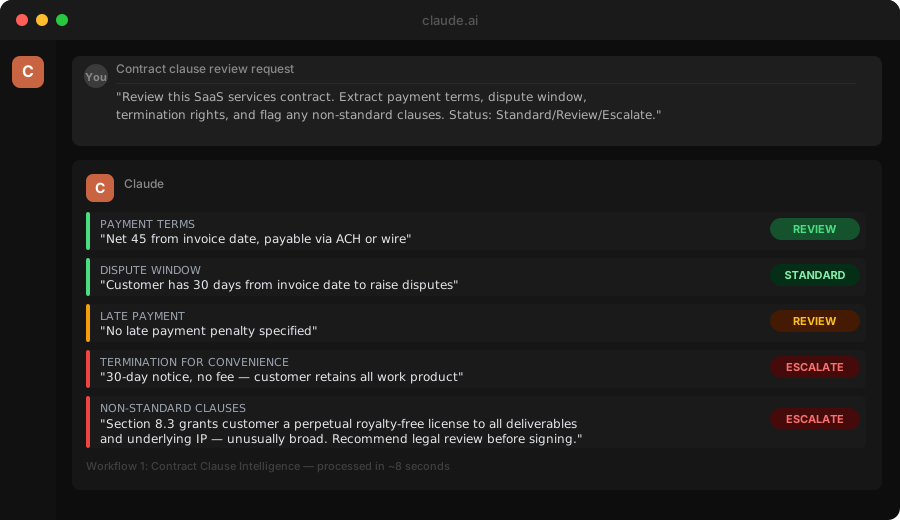
At scale. Build a webhook that fires when a contract is uploaded to your CLM (DocuSign Contracts, Ironclad, or similar). The webhook sends the contract text to the Claude API. The response posts back into the CLM as an internal review note. Your team sees a structured brief before they open the PDF.
Implementation time: 3-4 hours for a developer familiar with REST APIs and your CLM's webhook system.
Workflow 2: Quote Generation from Deal Notes
The problem. A sales rep closes a deal on a call, takes notes, and then manually creates a quote in your CPQ tool. The notes exist. The catalog exists. The quote takes 30 to 45 minutes of manual work, with a 15 to 20% error rate on pricing or line items.
The Claude approach. Feed Claude the call notes, the product catalog, and your pricing rules. Ask it to generate the quote structure.
Prompt:
You are a quoting assistant for a B2B company. Given the deal notes and product catalog below, generate a structured quote.

PRODUCT CATALOG:
[Paste your catalog as a plain table: Product Name | Unit Price | Billing Type (one-time / monthly / annual) | Available Discounts]

PRICING RULES:
- Standard payment terms: Net 30
- Net 60 available on request for deals above $50K ACV (requires VP approval)
- Annual prepay discount: 10%
- Multi-year discount: 5% per additional year
- Maximum discount without approval: 20% off list

DEAL NOTES:
[Paste the rep's call notes or CRM deal description]

Generate:
1. LINE ITEMS: Product name, quantity, unit price, extended price
2. DISCOUNTS APPLIED: What discount and why
3. PAYMENT SCHEDULE: Based on the discussed terms
4. FLAGS: Anything in the notes requiring human review (custom terms, below-floor pricing, non-catalog items requested)
5. QUOTE SUMMARY: 2-3 sentences summarizing the deal for the quote cover page

Do not invent information not found in the notes or catalog. Flag any gaps explicitly rather than filling them in.
What you get. A complete quote draft that the sales team reviews and adjusts in 5 minutes instead of building from scratch in 30. The flags section catches escalation items before the quote goes out.
At scale. Build a CRM trigger: when a rep moves a deal to the "Ready to Quote" pipeline stage, the deal notes are automatically sent to Claude. The structured output populates a draft record in your CPQ tool, ready for the rep to review and send. This is the same extraction pattern behind RevExOS's quote automation, applied to call transcripts instead of typed notes.
Workflow 3: Invoice QA Before Send
The problem. Invoice errors are expensive. A wrong PO number on an enterprise invoice triggers a rejection that adds 15 to 30 days to your DSO. A wrong billing entity name causes the invoice to route to the wrong AP team. A missing line item description triggers a dispute. The fix is a pre-send QA step. The problem is that manual QA is inconsistent and often skipped under deadline pressure.
The Claude approach. Before every invoice sends, pass the invoice data and the original contract summary through Claude for a validation check.
Prompt:
You are a pre-send invoice QA reviewer. Compare this invoice against the contract terms and flag any discrepancies.

CONTRACT SUMMARY:
- Customer legal name: [Name]
- Our billing entity: [Your legal entity]
- PO number required: [Yes/No] | PO number: [PO if applicable]
- Payment terms: Net [X]
- Contracted services: [List each line item from the contract]
- This invoice covers: [Billing milestone or period description]
- Expected invoice amount: [$X]

INVOICE DATA:
- Bill To name: [Name on invoice]
- Bill From entity: [Your entity on invoice]
- PO number on invoice: [PO shown]
- Payment terms on invoice: [Terms stated]
- Line items: [Description and amount for each line]
- Invoice total: [$X]

For each of the following checks, respond PASS, FAIL, or REVIEW. If FAIL or REVIEW, state what is wrong and what the correct value should be:

1. Billing entity: does Bill From on the invoice match the contracted entity?
2. Bill To: does Bill To on the invoice match the customer legal name?
3. PO number: does the PO on the invoice match the contract?
4. Payment terms: do the invoice terms match the contract?
5. Line items: are the descriptions consistent with contracted services?
6. Amount: is the invoice total consistent with the billing schedule?
What you get. A 6-point validation check in 3 seconds. This runs as a pre-send gate: invoices that pass send automatically; invoices that fail route to a human for a 5-minute fix before they cause a 30-day delay.
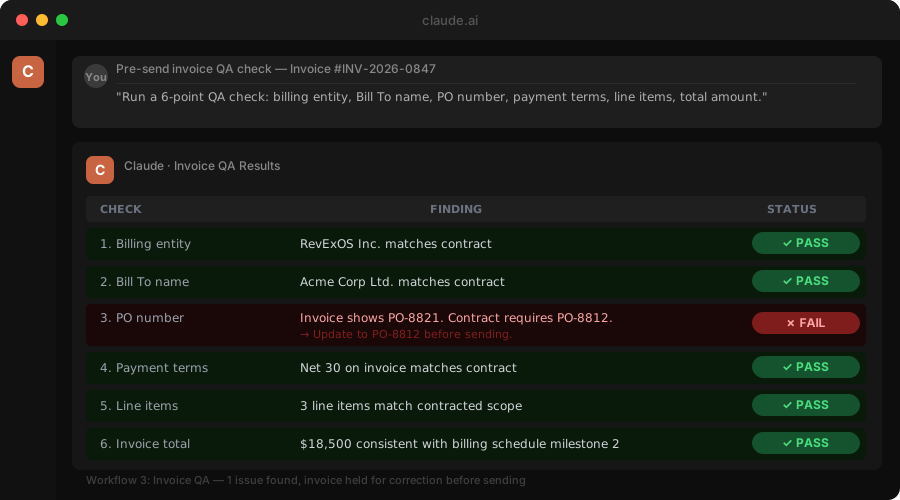
The ROI math. If your team sends 200 invoices per month and 8% have errors, that is 16 invoices triggering disputes or rejections. Each one adds an average of 20 days to collection. That is 320 invoice-days of lost cash flow per month. An automated QA gate that catches 80% of those errors saves 256 invoice-days per month. This pre-send validation is core to how RevExOS builds invoice automation.
Workflow 4: Collections Intelligence
The problem. Writing effective collection emails requires specific context: the exact invoice amount, the due date, the customer's payment history, any prior promises made, and the right tone for the relationship. With that context, a good collection email takes 10 to 12 minutes to write. Without context, it reads as generic and performs poorly.
The solution is not a template. Templates ignore context. The solution is Claude with context.
Prompt:
You are writing a collections follow-up email for a B2B accounts receivable team. Write a professional, direct email for this specific situation.

INVOICE DETAILS:
- Invoice number: [#]
- Invoice amount: [$X]
- Due date: [Date]
- Days past due: [N]
- Outstanding balance: [$X]

ACCOUNT CONTEXT:
- Customer name: [Name]
- Relationship: [X years customer, $X total billed, typically pays within [N] days]
- Payment history: [Any relevant notes: prior promises to pay, dispute history, escalations, last contact]
- Account owner (to CC): [AE name]

DUNNING STAGE: [First reminder / Second reminder / Pre-escalation / Final notice before collections referral]

INSTRUCTIONS:
- Professional and direct. Not apologetic.
- Reference the specific invoice number and amount.
- Match the tone to the dunning stage: escalate progressively with each stage.
- Include a placeholder for the payment link or instructions: [PAYMENT LINK]
- Do not use the phrases "please don't hesitate to" or "I hope this email finds you well"
- Keep it under 120 words.
- Output only the email body. No subject line.
What you get. A specific, contextual email draft in 20 seconds. At 100 collection emails per month, this saves 10 to 15 hours of writing time and produces better emails because the context is always included.
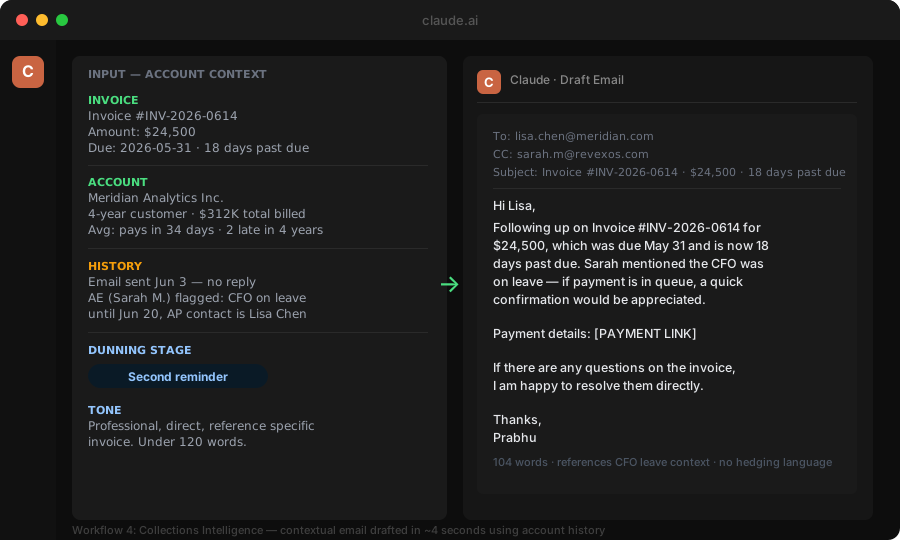
The upgrade. Connect your AR platform's webhook to an enrichment step: pull account payment history from your billing system, inject it into the prompt, and auto-draft the email. Your AR team reviews and sends, rather than writes from scratch.
Workflow 5: Revenue Recognition First-Pass Analysis
The problem. When a non-standard contract arrives, someone needs to classify the performance obligations, determine whether recognition is point-in-time or over-time, and identify any variable consideration elements. This typically requires 30 to 60 minutes of your controller's time per complex contract.
The Claude approach. Feed Claude the contract summary and ask it to produce a first-pass RevRec analysis. It is not a final determination. It is a structured brief that focuses your controller's review.
Prompt:
You are a revenue recognition analyst. Analyze this contract under ASC 606 and provide a first-pass classification.

CONTRACT SUMMARY:
[Paste 200-500 words summarizing the contract: parties, services, pricing structure, payment schedule, deliverables, milestones, any bonus or variable components]

Produce:

1. PERFORMANCE OBLIGATIONS: List each distinct performance obligation you can identify in this contract.

2. RECOGNITION PATTERN: For each obligation: point in time or over time? What is the recognition trigger?

3. VARIABLE CONSIDERATION: Is there any variable consideration (success fees, royalties, volume discounts, refund rights)? How should it be estimated and constrained under ASC 606?

4. TRANSACTION PRICE ALLOCATION: How should the total transaction price be allocated across performance obligations?

5. OPEN QUESTIONS: What are the 3-5 questions the controller should resolve before finalizing the RevRec policy for this contract?

Label this clearly as a first-pass analysis for internal review. It is not a final accounting determination.
What you get. A structured first-pass analysis that frames the key questions. Your controller spends 15 minutes reviewing and refining Claude's output instead of 60 minutes starting from scratch. The open questions section alone is worth the time: it forces the right conversations to happen before the contract is finalized.
The Integration Architecture
These five workflows are valuable in isolation. They are transformative when integrated into your existing Q2C systems so they run automatically.
Here is the minimal integration stack:
Trigger layer. Webhooks from your CLM (contract signed), CRM (deal moved to stage), billing system (invoice ready to send, invoice overdue), and AR platform (aging review triggered).
Processing layer. A serverless function (AWS Lambda, Vercel Edge Function, or similar) that receives the webhook, formats the relevant data, calls the Claude API with the appropriate prompt, and routes the response to the right destination.
Response routing. Structured Claude output posts back into the source system as an internal note, tag, or field update. Or it routes to a Slack channel for human review with one-click approval.
Human-in-the-loop gate. Any output that involves a material amount (set your own threshold, typically $10K and above) or a high-stakes decision (escalation, credit hold, write-off) routes to a named person. Claude analysis is the context, not the decision.
This architecture takes 2 to 4 hours of development time per integration. Once it is in place, it runs with no marginal cost per analysis.
What Actually Changes: The Metrics to Track
The ROI shows up in specific metrics. Track these from day one:
Invoice error rate. Should drop 60 to 80% within 60 days of deploying the invoice QA workflow. Calculate errors as invoices that required correction before sending or were rejected post-send.
Days from deal close to invoice send. If the quote generation workflow is connected to your CRM, this compresses by 3 to 7 days. Track it monthly by deal type.
Collection email response rate. Track promise-to-pay rates for AI-drafted vs. manually-drafted emails. Expect 15 to 25% improvement in response rates within 60 days once prompts are tuned.
Time to contract review completion. Track from contract received to review-complete in your CLM. Should drop by 40 to 60% once the clause extraction workflow is live.
Controller time on RevRec analysis. Hard to measure precisely. Survey your controller monthly: "How long did first-pass RevRec analysis take for new contracts this month?" Should drop 50% within 60 days.
Getting Started in 30 Minutes
You do not need to build the full integration stack on day one. The fastest path to a working pilot:
Step 1: Pick one workflow. Invoice QA has the most obvious ROI and the lowest implementation risk. Start there.
Step 2: Build a manual version first. Create a shared prompt template in a document. Have your AR team paste invoice data into Claude manually for 30 days. Measure the error catch rate.
Step 3: Automate the highest-volume use case. Once you know the prompt works reliably, build the webhook integration. Automate it for your highest-volume invoice type first.
Step 4: Measure before expanding. Document the error catch rate and time saved before moving to the next workflow. This gives you the business case for the next integration and keeps the rollout disciplined.
The companies getting the most value from Claude in their Q2C stack are not the ones who built the most sophisticated integrations first. They are the ones who started with a single, specific, measurable use case and expanded from there once the ROI was confirmed.
The intelligence layer already exists. The question is whether your Q2C stack is wired to use it.