How to Automate Accounts Receivable in HubSpot (With or Without an ERP)
HubSpot's native AR tools cover less than you think. This guide walks through deal-to-invoice triggers, payment link automation, dunning sequences, and the integration layer - whether you run a standalone stack or connect to NetSuite, SAP, or Dynamics.
RevExOS
Q2C Consulting
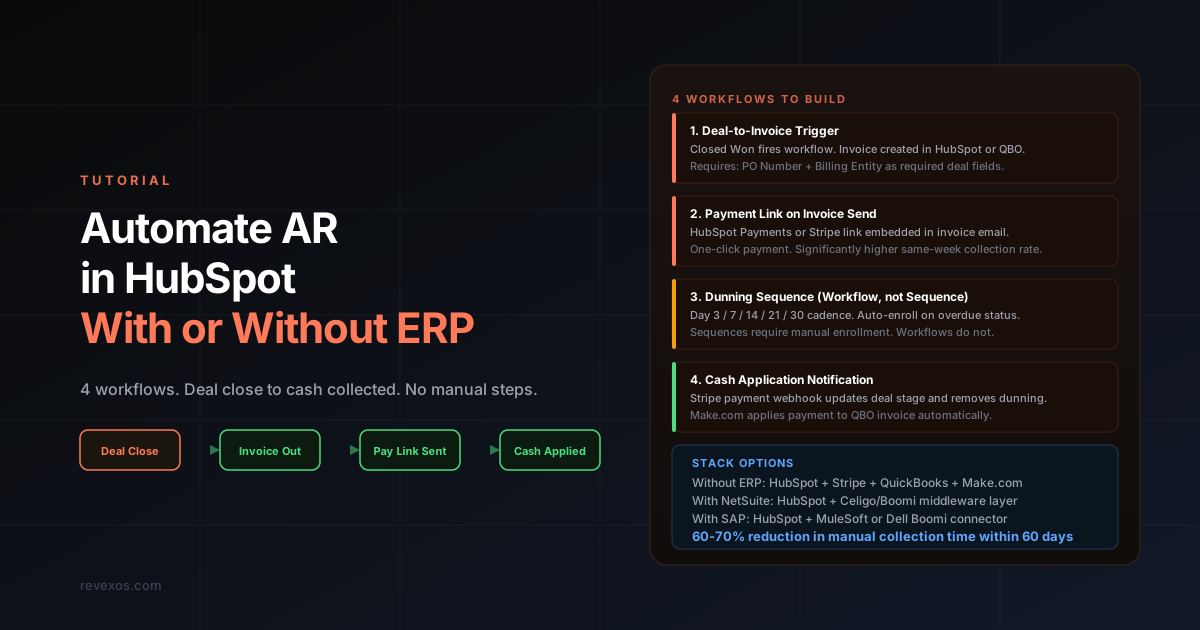
Most teams using HubSpot as their CRM assume AR automation comes included. It doesn't - at least not the kind that removes manual work.
HubSpot gives you workflows, sequences, and a payments product. But the out-of-the-box setup still requires someone to manually create invoices, manually check payment status, and manually trigger collection follow-up. This guide covers how to close those gaps, whether you're working with a lightweight stack (HubSpot + Stripe + QuickBooks) or connected to an ERP like NetSuite or SAP.
What HubSpot Actually Handles Out of the Box
Before building automation, you need to know what already exists. HubSpot's native AR-adjacent features:
HubSpot Payments Available on Sales Hub Starter and above. Lets you create payment links and collect one-time or recurring payments directly through HubSpot. Connects to Stripe as the processor. Decent for simple payment collection, but it doesn't generate invoices in the accounting sense - there is no invoice document that syncs to QuickBooks or your ERP.
HubSpot Quotes Available on all paid plans. You can generate a quote from a deal, add line items from a product library, and send it to the prospect for acceptance. This is the beginning of your Q2C flow. Problem: accepting a quote doesn't automatically create an invoice anywhere outside of HubSpot.
HubSpot Invoices HubSpot has been rolling out native invoice creation. You can generate an invoice from a deal, track payment status, and - in some portal configurations - sync to QuickBooks. This is improving but still not equivalent to what dedicated AR tools or accounting systems provide. It lacks milestone billing, retainer structures, and multi-entity support.
HubSpot Workflows This is where the real automation lives. Workflows let you trigger actions based on deal stage changes, contact properties, or invoice status. They are the engine you'll use to build the automation described below.
The 4 AR Automation Workflows to Build in HubSpot
Workflow 1: Deal-to-Invoice Trigger
The goal: the moment a deal closes, an invoice should exist. Not when someone checks their CRM at the end of the day - immediately on Closed Won.
How to build it:
- Create a HubSpot Workflow triggered by Deal Stage = Closed Won
- Add a delay of 5 minutes (buffer for any last-minute deal edits)
- Send an internal notification to the billing contact with deal name, amount, contract start date, and billing entity
- If you use HubSpot Invoices: add the "Create Invoice" action, pulling line items from the deal's product library
- If you use QuickBooks: use the native HubSpot-QuickBooks integration to create a QBO invoice, or use Make.com or Zapier to bridge the gap
What to pull from the deal record into the invoice:
- Company name and billing address
- Contact name and billing email
- Line items (product, quantity, unit price, discount)
- Payment terms (Net 30, Net 15, etc.) - store this as a deal property
- PO number - store this as a deal property and make it required on the deal form
The PO number is the most commonly missed field. If your customer requires a PO on the invoice and it's not there, the invoice gets rejected, adding 30-45 days to your collection cycle.
Workflow 2: Automatic Payment Link on Invoice Send
Once an invoice exists, the fastest way to get paid is to make payment as easy as possible. That means sending a payment link at the same time as the invoice.
How to build it:
- Trigger: Invoice created (or invoice email sent, if using HubSpot Invoices)
- Action: Generate a HubSpot Payment link for the invoice amount
- Action: Send an email using a template that embeds the payment link
- Action: Set a task for the deal owner with due date = invoice due date minus 5 days
The email template matters. A plain invoice PDF without a payment link has a significantly lower same-week payment rate than one with a single "Pay Now" button. Test both subject lines: "Invoice [#] from [Company] - Due [Date]" versus "Your invoice is ready - pay in 60 seconds."
Workflow 3: Dunning Sequence (Workflow, Not HubSpot Sequence)
Dunning is automated follow-up on unpaid invoices. Most HubSpot users build this as a Sequence rather than a Workflow, which is a mistake. Sequences require a human to enroll contacts. Workflows run automatically.
The dunning timeline that works for B2B:
| Days Past Due | Action | Channel | Tone |
|---|---|---|---|
| Day 0 | Invoice sent + payment link | Professional | |
| Day 3 | Soft reminder, link re-included | Friendly | |
| Day 7 | Second reminder, ask if there's an issue | Helpful | |
| Day 14 | Direct follow-up from deal owner | Email + logged call task | Direct |
| Day 21 | Escalation email to AP contact and finance contact | Firm | |
| Day 30 | Internal escalation flag, pause work if applicable | Internal workflow | - |
How to build this in HubSpot Workflows:
- Trigger: Invoice status = Sent AND Invoice due date is in the past (check daily)
- Branch by days overdue using calculated properties or enrollment date offsets
- Use personalization tokens in each email template to include invoice number, amount, and payment link
- Log each automated touchpoint to the deal timeline so the deal owner can see the full cadence history
The key property you need: "Invoice Due Date" must exist as a deal or contact property for the workflow logic to work. If you use HubSpot Invoices, this is native. If you sync from QuickBooks, confirm that the sync writes this field back to HubSpot.
Workflow 4: Cash Application Notification
Cash application - matching incoming payments to open invoices - is typically manual even when everything else is automated. The AR team logs into QuickBooks or their ERP, sees a payment in the bank feed, and manually applies it to the correct invoice.
You can't fully automate cash application without dedicated AR software, but you can automate the notification chain:
- Payment received in Stripe or HubSpot Payments triggers a webhook
- Webhook updates a deal property: Payment Received Date = today, Payment Status = Paid
- HubSpot Workflow triggers on that property change: notify deal owner, update contact record, remove from dunning sequence
- If using QuickBooks: Make.com or Zapier listens for the Stripe payment event and creates the payment record in QBO, applying it to the open invoice
This eliminates the manual check-and-mark-paid step, which is often where invoices stay in "overdue" status even after the cash has landed.
Stack Without an ERP: HubSpot + Stripe + QuickBooks
For companies under $10M ARR without a full ERP, this three-tool stack handles the full AR cycle:
| Stage | Tool | What It Does |
|---|---|---|
| Deal and quote | HubSpot | Product library, quote generation, deal close trigger |
| Invoice creation | HubSpot Invoices or Make.com | Creates invoice on deal close |
| Payment collection | Stripe (via HubSpot Payments) | Processes card and ACH payments |
| Accounting and AR ledger | QuickBooks Online | Tracks open invoices, cash application, aging |
| Dunning | HubSpot Workflow | Automated follow-up via email |
| Sync layer | Make.com or Zapier | Keeps Stripe, HubSpot, and QBO in sync |
The integration you actually need:
The native HubSpot-QuickBooks integration syncs contacts and displays invoice status in HubSpot. It does not auto-create QBO invoices from closed deals. For that, you need one of:
- Make.com scenario: HubSpot Deal Closed Won triggers creating a QuickBooks Invoice using deal line items
- Zapier: Same trigger/action, slightly easier setup but more expensive at scale
- Custom webhook: If you have a developer, a direct API call from HubSpot to QBO's API on deal close is reliable and free
Estimated setup time: 6-10 hours for a non-developer using Make.com or Zapier.
HubSpot + QuickBooks: Where the Native Integration Stops
The native HubSpot-QuickBooks app (rated around 2.5 out of 5 on G2 and Capterra) syncs contacts, shows QuickBooks invoice status on the deal, and lets you create a basic invoice by hand from HubSpot. It does not:
- create an invoice when a deal moves to Closed Won
- map custom deal properties (PO number, payment terms, billing contact) to invoice fields
- know the difference between the contracting entity and the billing entity
- handle milestone or retainer billing, or check line items against what was agreed
- merge near-duplicate companies ("Acme Inc" vs "Acme, Inc."): it creates a second customer, and payments start landing on the wrong one
The fields that have to reach the invoice for enterprise AP to accept it:
| HubSpot field | QuickBooks field | Native app maps it? |
|---|---|---|
deal.amount, line items | Invoice total and lines | Yes |
deal.closedate | Invoice date | Yes |
contact.billing_email | Send-to address (AP, not the deal contact) | Partly |
company.billing_entity (custom) | Customer on the invoice | No |
deal.po_number (custom) | PO field | No |
deal.payment_terms (custom) | Terms (else the customer default, often Net 30) | No |
deal.billing_contact (custom) | Bill-to name | No |
deal.invoice_memo (custom) | Memo | No |
The PO number causes most rejections. When a client's PO expires or is replaced mid-engagement and nobody updates the deal, every later invoice is auto-rejected by their AP system, often with no notice, and the payment clock resets.
Your options for closing the gap:
| Middleware (Breadwinner, SyncQ, Invoice Stack) | Automation platform (n8n, Make, Zapier) | Done-for-you | |
|---|---|---|---|
| Invoice on deal close | Yes | Yes | Yes |
| Custom field mapping | Limited | Full | Full |
| PO / contract validation | No | With a custom build | Yes |
| Multi-entity and milestone billing | Partial | Possible | Yes |
| Cost | $100-500/month | $20-100/month plus 2-5 days to build | Project-based |
| Who maintains it | Your team | Your team | External |
On an automation platform, add a pre-send check: if the PO is missing, the terms are undefined, or the billing entity isn't found in QuickBooks, send the invoice to a Slack or email review queue instead of the client, then write the QuickBooks invoice ID back to the deal.
Troubleshooting the most common sync problems:
- Invoice not created on Closed Won: the native app has no deal-close trigger; you need middleware or a workflow.
- PO number missing from the invoice: it lives in a custom property the native app doesn't map.
- Wrong billing contact: the app uses the deal's primary contact; add a
billing_contactproperty and map it to Bill To. - Terms default to Net 30 when the contract says Net 45: QuickBooks uses the customer default unless the invoice overrides it; map
payment_termsexplicitly. - Invoice went to the parent company, not the subsidiary: each billing entity needs its own QuickBooks customer and a
billing_entityproperty on the deal. - Sync broke after a QuickBooks plan change: available fields and API scopes differ between Simple Start, Essentials, Plus and Advanced.
Why it's worth fixing: B2B invoice rejection rates run around 25%, and each rejected invoice adds 20-30 days to its collection. On $500K of monthly invoicing, that is roughly $100K of receivables delayed at any moment. Reminder sequences can't fix an invoice that was wrong before it left. If you send under 20 simple fixed-fee invoices a month, the native app plus some manual cleanup may be enough; at 50+ a month, or with enterprise POs, milestones or retainers, the fix pays for itself.
Stack With an ERP: NetSuite, SAP, Dynamics Integration Patterns
If you run NetSuite, SAP S/4HANA, or Microsoft Dynamics, HubSpot sits at the top of the Q2C chain and hands off to the ERP for billing, AR, and revenue recognition.
The integration layer options:
| ERP | Native Connector | Third-Party Middleware |
|---|---|---|
| NetSuite | HubSpot-NetSuite connector (limited) | Celigo, Boomi, or custom |
| SAP S/4HANA | No native connector | Dell Boomi, MuleSoft, or custom |
| Dynamics 365 | Limited native sync | Microsoft Power Automate |
The deal-to-ERP handoff flow:
- Deal closes in HubSpot (Closed Won)
- HubSpot Workflow fires, sending deal data to the middleware layer
- Middleware creates a Sales Order in the ERP using the deal's line items, billing entity, and payment terms
- ERP generates the invoice and manages the AR sub-ledger from that point forward
- Payment status is synced back to HubSpot via middleware so the deal timeline stays accurate
What breaks most commonly:
The line item data model. HubSpot stores products in its product library. ERPs have their own item/SKU master. If item codes don't match exactly, the ERP rejects the order or maps to the wrong SKU. The fix is to store ERP item codes as custom properties on HubSpot product records and use those codes in the data handoff.
What to Track After You Go Live
The point of AR automation is to reduce DSO (days sales outstanding) and collection hours. Measure both:
| Metric | How to Track |
|---|---|
| Days Sales Outstanding (DSO) | Average AR balance / (Annual revenue / 365) |
| Invoice-to-payment cycle | HubSpot invoice created date vs. QBO payment date |
| Dunning email open rate | HubSpot email analytics on dunning templates |
| % invoices paid within terms | QBO report: invoices paid by due date vs. late |
| AR team hours on collections | Time tracked in your project management tool |
A well-configured HubSpot AR automation stack typically reduces manual follow-up time by 60-70% within the first 60 days. The bigger reduction in DSO usually takes 90-120 days to show up in the data as the dunning sequences cycle through their first full cohort.
Quick Reference: What Each HubSpot Plan Unlocks for AR
| Feature | Free | Starter | Professional | Enterprise |
|---|---|---|---|---|
| Deal pipeline | Yes | Yes | Yes | Yes |
| HubSpot Quotes | No | Yes | Yes | Yes |
| HubSpot Invoices | No | Yes | Yes | Yes |
| HubSpot Payments | No | Yes | Yes | Yes |
| Workflow automation | Limited | 10 workflows | 300 workflows | Unlimited |
| Custom properties | 10 | 10 | 1,000 | Unlimited |
| Native QBO integration | No | Yes | Yes | Yes |
For most small B2B companies, Sales Hub Starter at $50/month is the right entry point. You get quotes, invoices, payments, and enough workflow automation to cover all four workflows described above. Upgrade to Professional when you need more than 10 active workflows or need custom reporting on your dunning performance.
If you'd rather not build and maintain these workflows in-house, RevExOS builds AR automation on top of your existing HubSpot and accounting stack - dunning, cash application, and dispute handling included, with no ERP migration.
Frequently Asked Questions
- Can HubSpot automatically create a QuickBooks invoice when a deal closes?
- Not with the native integration. It syncs contacts and shows invoice status in HubSpot, but has no deal-close trigger that creates a QuickBooks invoice automatically - that requires a middleware tool, an automation platform like Make.com or Zapier, or a custom workflow.
- Why isn't my PO number showing up on QuickBooks invoices from HubSpot?
- The PO number is almost always stored in a custom HubSpot property that the native integration doesn't map. You need a middleware tool like Breadwinner or SyncQ that supports custom field mapping, or a custom automation that reads the property and writes it to the correct QuickBooks field.
- What's the average B2B invoice rejection rate, and why does it matter?
- Around 25%, often higher for professional services firms with PO dependencies. Each rejected invoice adds 20-30 days to the collection cycle, so a firm sending 100 invoices a month at a 25% rejection rate loses roughly a month of collection time across 25 invoices every month.
- How long does it take to fix HubSpot to QuickBooks invoice automation?
- A middleware tool takes days to configure. A custom n8n or Make.com workflow takes 2-5 days to build. A done-for-you engagement, which also adds contract-aware validation, typically takes a few weeks.
 QuickBooks Online
 Stripe
 NetSuite
 HubSpot
 SAP
SAP Make.com
 Zapier