AR Automation for Accounting Firms: Standardizing Collections Across Every Client's Books
Accounting and bookkeeping firms don't have one AR problem, they have one per client - different accounting systems, different terms, different tolerance for chasing a client's customer. Here's how firms actually solve it.
RevExOS
Q2C Consulting
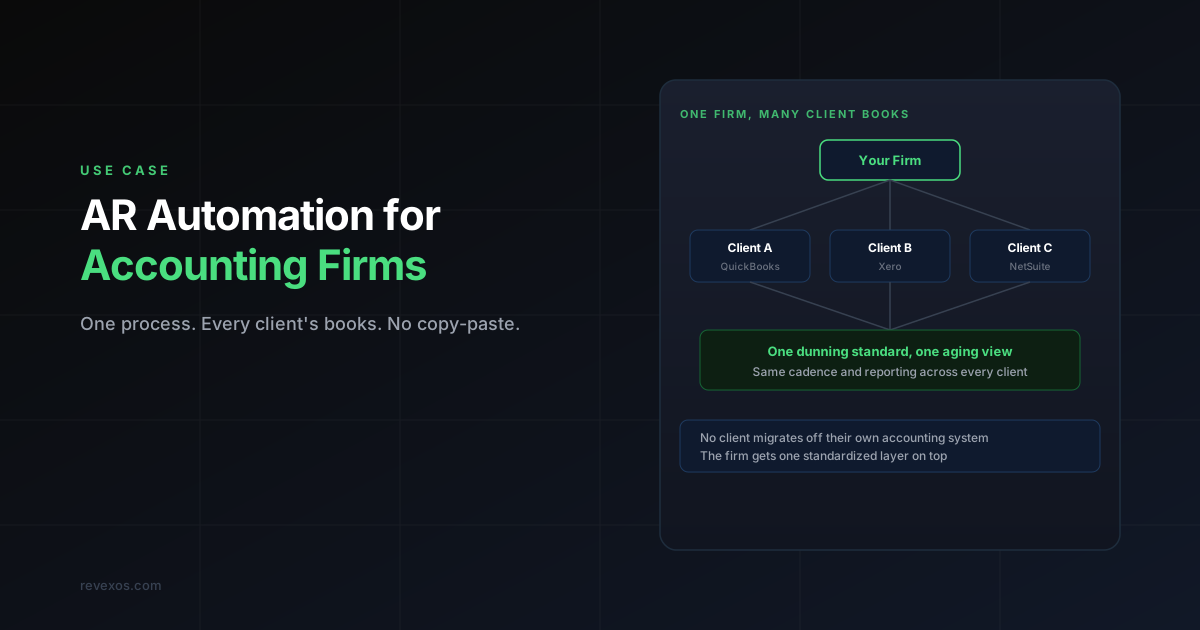
If you run an accounting or bookkeeping firm and offer AR or collections support as part of your service, you don't have one AR automation problem. You have one per client - a different accounting system, a different set of payment terms, a different customer base with a different tolerance for how firmly you can chase them on your client's behalf.
This is a different problem from AR automation for a single professional services firm managing its own AR. That post is about a firm collecting its own invoices. This one is about a firm collecting - or standardizing collections - across many separate clients' books at once.
Why Standard AR Tools Break Down Here
Every AR automation tool on the market - for QuickBooks, for Xero, or otherwise - is built around one company connecting to one accounting instance. That model assumes:
- One set of collection cadences and dunning tone, configured once
- One risk tolerance for how firm the escalation language gets
- One accounting system to integrate with
An accounting firm managing AR across a dozen clients has none of those constants. Client A is on QuickBooks with 30-day terms and a customer base that expects a gentle nudge. Client B is on Xero with 60-day terms and a construction-industry customer base that responds to firmer, more direct language. Client C just switched from NetSuite mid-quarter. Configuring a single AR tool's workflow builder to handle all of that means either building a separate configuration per client (defeating the point of standardizing) or picking one generic cadence that fits none of them well.
What Firms Actually Need
Three things, in order of how often they get skipped:
1. One standardized process, applied per-client, not one generic template applied to everyone. The cadence logic - how many days before escalation, what tone at each stage - should be consistent as a framework across clients, while the actual terms, tone calibration, and customer-specific handling flex per client's reality. This is the difference between "we have an AR process" and "we have twelve ad hoc AR processes that happen to share a name."
2. No client has to migrate their accounting system. If offering AR-as-a-service to your clients requires each one to adopt a new platform, you've turned a value-add service into a sales project for every single client relationship. The AR layer needs to sit on top of whatever each client is already running - QuickBooks, Xero, NetSuite - without touching that decision.
3. One reporting view for the firm, without merging client data. Partners and account managers need to see AR health across the client portfolio at a glance - which clients have DSO creeping up, which have a concentration of at-risk accounts - without commingling one client's financial data with another's, which most firms are contractually and ethically required to keep separate.
Where This Fits in a Firm's Service Model
Accounting and bookkeeping firms typically offer AR support in one of three shapes, and the right automation approach differs for each:
Bookkeeping-plus-collections retainer. The firm already touches the books monthly and adds light collections support - reminder emails, aging report reviews - as part of the retainer. Here, standard AR software configured per client can work if the firm has capacity to configure and maintain each client's workflow separately, since the volume per client is usually low.
Dedicated AR/collections-as-a-service line. The firm has built (or wants to build) collections into a distinct, billable service line across its client base. This is where the "twelve ad hoc processes" problem shows up hardest, and where a managed AR automation service built to standardize across each client's existing stack - rather than software the firm's own staff has to configure per client - tends to hold up better as the client count grows.
Fractional CFO / controller engagements. Here AR sits inside a broader finance function the firm is running for the client, alongside cash forecasting and reporting. The AR piece needs to feed the same reporting cadence as everything else the fractional team delivers, not exist as a disconnected tool the client's customers interact with separately.
The Question to Ask Before Choosing a Tool
"If we onboard our next five clients, does our AR process get five times harder, or does it stay the same shape?"
If the honest answer is "five times harder" - because each client needs its own tool configuration, its own login, its own maintenance - that's the signal the firm has a scaling problem, not a tooling gap that a better software choice fixes. At that point the fix is a layer built to standardize the process across clients while adapting the specifics per client, which is closer to a managed service model than a per-client software rollout.
Frequently Asked Questions
Can one AR automation tool really serve clients on different accounting systems? Some multi-platform tools (Chaser, Kolleno) support both QuickBooks and Xero, which covers two systems from one vendor. Beyond that - NetSuite, Sage, or a client-specific ERP - most single tools don't span everything, which is exactly why a firm with a mixed client base usually ends up either running several tools or moving to a service model built to sit on top of whatever each client already uses.
Should the firm bill AR automation as a separate line item or bundle it into the existing retainer? Most firms that build a genuine collections-as-a-service line bill it separately, tied to invoice volume or DSO improvement, since the value delivered (cash collected faster) is distinct from bookkeeping and easier to price against outcomes.
How is this different from just hiring a part-time collections specialist for the firm? A specialist still needs a system to work inside, and still hits the same "one process per client" scaling wall as client count grows. Automation (software or service) doesn't replace the judgment calls a specialist makes on genuinely disputed or escalated accounts - see what Claude-driven collections automation does and doesn't replace - but it removes the repetitive cadence work that doesn't need a person doing it by hand for every client.
What if some clients only have a handful of overdue invoices a month? Low volume per client is normal in this model - the point isn't automating away a small workload, it's having one consistent process that works whether a given client has three overdue invoices or three hundred, without the firm re-inventing the workflow each time.
If you're running AR across multiple client books and want a framework specific to your client mix, work through your actual client list rather than a generic template: the free AR Calling Tracker was built for exactly this kind of multi-client firm. Stuck on a specific setup? Ask me.
 QuickBooks Online
 Xero
Xero NetSuite