How Claude AI Automates Collections Emails and Dunning Cadences
Rigid dunning tools send the same email to every customer at the same day threshold. Claude reasons about two things a template can't: how overdue the invoice is, and how much the relationship is worth protecting. Here's how that actually works, with real examples.
RevExOS
Q2C Consulting
Most dunning automation works the same way: pick a day-past-due threshold, attach a template, send it. Fifteen days late gets Template B. Thirty days late gets Template C, slightly firmer. It is automation in the narrowest sense - a rule fires, a merge field fills in a name and an amount, an email goes out. It also treats every customer at day 30 identically, whether that customer is a brand-new account that has been difficult from day one or a three-year relationship that has never once paid late before this invoice.
Claude does not replace the cadence. It replaces the part of the cadence that a rigid template genuinely cannot do: writing the email so the tone matches both how overdue the invoice actually is and how much you want to protect the relationship, informed by the specific facts of the account rather than a single day-count variable. This post walks through exactly how that reasoning works, with real before-and-after examples, and points to the free tool built on this same logic if you want to try it on a real invoice.
The Two Variables a Template Can't Weigh Against Each Other
A rigid dunning system has one input: days past due. Claude-driven collections automation has two, and the interaction between them is where the actual judgment happens.
1. How overdue the invoice is. This site's own AR Collections Email Generator uses six stages, and they map to a natural escalation:
| Stage | Window | Tone |
|---|---|---|
| Pre-due | 3 days before due | A gentle heads-up, not a reminder of lateness |
| Due today | Day 0 | Neutral, informational |
| Just late | 1-7 days | Friendly, assumes oversight |
| Follow-up | 8-14 days | Slightly more direct, still warm |
| Firm | 15-30 days | Clear ask, states consequences of continued delay |
| Final | 31+ days | Formal, references next steps (collections, legal, service pause) |
2. How much the relationship is worth protecting. This is the variable a rigid system ignores entirely. A long-term, high-value account gets a different Firm-stage email than a brand-new, standard account - not because the ask is different (both owe the money and both need to pay), but because the cost of damaging the relationship is different, and the email should reflect that without softening the actual request.
The Same Stage, Two Different Relationships
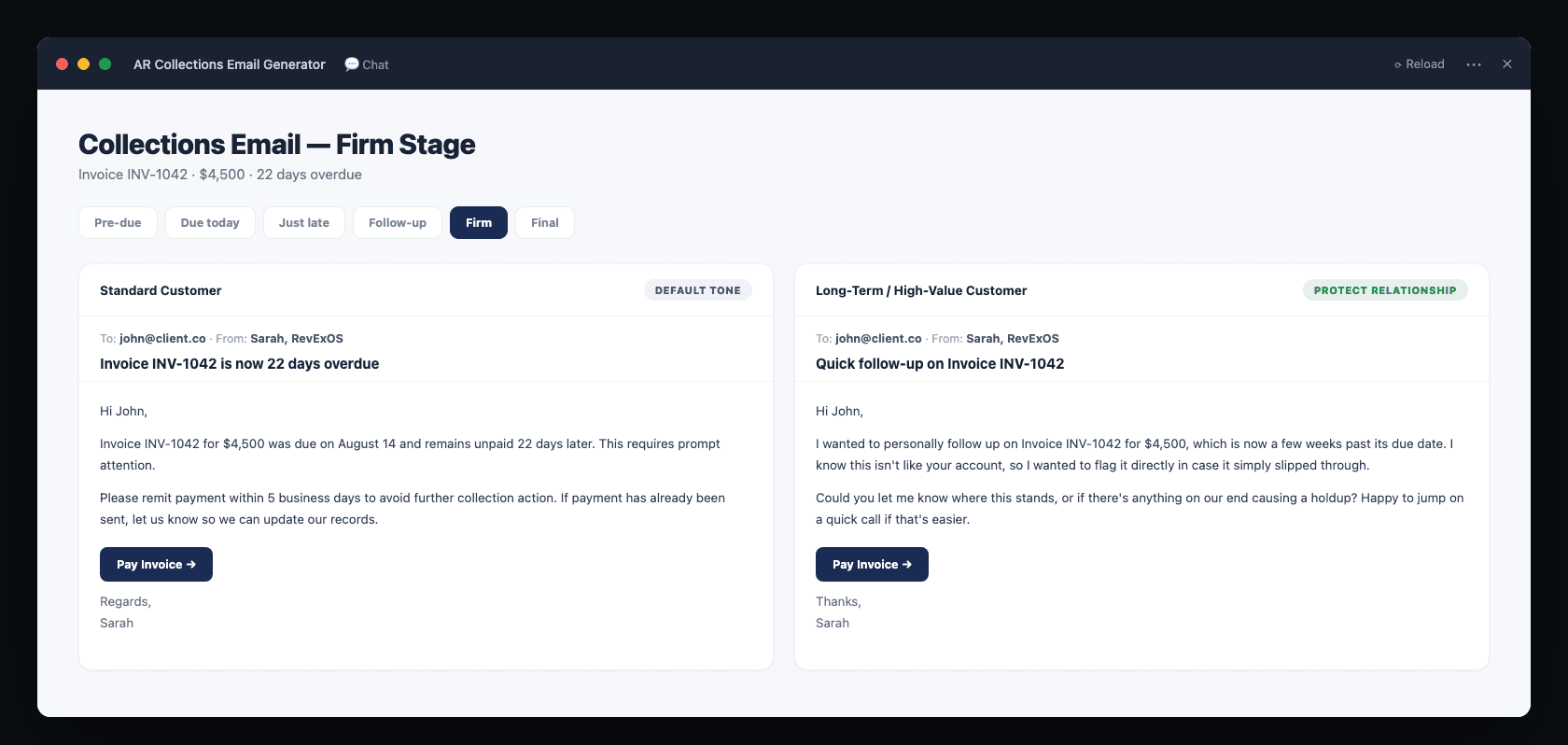
Here is what that looks like in practice: the same invoice, same 22-days-overdue "Firm" stage, written for two different relationship settings.
Standard customer, Firm stage:
Subject: Invoice INV-1042 is now 22 days overdueHi John,Invoice INV-1042 for $4,500 was due on August 14 and remains unpaid 22 days later. This requires prompt attention.Please remit payment within 5 business days to avoid further collection action. If payment has already been sent, let us know so we can update our records.[Payment Link]Regards, Sarah
Long-term / high-value customer, Firm stage:
Subject: Quick follow-up on Invoice INV-1042Hi John,I wanted to personally follow up on Invoice INV-1042 for $4,500, which is now a few weeks past its due date. I know this isn't like your account, so I wanted to flag it directly in case it simply slipped through.Could you let me know where this stands, or if there's anything on our end causing a holdup? Happy to jump on a quick call if that's easier.[Payment Link]Thanks, Sarah
Both emails ask for the same thing, by the same deadline pressure implicitly conveyed through "22 days" and "few weeks." Neither one is soft on the actual request. The difference is entirely in how the lateness is framed: the standard-customer email treats this invoice as one data point in a generic escalation path, while the long-term-customer email treats it as a departure from an established pattern worth investigating together, which is usually the more accurate read of what actually happened with a good customer who suddenly goes quiet on an invoice.
This is the reasoning a template cannot do. A merge-field system can swap in a name and a dollar amount. It cannot decide that the framing itself should change based on account history, because "account history" is not a variable most dunning tools are built to reason about at the sentence level - it is, at best, a variable that changes which template fires, not how the chosen template is actually written.
Where the Facts Come From
This only works if Claude has real account-specific input, not just a day-count. The AR collections dashboard built with Claude Cowork is designed to feed exactly this: the Customers sheet carries risk tier and relationship flags, the Payment_Patterns sheet carries average days to pay and P2P honor rate, and the Call_Log sheet carries AI-summarized notes from every prior contact attempt.
Feed those into the email-generation step and the output stops being generic-firm-but-relationship-aware and starts being genuinely specific: an email for a customer with an 82% honor rate and no prior disputes reads differently from one for a customer with two broken promises already logged this quarter, even at the identical days-past-due stage. The relationship-protection toggle in the free tool is a simplified, single-invoice version of this same idea - the full version, wired to real call log and payment pattern data, produces sharper output because it has more to reason about.
Scaling Past One Email at a Time
Generating one email for one invoice is useful for a single tricky account. It does not scale to a book of 200 open invoices. The path to scale is the same Claude Cowork approach used for the AR dashboard: upload the full Invoices, Customers, and Payment_Patterns sheets to a Cowork project and ask Claude to draft the next-stage email for every invoice that is due for outreach today, using each customer's actual risk tier and payment history rather than running the same prompt 200 times by hand.
"For every invoice in the Invoices sheet with a next-follow-up date of today, draft the collections email matching its current cadence stage. Use the Customers sheet to set relationship tone (standard vs. protect-the-relationship) and pull the two most recent Call_Log entries for context if any exist. Output as a table: invoice number, customer, stage, subject line, and email body."
This produces a batch of ready-to-send, individually reasoned emails in one pass, each one accounting for stage, relationship value, and recent contact history, instead of a batch of identical templates with different names swapped in.
What This Doesn't Replace
Claude-written collections emails are not a substitute for a defined cadence - you still need the day-threshold logic (the Follow_Up_Cadence sheet from the AR dashboard tracker) to decide when an email goes out and at what stage. What Claude replaces is the assumption that every email at a given stage should read the same way. The cadence decides timing and escalation level; Claude decides how that escalation level should actually sound for this specific account.
It also is not a substitute for human judgment on genuinely disputed invoices, broken promises that need a phone call instead of another email, or accounts approaching legal escalation - those situations need a person, and the dispute-and-escalation handling section of the AR Prompt Playbook is built around exactly that handoff rather than trying to automate around it.
Deciding which threads clear that bar doesn't have to be a guess, either. Paste a collections thread into the Jev API Playground and score its urgency on a rubric - a low-confidence score sitting between "responsive" and "escalate" is the model telling you a human should read it, instead of an email generator quietly picking a tone for a case it shouldn't be handling at all.
Try It
The free AR Collections Email Generator runs the stage-plus-relationship logic described here on a single invoice with no account required. Pick a stage, toggle standard vs. protect-the-relationship, and see the difference in framing for yourself before deciding whether to wire it into a full batch workflow.
For a step-by-step guide to building this and the rest of your AR workflow with AI, see the free AR Prompt Playbook. If you want to wire this directly into a scheduled workflow instead of drafting one email at a time, here's the full n8n build with the exact Claude prompt.
For the broader system this fits into, see how to automate accounts receivable end-to-end and why your DSO is too high.
Frequently Asked Questions
Will a Claude-written collections email sound noticeably different from a human-written one? Not if the prompt gives it real context. The examples above are generated exactly this way - stage plus relationship setting plus, ideally, real account history. The output reads like a specific person wrote it about a specific account, not like a template with a name filled in, because it is reasoning about that account rather than filling a slot.
Does this require integrating with my email system to actually send anything? No, not for drafting. Claude generates the subject and body; sending is a separate step, typically through your existing email tool, CRM, or an automation platform like n8n or Zapier that takes the drafted content and sends it on the cadence you define.
What happens if I don't have Call_Log or Payment_Patterns data yet? The stage-plus-relationship logic works on its own with just the invoice's days-overdue and a relationship flag - that is exactly what the free tool demonstrates with no additional data required. Call log and payment pattern data sharpen the output further once you have it, but they are not a prerequisite to start.
Can this handle SMS or only email? The same reasoning (stage plus relationship, informed by account history) applies to any channel. SMS just needs a tighter character limit and a more compressed version of the same tone logic - the AR Prompt Playbook includes a dedicated SMS-with-character-limit prompt for this.
 Claude
 n8n
n8n