How to Build a Dunning Workflow in n8n (Step by Step, With the Claude Prompt)
A 7-node n8n workflow that pulls overdue invoices, sorts them by cadence stage, drafts the collections email with Claude, and sends it, no custom backend required.
RevExOS
Q2C Consulting
n8n is a self-hosted (or cloud) workflow automation tool - node-based, similar in shape to Zapier or Make.com, but open-source and considerably more flexible when a workflow needs a raw HTTP Request node instead of a pre-built integration. That flexibility is exactly what a dunning workflow needs, because the interesting part - deciding what tone an overdue-invoice email should take - isn't a pre-built n8n integration for any vendor. It's a Claude API call with the right prompt.
This walks through the whole workflow node by node, including the exact prompt, so you can rebuild it directly.
If you'd rather use Make.com, the $500/month Q2C stack post covers an equivalent dunning scenario built on that platform instead - the logic is the same, the node names differ. If you outgrow either self-built version, RevExOS's AR automation covers this same cadence-and-tone logic as a managed layer instead of a workflow you maintain.
The Workflow, End to End
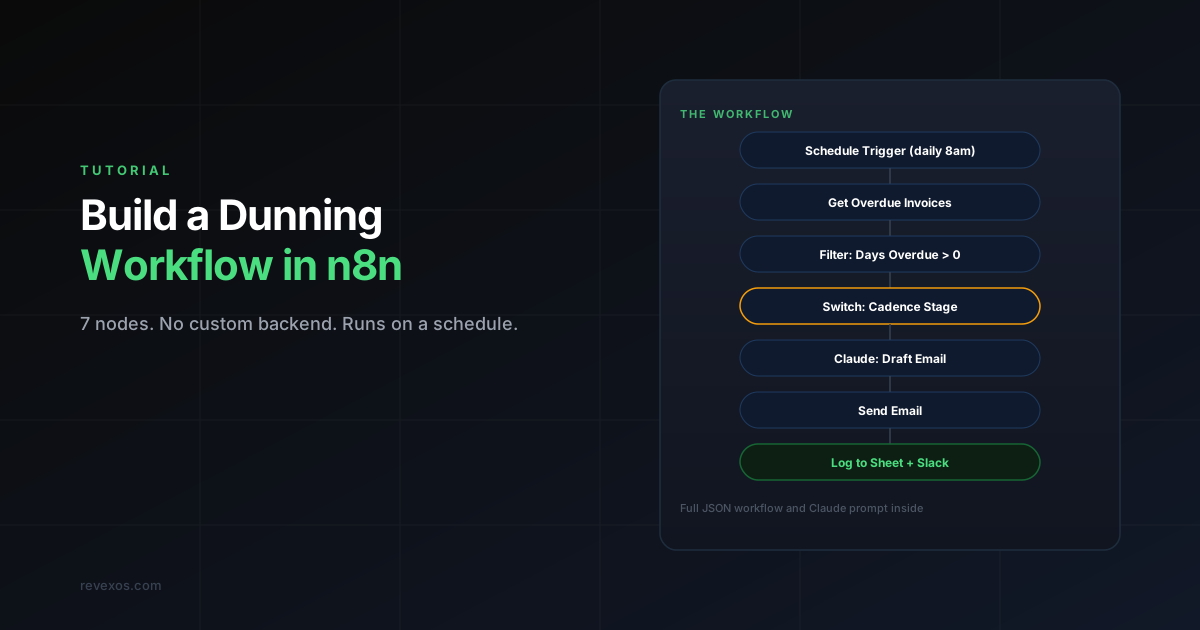
Seven nodes, run once a day:
- Schedule Trigger - fires once daily, e.g. 8:00 AM
- Get Overdue Invoices - pulls open, overdue invoices from your accounting system
- Filter - keeps only invoices actually past due (excludes anything at day 0 or earlier)
- Switch - routes each invoice to a branch based on its cadence stage (days overdue)
- Claude: Draft Email - an HTTP Request node calling the Claude API to write the actual email
- Send Email - sends the drafted email via your email provider
- Log + Notify - writes the sent email to a tracking sheet and pings Slack
Node 1: Schedule Trigger
Standard n8n Schedule Trigger, set to a daily cron interval. Run it in the morning, before your team's day starts, so any invoices requiring manual follow-up are already flagged by the time someone checks Slack.
Node 2: Get Overdue Invoices
If you're on QuickBooks Online, n8n has a built-in QuickBooks node - use its "Get Many" operation on the Invoice resource, filtered to Balance > '0'. If you're on Xero, or if you want more control over the query than the built-in node exposes, use an HTTP Request node against the accounting system's REST API directly with your OAuth2 credentials.
Either way, the output you need per invoice is: invoice ID, customer name, customer email, amount due, due date, and any existing note about payment status.
Node 3: Filter
A Filter node with a single condition:
{{ $today.diff($json.dueDate, 'days') > 0 }}This drops anything not yet overdue. Everything downstream only sees invoices that actually need a dunning email.
Node 4: Switch - Cadence Stage
A Switch node with one output per stage, based on days overdue. This mirrors the same six-stage cadence used in RevExOS's free AR Collections Email Generator:
| Stage | Days Overdue | Output Branch |
|---|---|---|
| Just late | 1-7 | stage_1 |
| Follow-up | 8-14 | stage_2 |
| Firm | 15-30 | stage_3 |
| Final | 31+ | stage_4 |
Use a Set node right after the Switch on each branch to attach a stage field ("just_late", "follow_up", "firm", "final") to the item, so the next node knows which tone to ask Claude for without re-computing days-overdue logic downstream.
Node 5: Claude - Draft the Email
This is the node that does the actual work. Use an HTTP Request node configured as:
- Method: POST
- URL:
https://api.anthropic.com/v1/messages - Headers:
x-api-key(your Anthropic API key, stored as an n8n credential, never hardcoded in the node),anthropic-version: 2023-06-01,content-type: application/json - Body:
{
  "model": "claude-sonnet-5",
  "max_tokens": 400,
  "messages": [
    {
      "role": "user",
      "content": "Write a collections email for an overdue invoice.\n\nStage: {{ $json.stage }}\nCustomer name: {{ $json.customerName }}\nInvoice number: {{ $json.invoiceId }}\nAmount due: {{ $json.amount }}\nDays overdue: {{ $json.daysOverdue }}\nRelationship: {{ $json.relationshipTier }}\n\nRules:\n- 'just_late' and 'follow_up' stages: friendly, assume oversight, no threats.\n- 'firm' stage: clear ask, state the consequence of continued delay, still professional.\n- 'final' stage: formal, reference next steps (collections or service pause).\n- If relationship is 'high_value', soften the framing without softening the actual ask - treat this as a departure from pattern worth investigating together, not a generic escalation.\n- Output only the email subject and body, no preamble or explanation."
    }
  ]
}
Newer n8n versions also ship a native Anthropic Chat Model node under the AI/LangChain node category, which handles the credential and request formatting for you - functionally equivalent to the HTTP Request approach above, so use whichever your n8n version supports. The prompt content is the same either way.
The relationshipTier field needs to come from somewhere - either a lookup against your CRM in an earlier node, or a static tag you maintain per customer. For the reasoning behind why that field changes the output meaningfully, see how Claude reasons about relationship value alongside days overdue.
Node 6: Send Email
A Gmail, Microsoft Outlook, or SMTP node (whichever matches your email provider), pulling the subject and body straight from Claude's response in the previous node. Parse the response with a small Code node first if you need to split subject from body cleanly - Claude's output format in the prompt above returns both in one block of text.
Node 7: Log + Notify
Two final nodes, run in parallel off the Send Email node:
- Google Sheets (or Airtable) node - appends a row: invoice ID, customer, stage, date sent, subject line. This becomes your audit trail and prevents double-sending if the workflow runs more than once on the same invoice.
- Slack node - posts a summary to a finance channel, e.g. "Sent 12 dunning emails today: 7 friendly, 3 firm, 2 final."
Handling the Cases This Workflow Shouldn't Touch
Not every overdue invoice should get an automated email. Build in an exclusion path before the Switch node for:
- Invoices already flagged as disputed in your accounting system
- Customers with a note indicating a payment plan or promise-to-pay already in progress
- Accounts approaching legal escalation, which need a person, not another email
The AR Prompt Playbook's dispute-and-escalation section is built around exactly this handoff - the workflow should route these cases to a Slack alert for a human, not silently skip them.
Testing Before You Turn On Daily Sends
Before scheduling this to run automatically:
- Run it manually against a handful of known overdue invoices and read every generated email before anything sends
- Point the Send Email node at your own inbox first, not customers, until you've validated the output for at least a full cadence cycle
- Confirm the Filter and Switch logic against edge cases - an invoice due today, an invoice 366 days overdue, a $0.01 balance from a rounding error
Frequently Asked Questions
Do I need a paid n8n plan to build this? No - n8n's self-hosted version is free and open-source, and this workflow doesn't need any paid nodes. n8n Cloud has a free tier as well, sufficient for the invoice volume most small teams run through a workflow like this.
What does this cost to run? The only real cost is the Claude API calls - at roughly 400 output tokens per email, this is a fraction of a cent per invoice. Even a few hundred overdue invoices a month costs a few dollars in API usage.
Can this handle SMS instead of email? Swap the Send Email node for a Twilio node, and add a character-limit instruction to the Claude prompt. The AR Prompt Playbook includes a dedicated SMS-with-character-limit prompt you can drop in directly.
What happens when a customer pays between the Get Invoices step and the email actually sending? Add a final check immediately before Send Email - a second, lightweight lookup against the accounting system for that specific invoice's current balance - and skip the send if it's already zero. Real-time accuracy here matters more than workflow simplicity.
Is this a replacement for a full AR automation platform? For a single, fixed cadence on straightforward invoices, this covers most of what a paid tool would. It doesn't include a payment portal, cash application, or a UI your whole team can configure without touching the n8n canvas - see the full comparison of dedicated AR automation tools for QuickBooks if you need those.
 QuickBooks Online
 Claude
 n8n
n8n