How to Build a Deferred Revenue Waterfall Tracker with Claude Cowork
A step-by-step guide to turning a contracts spreadsheet into a live, interactive deferred revenue waterfall using Claude Cowork's Live Artifacts, including how to handle mid-term contract modifications under ASC 606.
RevExOS
Q2C Consulting
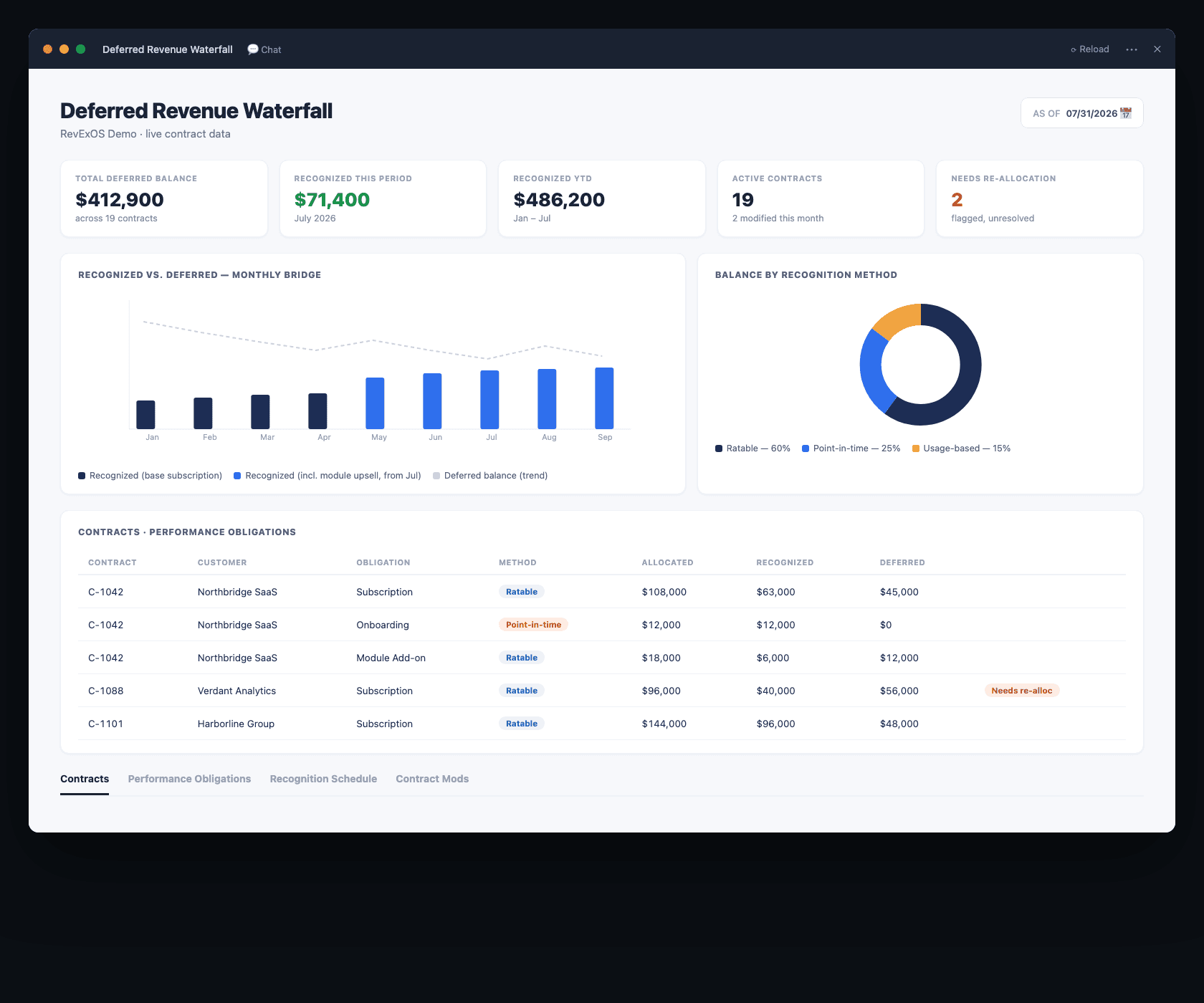
Most finance teams track deferred revenue in one of two ways: a rigid schedule built once in Excel and never touched again, or a manual monthly journal entry someone re-derives from memory of "roughly what should recognize this month." Neither survives contact with a mid-term upsell, a contract that starts on the 14th instead of the 1st, or a customer who adds a module in month seven of a twelve-month term.
A deferred revenue waterfall is not conceptually hard. It is mechanically tedious: every contract needs its own recognition schedule, every schedule needs to re-run when a contract changes, and the finance team needs a monthly view of what is recognized, what is still deferred, and what is coming due next. That tedium is exactly what Claude Cowork's Live Artifacts removes. You upload your contracts and billing data, describe the waterfall you need, and Claude builds an interactive dashboard that recalculates the schedule for every contract, flags anything that needs re-allocation after a modification, and gives you a month-by-month recognized-versus-deferred view without a single manual formula.
This post walks through the exact schema, the exact prompt, and a full worked example with a mid-term contract modification, so you can build the same thing for your own contract book. It follows the same approach as the AR collections dashboard we built with Claude Cowork - same tool, different part of the revenue cycle.
What Claude Cowork Adds to a Revenue Recognition Waterfall
A static waterfall spreadsheet answers one question well: what does the schedule look like today. It does not answer what happens when a customer upgrades mid-contract, which contracts have performance obligations that were never properly allocated, or which recognized-to-date figures are stale because nobody updated the sheet after last month's billing run.
Claude Cowork reads your contracts sheet, your performance-obligation allocation, and your billing history, then builds a Live Artifact: a running dashboard with a recognized-vs-deferred summary, a schedule for every contract broken into performance obligations, and a flagged list of any contract modification that has not yet been re-allocated. Change the as-of date and the whole thing recalculates. Ask Claude to add a cohort view, a churn-adjusted deferred balance, or a bridge from opening to closing deferred revenue, and it revises the artifact in place.
The Data You Need: A Deferred Revenue Schema That Works
You do not need a general ledger export. You need four sheets that between them capture everything ASC 606 cares about: the contract, its performance obligations, the recognition schedule, and any modifications.
| Sheet | What It Contains |
|---|---|
| Contracts | Contract ID, customer, contract start date, term length, total contract value (TCV), billing frequency, and status (active, expired, modified) |
| Performance_Obligations | One row per distinct performance obligation per contract: description, standalone selling price (SSP), allocated transaction price, recognition method (ratable, point-in-time, usage-based), and recognition start/end dates |
| Recognition_Schedule | One row per obligation per period: period (month), amount recognized, cumulative recognized to date, and remaining deferred balance |
| Contract_Mods | Modification date, contract ID, type (upsell, downsell, term extension, termination), new TCV, and whether it was treated as a separate contract or a cumulative catch-up under ASC 606 |
If you are billing SaaS subscriptions with occasional professional-services add-ons, most contracts will have two performance obligations: the subscription (ratable, recognized evenly over the term) and implementation or onboarding services (often point-in-time or recognized over a shorter period). Bundled deals need SSP allocation to split the total contract value across obligations before any recognition schedule can be built - Claude can do this allocation for you if you give it each obligation's standalone list price.
Building the Waterfall Dashboard: Step by Step
Step 1 - Open Claude Cowork and create a project
Go to claude.ai, switch to Cowork, and start a new project named something like "Revenue Recognition - [Company Name]." Projects keep Claude's understanding of your contract schema persistent across sessions, so you are not re-explaining the structure every time you ask for a revision.
Step 2 - Upload your contracts and obligations data
Attach your Contracts, Performance_Obligations, and Recognition_Schedule sheets (Contract_Mods too, if you have any modifications logged). If you have not built a recognition schedule yet, Claude can generate one from just the Contracts and Performance_Obligations sheets - the schedule is a mechanical output of start date, term, allocated price, and recognition method.
Step 3 - The build prompt
"This is my contracts and performance-obligations data. Build me a live deferred revenue waterfall dashboard artifact with: headline KPIs (total deferred revenue balance, revenue recognized this period, revenue recognized year-to-date, number of active contracts, number of contracts with unresolved modifications), a monthly recognized-vs-deferred bridge chart from the earliest contract start date through 12 months forward, a table of every contract broken into its performance obligations with allocated price, recognition method, and remaining deferred balance, and a flagged list of any contract in Contract_Mods that has not been re-allocated in Performance_Obligations. Use an As_Of_Date I can change to recalculate every schedule."
Claude reads every sheet, applies ratable or point-in-time recognition logic per obligation, and generates a self-contained React artifact with the bridge chart, the contract-level table, and the flagged-modifications list.
Step 4 - Pin and iterate
Click Pin so the dashboard persists in your project sidebar. From there, ask for anything the first pass missed: a cohort breakdown by contract start quarter, a variance column comparing this month's recognized revenue to last month's, or a drill-down that shows the full month-by-month schedule for a single contract when you click its row.
A Worked Example: One Contract, One Mid-Term Upsell
Take a single SaaS contract to make the mechanics concrete.
Original contract: 12-month term starting January 1, 2026. Total contract value $120,000, split into a $108,000 subscription (SSP $108,000, ratable over 12 months) and a $12,000 onboarding package (SSP $12,000, recognized point-in-time at kickoff). Monthly subscription recognition: $9,000. The $12,000 onboarding amount recognizes in full in January.
Through June (6 months), the schedule looks like this:
| Month | Subscription Recognized | Onboarding Recognized | Cumulative Recognized | Deferred Balance |
|---|---|---|---|---|
| Jan | $9,000 | $12,000 | $21,000 | $99,000 |
| Feb | $9,000 | $0 | $30,000 | $90,000 |
| Mar | $9,000 | $0 | $39,000 | $81,000 |
| Apr | $9,000 | $0 | $48,000 | $72,000 |
| May | $9,000 | $0 | $57,000 | $63,000 |
| Jun | $9,000 | $0 | $66,000 | $54,000 |
The modification: in July, the customer adds a second product module for the remaining 6 months of the term, at $3,000/month. This is a distinct, priced-at-standalone-value addition to an existing contract, which under ASC 606 typically gets treated as a separate contract rather than a cumulative catch-up on the original one, because the new module is priced at its standalone selling price and adds distinct goods or services.
The waterfall dashboard needs to do two things here: keep the original $108,000 subscription schedule running unchanged through December, and open a new schedule for the $18,000 module ($3,000 × 6 months) starting in July. This is exactly what the Contract_Mods sheet and the "flagged for re-allocation" logic in the prompt catch - without it, it is easy to either double-count the new module inside the original obligation's schedule, or miss adding it to Performance_Obligations entirely, which understates both recognized revenue and the deferred balance from July onward.
From July, the combined monthly recognized figure becomes $9,000 (original subscription) + $3,000 (new module) = $12,000/month, and the dashboard's bridge chart should show the step-up starting exactly in July, not blended in gradually.
What the Dashboard Surfaces
- Total deferred revenue balance - the single number auditors and the CFO ask for first, live and reconciled to the contract level, not a plug figure from a prior close.
- Revenue recognized this period vs prior period - a variance the dashboard calculates automatically rather than someone re-deriving it in a side calculation.
- Contracts with unresolved modifications - the list that matters most for close accuracy. A modification logged in Contract_Mods but not yet reflected in Performance_Obligations is a real risk of misstated revenue, and it is the kind of thing that is easy to miss in a manual process and immediate to catch in a dashboard built to flag it.
- Per-obligation drill-down - click any contract and see its full schedule broken into every performance obligation, useful for both internal review and for handing an auditor a clean, traceable schedule instead of a spreadsheet with hidden formulas.
Handling Contract Modifications: The Part Spreadsheets Get Wrong
ASC 606 treats contract modifications one of three ways, and getting the wrong one wrong changes the numbers materially:
- Separate contract - the added goods/services are distinct and priced at standalone value. Run a new, independent schedule alongside the original (the module example above).
- Termination of the old contract and creation of a new one - the modification isn't priced at standalone value and the remaining goods/services are distinct from what's already been delivered. Recognize what's already been delivered, then treat the remaining performance obligations as a brand-new contract with the remaining consideration.
- Cumulative catch-up - the remaining goods/services are not distinct from what's already been delivered (they are part of a single, larger performance obligation already partway through). Recalculate the transaction price and record a cumulative adjustment to revenue in the period of the modification.
A general-purpose spreadsheet cannot make this judgment call automatically. What Claude Cowork adds here is not that it applies ASC 606 mechanically without human review - it should not be trusted for that, and every modification should still go through your controller or a technical accounting review - but that it flags every contract with a logged modification that has not yet had its treatment decided and re-allocated, so nothing slips through a close cycle unnoticed. That flagging step is the actual failure mode in most manual processes: not that nobody knows how to apply ASC 606, but that a modification gets logged in a sales or billing system and never makes it back to the revenue schedule at all.
Adapting This for Your Contract Book
- Recognition method column on Performance_Obligations is what drives the schedule logic. Ratable obligations spread evenly by month; point-in-time obligations recognize in full on a trigger date; usage-based obligations recognize as usage is reported, which needs an additional Usage_Log sheet if you have any consumption-priced components.
- SSP allocation - if you sell bundles at a discount to the sum of standalone prices, allocate the discount proportionally across obligations by SSP before building the schedule, not just to whichever obligation is easiest.
- As_Of_Date - set this to your close date and every contract's cumulative-recognized and remaining-deferred figures recalculate together.
- Contract_Mods - log every modification here the day it happens, even before you have decided its ASC 606 treatment. The dashboard's flagged list is only as good as this sheet being current.
For the mechanics of SSP allocation on bundled subscription-plus-usage-plus-services deals specifically, see Revenue Recognition Explained: The 5 Steps Every Business Must Understand. For how this fits into the rest of the quote-to-cash cycle, see how Claude AI automates the full Q2C cycle.
Frequently Asked Questions
Does this replace my ERP's revenue recognition module? No. This is a working tool for finance teams who do not have a dedicated RevRec system (Zuora RevPro, RightRev, or similar) yet, or who want a fast, auditable cross-check against one they do have. For companies with complex multi-element arrangements at scale, a dedicated RevRec engine is still the right long-term investment.
Can Claude decide the ASC 606 treatment for a modification on its own? It can surface the modification and summarize the facts (distinct goods/services, standalone pricing, remaining term), but the treatment decision should go through your controller or technical accounting resource. Use the dashboard to make sure nothing gets missed, not to make the judgment call unsupervised.
What if my contracts have usage-based components? Add a Usage_Log sheet with period, contract ID, obligation ID, and usage-based amount recognized. Claude incorporates it into the same schedule, recognizing the usage-based obligation as usage is reported rather than ratably.
How is this different from the AR dashboard post? Different part of the cycle. The AR dashboard tracks what is billed and collected. This tracks what is earned and recognized, whether or not it has been billed yet - deferred revenue is fundamentally a recognition question, not a collections question, and the two schedules should reconcile but never be confused with each other.
 Claude