How Accurate Is AI Invoice Parsing, Really? A Grounded Look at What Breaks
What vision-based AI invoice extraction reliably gets right, what commonly needs a manual fix, and why RevExOS's free Invoice Parser puts a review screen between extraction and export instead of trusting the output blindly.
RevExOS
Q2C Consulting
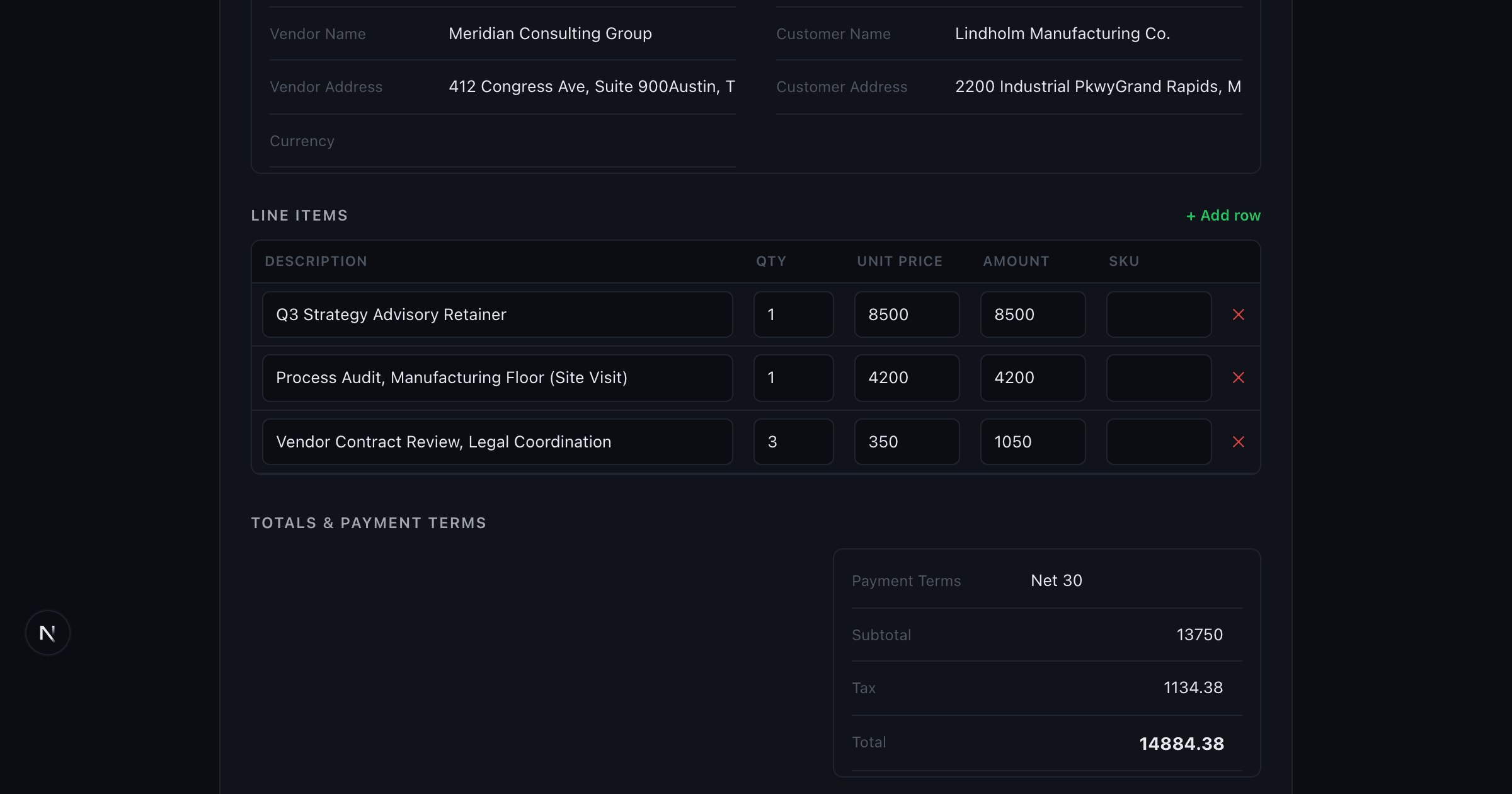
"How accurate is it" is the first question anyone asks about a tool that reads documents automatically, and it's a fair question to ask skeptically. This post covers what vision-based AI extraction (Claude today) - the approach behind the Invoice Parser - actually does well, what it commonly gets wrong, and why the tool is built around a review screen instead of a "trust the output" promise.
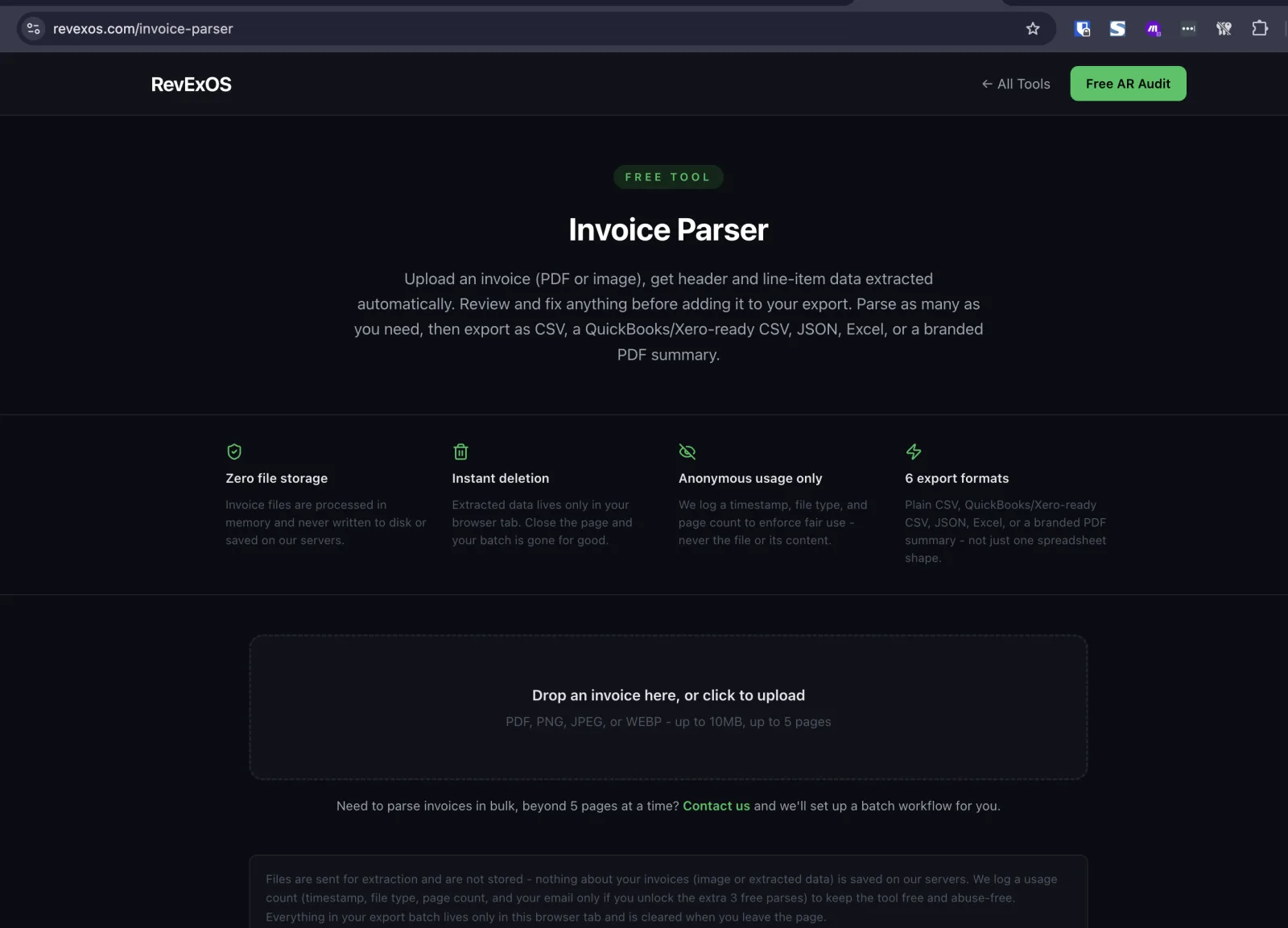
This is not a cross-model benchmark. If you want a comparison of Claude, GPT-4o, Gemini, and specialized document-AI tools against each other on published accuracy numbers, that's a different post. This one is narrower and more useful for actually using the tool: what to expect, document by document, when you run your own invoices through it.
Why We're Not Giving You a Single Accuracy Percentage
You'll see tools in this space advertise a number - "98% accurate," "99.2% field accuracy." Treat those numbers carefully. Published accuracy figures come from a specific benchmark corpus, usually clean, well-formatted invoices chosen to represent the easy end of the distribution. A number measured that way tells you almost nothing about what will happen with your specific invoices, which might include a scanned fax from a subcontractor, a photo taken at an angle on a phone, or an invoice template a vendor hasn't updated since 2011.
We'd rather describe accuracy honestly by document type than hand you a number we can't stand behind for your actual documents. What follows is that breakdown.
What It Reliably Gets Right
Clean, typed, single-page invoices. A standard digital invoice - generated by accounting software, laid out with a clear header block and a simple line-item table - is the easy case for any vision-based model, and Claude handles it well. Vendor name, customer name, invoice number, dates, and totals extract accurately and consistently.
Line-item amounts and totals on well-structured tables. When a line-item table has consistent columns (description, quantity, unit price, amount) and the math is internally consistent, extraction is reliable. The model can also cross-check: if quantity times unit price doesn't match the stated amount, that's a pattern worth a second look on the review screen, though the tool doesn't currently flag it automatically - that's exactly the kind of thing the review step exists to catch.
Standard date and currency fields when the format is unambiguous. ISO-style dates, clearly labeled currency symbols next to amounts, and standard payment terms language ("Net 30," "Due on Receipt") extract cleanly.
Multi-page invoices within the tool's limits. Up to five pages, the parser handles continuation tables and repeated header information across pages without needing you to stitch anything together manually.
What Commonly Needs a Manual Fix
Handwriting. Any handwritten note, correction, or annotation on an invoice - a scrawled PO number in the margin, a handwritten total on a fax - is meaningfully less reliable than typed text for any vision model, including this one. If a vendor invoice has handwritten elements, check those specific fields closely on the review screen rather than trusting them by default.
Poor scans and phone photos. Low-resolution scans, invoices photographed at an angle, uneven lighting, or a crumpled page all degrade extraction quality. This isn't unique to one model - it's a limitation of vision-based OCR generally, credible competitors in this space say the same thing about their own tools. A slightly better photo (flat, well-lit, straight-on) meaningfully improves results before you even upload.
Unusual layouts. Invoices that don't follow a standard header-then-table structure - inline billing summaries, multi-column layouts, invoices with the total in an unexpected position, or templates that mix line items with narrative text - are where the model is more likely to misplace a value or miss a field. The more a document deviates from "vendor block, customer block, line-item table, totals block," the more worth double-checking every field becomes.
Currency symbols vs. ISO codes. This is a subtler failure mode worth knowing about specifically. A dollar sign ($) appears on invoices from the US, Canada, Australia, Singapore, and several other countries. A vision model extracting a currency symbol has to infer which currency that actually is from context (vendor address, language, other clues) rather than reading it directly off the page. If you're processing invoices from multiple countries that use the same symbol, check the currency field specifically - it's an easy one to get wrong silently, and it directly affects any downstream total.
Non-Latin text. Invoices in languages using non-Latin scripts, or with vendor and customer names in non-Latin characters, are a harder case for any general-purpose vision model. This is true across every vision-based OCR approach, not specific to this tool. If you regularly process invoices in non-Latin scripts, treat every field on those documents as needing review, not just the ones that look uncertain.
Ambiguous or missing PO numbers. A PO number that's referenced indirectly ("re: our order of 3/15") rather than clearly labeled is inconsistently extracted. If your AP process depends on an exact PO match, this is a field worth confirming every time, not just on documents that look unusual.
Why the Review Screen Exists
None of the above is a defect to apologize for - it's the honest shape of what vision-based document extraction can and can't do reliably in 2026, for this tool and for every credible competitor doing the same kind of work. The design response to that reality is the review screen: nothing extracted by the Invoice Parser goes into your export batch automatically. Every header field and every line item is editable before you click "Add to Export Batch," and you see the full extracted invoice before it goes anywhere - into a CSV, a QuickBooks or Xero-ready import file, JSON, Excel, or a PDF summary.
That's a deliberate design choice, not a missing feature. A tool that skipped the review step and pushed extraction straight to export would be faster, but it would also be pushing extraction errors straight into your accounting system with nothing catching them. For invoices that matter - the ones affecting your books, not a low-stakes internal note - a five-second glance at the review screen before export is the tradeoff worth making.
A Practical Way to Think About This
If you're deciding whether to trust this tool (or any vision-based invoice extraction tool) for your own documents, the honest framework is:
- Clean, typed, single-vendor invoices from consistent sources: extraction is reliable enough that review is mostly a formality - a quick scan rather than a careful check.
- Scanned or photographed invoices, especially from smaller or inconsistent vendors: review every field, not just the ones that look off. This is where errors concentrate.
- Handwriting, non-Latin text, or unusual layouts anywhere on the document: treat the extraction as a first draft, not a final answer, and check it line by line.
- Currency and PO number fields specifically: worth a habitual second look regardless of document quality, since these are the fields most likely to be wrong in a way that isn't visually obvious.
This mirrors how the credible tools in this space talk about their own limits - nobody doing vision-based OCR honestly claims handwriting and poor scans are a solved problem, because they aren't, for any model. The review step is what makes the difference between "mostly right" and "correct" survivable.
Try it against your own invoices: Invoice Parser. Two free parses a day, no signup, five a day once you share an email. If you're building invoices rather than receiving them, the Invoice Generator is the other half of that workflow.
Frequently Asked Questions
- How accurate is AI invoice parsing on a clean, typed invoice?
- In our test, it correctly extracted every header field and all three line items exactly, including quantities and computed totals, but missed populating the Currency field since the source used a '$' symbol instead of a currency code.
- What kinds of invoices are hardest for AI to parse accurately?
- Handwritten invoices or annotations, low-quality or angled scans, non-Latin script, multi-page invoices with totals only on the last page, and documents mixing multiple currencies.
- Should I trust any invoice OCR tool that claims near-100% accuracy on every document?
- Be skeptical - every credible vendor has some limitation profile around handwriting, scan quality, and unusual layouts, so a claim of universal accuracy usually means it was only tested on easy documents.