Xero Invoice Automation: LMS Course Orders Become Xero Invoices
Every Thinkific course sale creates or updates the Xero invoice on its own, with the right customer, line items and amounts - linking the learning platform to the books for a training company.
- ×Course sales in Thinkific, invoices in Xero, no link between them
- ×Each order copied across by hand
- ×Invoices lagged behind sales
- ×Bulk and repeat orders easy to double-bill or miss
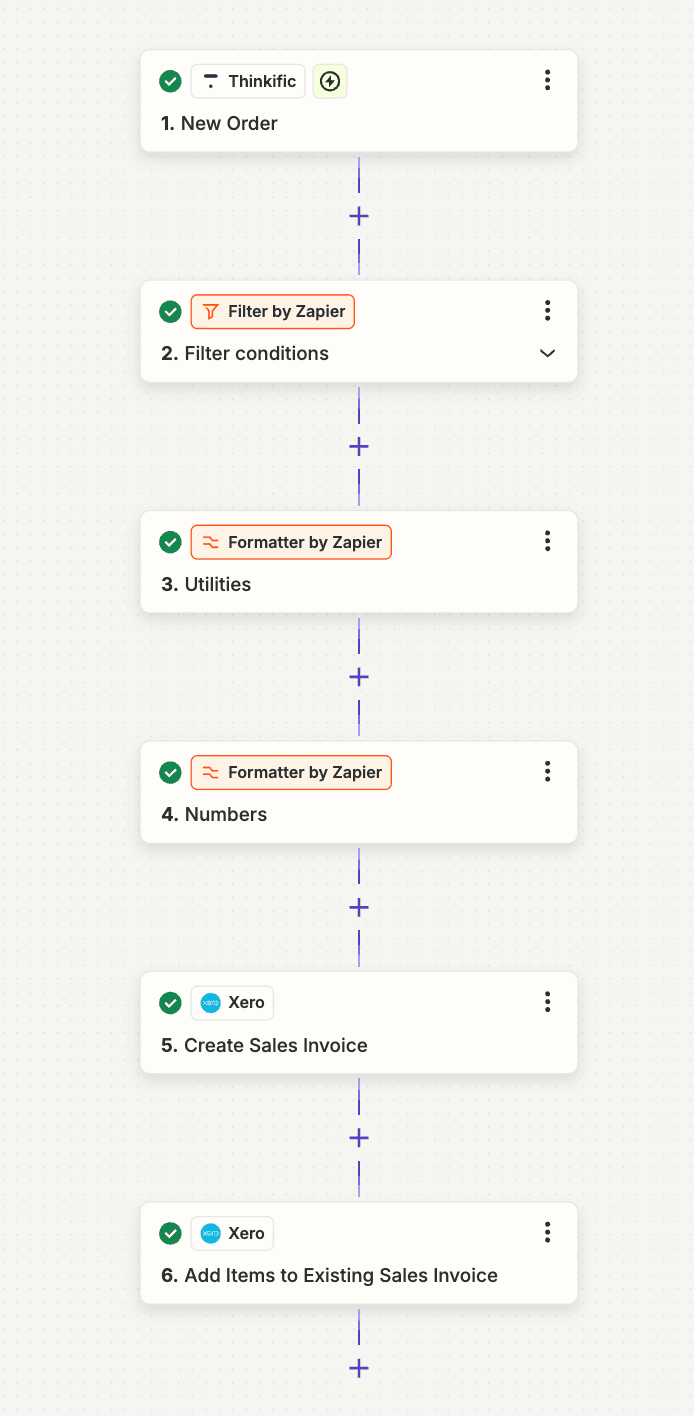
- ✓Every new Thinkific order triggers the workflow
- ✓Orders that should not be billed are filtered out
- ✓Dates and amounts formatted for the Xero API
- ✓Sales invoice created, or items added to the customer's existing invoice
Stack
How It Works
New order in the LMS
A Thinkific course order triggers the workflow the moment it is placed.
Filter what gets invoiced
Free enrolments and orders that should not be billed are filtered out before anything reaches Xero.
Format for Xero
Formatter steps convert dates and numbers into the shape the Xero API expects.
Create or extend the invoice
A new sales invoice is created, or the items are added to the customer's existing invoice so nothing is billed twice.
Results
invoices a month created automatically
invoice on every course sale
orders copied by hand
“Prabhu was very helpful and knowledgeable as well as being prompt with communication and readily available to work on the project of linking LMS orders to Xero invoices.”
FAQ
How many invoices does it handle?+
Around 100 invoices a month, one for every billable course order.
Does it only work with Thinkific?+
This build uses Thinkific. The same pattern works with any LMS or store that can send a new-order event to Zapier, Make.com or n8n.
How are repeat orders handled?+
When an order belongs to a customer's existing invoice, the new items are added to that invoice instead of creating a duplicate.