What Is Cash Application? How to Match Payments to Invoices
Cash application matches each payment to the invoice it pays. How it works, why cash sits unapplied, and how to automate it in QuickBooks and Xero.
RevExOS
Q2C Consulting
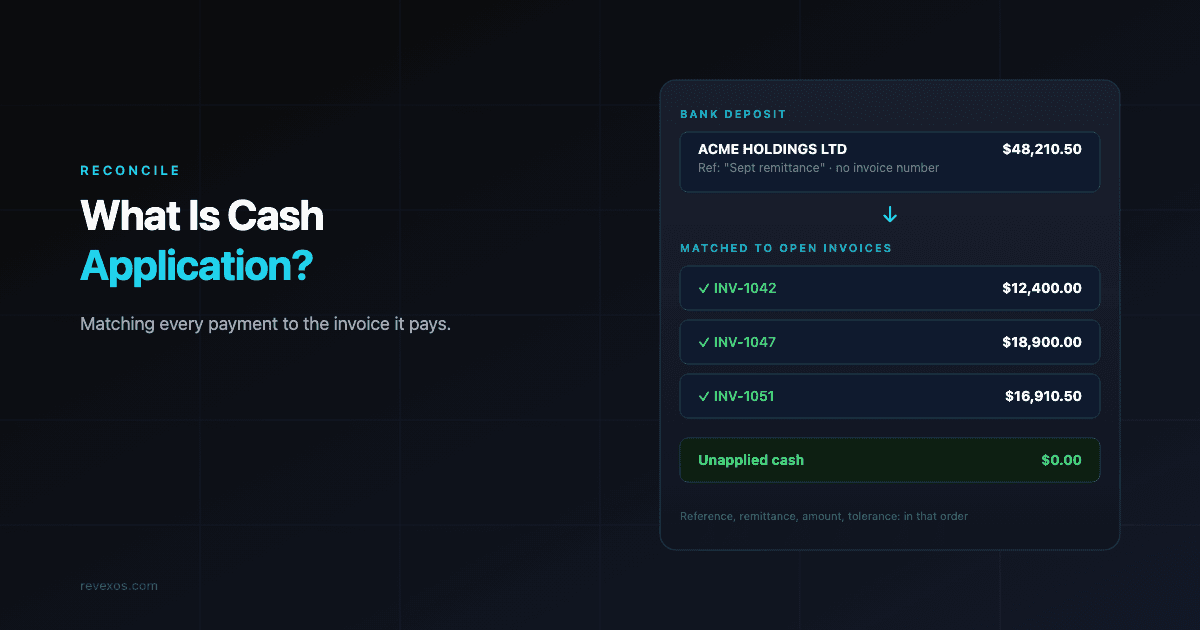
A customer pays. The money is in your bank account. And in your accounting system, the invoice is still open.
That gap is cash application: the work of matching each incoming payment to the invoice (or invoices) it pays, recording it against the customer's account, and closing those invoices out. Until it happens, your receivables ledger is wrong, your aging report is wrong, and the customer who just paid may get a reminder asking them to pay again.
Cash application is the first half of the reconcile stage of the lead-to-cash cycle. It gets less attention than collections, because nothing about it feels urgent. But every collections process depends on it: you cannot chase what is actually overdue if you do not know what has actually been paid.
What cash application actually involves
For each payment that arrives, someone (or something) has to answer four questions:
- Who paid? The bank line says "ACME HOLDINGS LTD", but your customer record is "Acme Inc.", and the invoice went to "Acme Europe GmbH".
- What are they paying? One invoice, several invoices, part of an invoice, or an old balance.
- Does the amount match? Full payment, short payment, overpayment, or a payment net of fees or tax.
- Where does any difference go? A deduction to investigate, a fee to expense, a credit to hold on account.
When the payment arrives with a clear reference ("INV-1042") for the exact invoice amount, the answer takes seconds. The trouble is that a large share of B2B payments do not arrive that way.
Where the information comes from
Cash application runs on two inputs: the payment itself and the remittance advice, the note that says what the payment is for. They often arrive separately.
| Payment method | What the bank line usually tells you | Where remittance usually is |
|---|---|---|
| ACH / bank transfer | Payer name, amount, a short reference field (often truncated) | Separate email from the customer's AP system, or an addenda record (US CCD+ / CTX) |
| Wire | Payer name, amount, a free-text reference | Separate email, sometimes nothing |
| Check / lockbox | Amount, check number | The stub mailed with the check, scanned by the lockbox bank |
| Card (Stripe, etc.) | Payout total, not individual payments | The processor's dashboard or payout report |
| Customer AP portal | Payer name, amount | A download inside the customer's supplier portal |
Large customers typically pay many invoices in a single transfer and send the breakdown as a PDF or a portal notification. Smaller customers often type whatever they like in the reference field, or leave it blank. Card payments add a different problem: the bank sees one payout that bundles dozens of payments, minus fees. That case gets its own guide.
The matching logic, step by step
Whether a person or software does it, good cash application follows the same order, from strongest evidence to weakest:
1. Exact reference match. The payment reference contains an invoice number that exists, belongs to that customer, and the amount matches. Apply and close.
2. Remittance match. The payment matches the total of a remittance advice, and each line on the remittance matches an open invoice. Apply each line.
3. Amount match within the customer. No usable reference, but the payer is identified and exactly one open invoice (or one combination of open invoices) adds up to the amount. Apply, but flag it as matched on amount only.
4. Tolerance match. The amount is close to an open invoice but not exact, within a set tolerance (for example, under $25 or under 0.5%). Apply the payment and record the difference as a short or over payment, with a reason code. The guide to short payments and deductions covers what to do with that difference.
5. Unapplied. Nothing matches with confidence. Record the cash against the customer (or a suspense account if the customer is unknown) as unapplied cash, and send it to someone to investigate.
The order matters. A system that tries amount matching before reference matching will happily apply a $5,000 payment to the wrong $5,000 invoice, and that kind of mistake is harder to unwind than a payment left unapplied.
You can test the arithmetic for a single invoice with the free invoice vs payment reconciliation tool. Enter the invoice total and the payments received, and it tells you whether the invoice is paid in full, short paid, or overpaid.
Unapplied cash: the balance nobody owns
Unapplied cash is money you have received but not matched to an invoice. It looks harmless, because the cash is in the bank. It is not harmless:
- The customer looks overdue when they are not. Your dunning sequence keeps sending reminders for invoices they paid. Few things damage a customer relationship faster than being chased for money you already have.
- DSO is overstated. Open invoices stay open, so receivables look larger than they are. If you are measuring why your DSO is too high, unapplied cash can be part of the answer.
- Credit decisions go wrong. A customer at their credit limit on paper may have paid down half their balance.
- Month-end close takes longer. Someone has to clear the suspense account before the books can be closed.
Track the unapplied cash balance as a number, weekly, and track how old the oldest unapplied item is. Both should trend toward zero. A healthy target for most B2B firms is that every payment is applied within one or two business days of hitting the bank, and nothing sits unapplied past month-end without a named owner.
Why cash application breaks
In practice, the same causes show up again and again:
Invoice numbers do not travel with the payment. The customer's AP system pays against its own voucher number, not yours, or the bank truncates the reference field. The fix starts upstream: put your invoice number, and the customer's PO number, where their AP team will copy it. The B2B quote checklist and the payment instructions on the invoice itself are where this is won or lost.
One payment, many invoices, no breakdown. A customer pays $48,210.50 covering eleven invoices, and the remittance email goes to a salesperson instead of accounts receivable. Give customers a single remittance address (for example, remittance@yourcompany.com) and print it on every invoice.
Customer names do not match. Parent companies pay for subsidiaries, and payment processors or banks shorten names. Keep a list of known payer aliases per customer. Every time someone manually identifies a payer, add the alias so the next match is automatic.
Partial and net payments. Withholding tax, bank charges on international wires, early payment discounts, and disputed lines all reduce the amount received. Without a reason code for each, these differences pile up as small open balances that nobody will ever collect.
Cash is applied in the wrong system. Payments are recorded in the bank feed of the accounting system, but invoices live in a billing platform, or the other way round. The two drift apart until someone reconciles them by hand.
Doing it in QuickBooks and Xero
Most small and mid-sized firms apply cash inside their accounting system. Both major platforms support the matching steps above, with limits:
- QuickBooks Online suggests matches from the bank feed to open invoices when the amount matches. Multi-invoice payments are applied with Receive Payment, selecting each invoice. Differences are handled with a discount line, a credit memo, or by leaving the balance open.
- Xero does the same in bank reconciliation, with "Find & match" for one payment against several invoices, and bank rules to auto-code recurring items like fees.
Both work well at low volume. They start to struggle when remittance arrives as a PDF in an inbox rather than in the bank line, because neither system reads the remittance for you. That is the point where teams either add a dedicated AR tool (see the comparisons for QuickBooks and Xero) or build a small automation that reads remittance emails and suggests matches.
Automating cash application
Automation here is less about clever AI and more about applying the five-step matching logic consistently, every day, with good data. The building blocks:
- Capture remittance in one place. A dedicated inbox, plus downloads from the customer AP portals you are registered on.
- Extract the lines. Invoice numbers, amounts, and deductions from remittance PDFs and emails. This is the same extraction problem as invoice parsing, and modern models handle it well when the output is checked against your open invoices.
- Match in order of evidence. Reference, remittance, amount, tolerance, as described above. Auto-apply only the first two categories at first, and send the rest to a review queue with a suggested match.
- Learn aliases and patterns. Every manual match should teach the system: this payer name is this customer; this customer always short-pays bank fees.
- Measure the auto-match rate. The share of payments applied without anyone touching them. Start by measuring it, then raise it category by category.
The goal is not zero human involvement. It is that humans only see the payments that genuinely need judgment, and those payments arrive with the evidence already gathered.
What to measure
| Metric | What it tells you |
|---|---|
| Unapplied cash balance | Money received but not matched to any invoice |
| Days to apply | Time from cash in bank to invoice closed |
| Auto-match rate | Share of payments applied without manual work |
| Short-pay and deduction value | Money that arrived short and is still unresolved |
| Customers with credit balances | Overpayments you are holding |
If you can only track one, track unapplied cash. It is the number most likely to be hiding a problem somewhere else in the cycle.
Where cash application fits
Cash application sits between collections and revenue. It closes the loop on the invoice your team created and the reminders it sent, and it feeds the numbers that finance reports. When it runs well, no one notices it. When it does not, every stage before and after it gets worse: collections chases the wrong customers, the aging report is wrong, and the close runs late.
If you are mapping your own process, start with the lead-to-cash overview to see how each stage hands off to the next, then read what accounts receivable covers for the ledger that cash application keeps accurate.
Frequently Asked Questions
- What is cash application in accounts receivable?
- Cash application is the process of matching each incoming customer payment to the invoice or invoices it pays, recording it against the customer's account, and closing those invoices. It sits between receiving cash in the bank and the invoice showing as paid in the ledger.
- What is the difference between cash application and payment reconciliation?
- Cash application matches individual payments to individual invoices. Payment reconciliation is the wider check that your ledger, bank, and payment processor balances agree. Cash application is one part of reconciliation, usually done daily, while full reconciliation is usually done at month-end.
- What is unapplied cash?
- Unapplied cash is money you have received but not yet matched to an invoice. While it sits unapplied, the related invoices still look open, so customers can be chased for invoices they already paid and DSO looks higher than it really is.
- How do you automate cash application?
- Collect remittance advice in one inbox, extract invoice numbers and amounts from it, then match payments in order of evidence: exact invoice reference, remittance lines, amount within the customer, and amount within a tolerance. Auto-apply the strong matches and send the rest to a review queue with a suggested match.
- What is a good auto-match rate for cash application?
- It depends on how customers pay. Firms whose customers include invoice numbers in payment references can auto-apply most payments; firms paid by large customers through AP portals often start much lower. Measure your current rate first, then raise it by fixing the most common reason payments fail to match.
 QuickBooks Online
 Xero
Xero